Share feedback directly with Fabric product managers, participate in targeted research studies and influence the Fabric roadmap.
Sign up nowGet Fabric certified for FREE! Don't miss your chance! Learn more
Dear All,
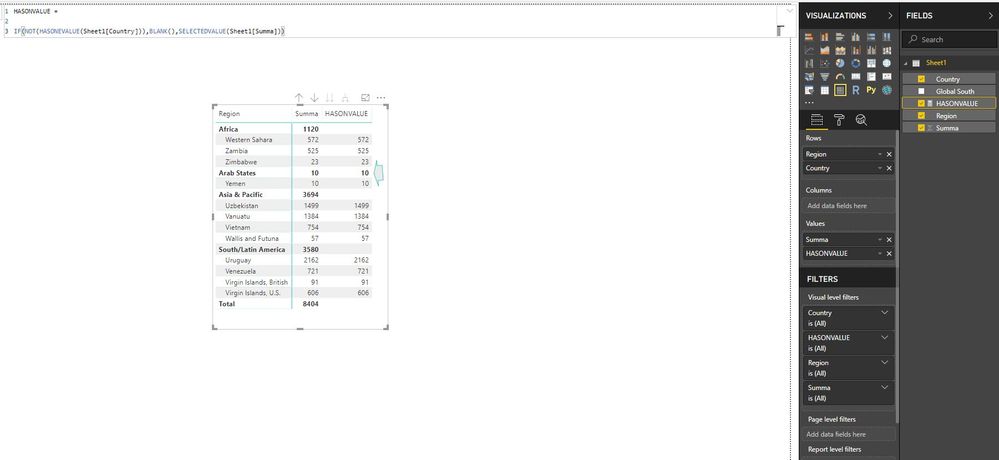
I think I found a bug regarding the "HASONVALUE" calculation, so when there is only one element in a list, the hasonvalue can't work in a proper way.
Could you please advise?
Thank you so much,
Máté
Solved! Go to Solution.
@Anonymous
For what you're trying to do, since in the context of the matrix there is only one country within Arab States, HASONEVALUE ( Sheet1[Country] ) returns TRUE for both the Region and Country level.
You can use the ISINSCOPE function instead of HASONEVALUE and you should only see values at the country "level".
By the way, would you want to consider aggregating with SUM instead of SELECTEDVALUE? SELECTEDVALUE will return either the single value in the Summa column or blank if there are multiple values.
Regards,
Owen
@Anonymous
For what you're trying to do, since in the context of the matrix there is only one country within Arab States, HASONEVALUE ( Sheet1[Country] ) returns TRUE for both the Region and Country level.
You can use the ISINSCOPE function instead of HASONEVALUE and you should only see values at the country "level".
By the way, would you want to consider aggregating with SUM instead of SELECTEDVALUE? SELECTEDVALUE will return either the single value in the Summa column or blank if there are multiple values.
Regards,
Owen
Hi Owen,
I also have a similar problem.
this is the link to the problem. I tried your solution but it didnt help. Could you help me resolving this?
Thanks in advance!
Dear Owen,
This is why I love this community, it is a pleasure to work with clever people!
Thank you for your recommendations, they helped me a lot.
All the best,
Máté
If you love stickers, then you will definitely want to check out our Community Sticker Challenge!
Check out the January 2026 Power BI update to learn about new features.
| User | Count |
|---|---|
| 65 | |
| 65 | |
| 48 | |
| 21 | |
| 18 |
| User | Count |
|---|---|
| 119 | |
| 117 | |
| 38 | |
| 36 | |
| 27 |