Don't miss your chance to take the Fabric Data Engineer (DP-600) exam for FREE! Find out how by attending the DP-600 session on April 23rd (pacific time), live or on-demand.
Learn moreNext up in the FabCon + SQLCon recap series: The roadmap for Microsoft SQL and Maximizing Developer experiences in Fabric. All sessions are available on-demand after the live show. Register now
Hello,
I’m attempting bring data from a MySQL query into Power BI. The table has two columns “TagId” data type is INT and Value data type is JSON. The path I am wanting to return from Value is “pv”.
Here is the query that executes fine:
SELECT TagId, JSON_EXTRACT(Value, "$.pv") pv FROM TagValue;
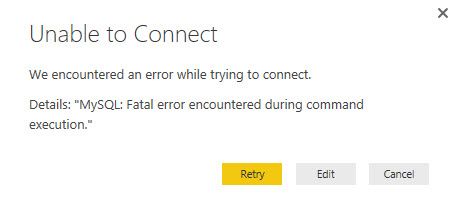
When I put this query in the “SQL statement” in “Advanced options” of my “Get Data” I get the following error message:
Anyone have experience or recommendations on how I can accomplish this?
Thanks,
Brian
Hi bfaivre,
I am not very familiar with MySQL, I suggest that we take a look at the general query log in MySQL, see if the query language putted into Power BI Desktop would get the proper result in MySQL.
Also, please enable Power BI Desktop Tracing:
File -> Options & Settings -> Options->Global->Diagnostics, check the tracing
By the way, would it be available to select the table item through the Table List?
Regards
If you have recently started exploring Fabric, we'd love to hear how it's going. Your feedback can help with product improvements.
A new Power BI DataViz World Championship is coming this June! Don't miss out on submitting your entry.
| User | Count |
|---|---|
| 46 | |
| 43 | |
| 39 | |
| 20 | |
| 15 |
| User | Count |
|---|---|
| 68 | |
| 68 | |
| 31 | |
| 27 | |
| 24 |