Don't miss your chance to take the Fabric Data Engineer (DP-600) exam for FREE! Find out how by attending the DP-600 session on April 23rd (pacific time), live or on-demand.
Learn moreJoin the FabCon + SQLCon recap series. Up next: Power BI, Real-Time Intelligence, IQ and AI, and Data Factory take center stage. All sessions are available on-demand after the live show. Register now
Hi All,
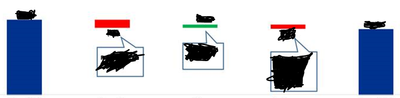
I'm trying to work on Visual from the Bridge configuration like that (see below)
Waterfall Chart is not good for me.
You have any Suggestions?
Hi @netanel ,
I am not clear about your requirement, so if possible could you please inform me more detailed information(such as your expected output and your sample data)? Then I will help you more correctly.
Please do mask sensitive data before uploading.
Thanks for your understanding and support.
Best Regards,
Zoe Zhi
If this post helps, then please consider Accept it as the solution to help the other members find it more quickly.
For example, opening year 2018 = 100, change in price = 20, change in quantity = (30), change in quality = 20, total 2019 = 110
I am looking for a graph in the Bridge configuration that reflected the ups and downs when there is a start and end.
As with any analytics you can find anywhere.
Thank you!
Hi @netanel ,
As I know, there is no built-in chart like your chart. I think you might need to use custom chart to see whether it work or not ,, or if you are professional in R, you also could create visual by R.
By the way, you also could inform me more detailed information (such as your sample data and your expected output). And If you want to how the trend of value, I think you could try to create a date column, then you could calculate cumulative value and show this in chart which will show the trend.
Best Regards,
Zoe Zhi
If this post helps, then please consider Accept it as the solution to help the other members find it more quickly.
Check out the April 2026 Power BI update to learn about new features.
If you have recently started exploring Fabric, we'd love to hear how it's going. Your feedback can help with product improvements.
A new Power BI DataViz World Championship is coming this June! Don't miss out on submitting your entry.
| User | Count |
|---|---|
| 48 | |
| 40 | |
| 38 | |
| 20 | |
| 16 |
| User | Count |
|---|---|
| 68 | |
| 67 | |
| 30 | |
| 26 | |
| 26 |