We've captured the moments from FabCon & SQLCon that everyone is talking about, and we are bringing them to the community, live and on-demand. Starts on April 14th. Register now
Hi there,
I have a field in my DB that contains a long JSON string of field names and data.
See example below:-
{"Id":"9988fe88-1fc9-4826-b26e-9292d8e68a5b","DateCreated":"2017-05-01T11:14:15.374607Z","OperatorName":"ATEMP","EventId":"6a1814d1-4dfa-43b8-ab79-b7a0cfd30ca8","EventName":"xxxxx","EventCode":"17R43/xxxxx","Title":"Mr","Forename":"C","Surname":"yyyyyyyyyy","Line1":"Unit7 Mills Way","Line2":"Somwhere","Line3":"","Town":"Salisbury","County":"Wiltshire","Country":null,"Postcode":"IG8 0QN","PhoneHome":null,"PhoneDay":null,"PhoneMobile":"07768000000","Email":null,"EmailAccount":null,"EmailDomain":null,"ReplacementDate":null,"Notes":null,"VehiclesOfInterest":[{"PreferredDealerId":null,"VehicleModel":"Some Model","VehicleCode":"17MY Something","VehicleBrand":"Bugatti","DealerId":"bec64661-154c-4182-9c67-b2edf285c842","DealerName":"Bugatti UK ","DealerCode":"12810","TestDrive":false,"Brochure":true,"EBrochure":false,"Competition":false,"RegisterForEvent":false,"DpaPost":true,"DpaPhone":true,"DpaSms":false,"DpaEmail":false}]}
Does anyone have any ideas on how I can write a DAX query to get this extracted into separate fields?
Thanks.
Solved! Go to Solution.
Hi @SachinC,
I try to reproduce your scenario, type the long text in a table.
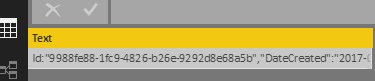
1. Go to the Query Edit, click split column by comma, you will get the following table.

2. Click Transpose under Transfrom on home page, you will get:
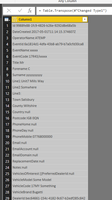
3. Split the column by ":", then Transpose table again, finally click "use the first row as hearders", you will get expected result.

Please see my Power Query statement as follows.
let
Source = Table.FromRows(Json.Document(Binary.Decompress(Binary.FromText("XZPbcpswEIZfheG6ahHGIHwXH9p6Widp4jTT2rkQYgmaEZJHiBymL19J2AZHF5rR9+8uq9XPbheuy9k+zHNCKiAE4YrlKCFxioo4BZTHeVwSSAmdFvvw0z5cUgMLDXYv96FNjCOcoWiKIrzFeIaTGZ5+nmRJGmV/ffzNATQ1Sl/TBnzC1Xa1ufXS6gWkWfdlUooJTkqMkrKiKJkUBNEiy1GR0YhV5SRilAxJ52Jvbg18ocqe4+wumXwZ1C03olc22oOvSoM8VVl4dN/pM3k/Ly/95BKwFx4kN1mw4UK0wSMd1Nir96p5rUHDGU887ltQr7IPooK3Raf75IXqpHn3wiMXpq35Md0LLmgmOyEsuFWtYacLrr+RIPp17SNvayXhu/Ktn2IdWtL3D2SjCn6cQ5RlKYn86ufXUC6GcH+8Ysw18YEuld3lAO/gICiDxs7fmWMQrpWBdjj+hpozAe1NtZbGDql1hXf/bGsaKtAayiVQAdo74jJnY68tThOG4Hgc9NG7b/4ELsbUXD6PQ+aayt5q8+6ZGsN7Nw9f3IcFsDRJU4zwNGEowSRGOUsz+yNAWcVkykgSj7LOJjwWDB5+BCN56CkmuJ/x1t55qfmL4xUVLVg214rVnXvzmdGdI6sROkUtVHMAww1XckTv4Jm3dpTWzN7+I2l5oM4vQ1UHnAUuyH3TXuacXOBR+PT0Hw==", BinaryEncoding.Base64), Compression.Deflate)), let _t = ((type text) meta [Serialized.Text = true]) in type table [Text = _t]),
#"Changed Type" = Table.TransformColumnTypes(Source,{{"Text", type text}}),
#"Split Column by Delimiter" = Table.SplitColumn(#"Changed Type", "Text", Splitter.SplitTextByDelimiter(",", QuoteStyle.Csv), {"Text.1", "Text.2", "Text.3", "Text.4", "Text.5", "Text.6", "Text.7", "Text.8", "Text.9", "Text.10", "Text.11", "Text.12", "Text.13", "Text.14", "Text.15", "Text.16", "Text.17", "Text.18", "Text.19", "Text.20", "Text.21", "Text.22", "Text.23", "Text.24", "Text.25", "Text.26", "Text.27", "Text.28", "Text.29", "Text.30", "Text.31", "Text.32", "Text.33", "Text.34", "Text.35", "Text.36", "Text.37", "Text.38", "Text.39", "Text.40"}),
#"Changed Type1" = Table.TransformColumnTypes(#"Split Column by Delimiter",{{"Text.1", type text}, {"Text.2", type text}, {"Text.3", type text}, {"Text.4", type text}, {"Text.5", type text}, {"Text.6", type text}, {"Text.7", type text}, {"Text.8", type text}, {"Text.9", type text}, {"Text.10", type text}, {"Text.11", type text}, {"Text.12", type text}, {"Text.13", type text}, {"Text.14", type text}, {"Text.15", type text}, {"Text.16", type text}, {"Text.17", type text}, {"Text.18", type text}, {"Text.19", type text}, {"Text.20", type text}, {"Text.21", type text}, {"Text.22", type text}, {"Text.23", type text}, {"Text.24", type text}, {"Text.25", type text}, {"Text.26", type text}, {"Text.27", type text}, {"Text.28", type text}, {"Text.29", type text}, {"Text.30", type text}, {"Text.31", type text}, {"Text.32", type text}, {"Text.33", type text}, {"Text.34", type text}, {"Text.35", type text}, {"Text.36", type text}, {"Text.37", type text}, {"Text.38", type text}, {"Text.39", type text}, {"Text.40", type text}}),
#"Transposed Table" = Table.Transpose(#"Changed Type1"),
#"Split Column by Delimiter1" = Table.SplitColumn(#"Transposed Table", "Column1", Splitter.SplitTextByEachDelimiter({":"}, QuoteStyle.Csv, false), {"Column1.1", "Column1.2"}),
#"Changed Type2" = Table.TransformColumnTypes(#"Split Column by Delimiter1",{{"Column1.1", type text}, {"Column1.2", type text}}),
#"Transposed Table1" = Table.Transpose(#"Changed Type2"),
#"Promoted Headers" = Table.PromoteHeaders(#"Transposed Table1", [PromoteAllScalars=true])
in
#"Promoted Headers"
Best Regards,
Angelia
An easier method is to go in the query editor and right-click the column and on transform choose JSON, then you expand the JSON you want as columns.
👍
Hi @SachinC,
I try to reproduce your scenario, type the long text in a table.
1. Go to the Query Edit, click split column by comma, you will get the following table.
2. Click Transpose under Transfrom on home page, you will get:
3. Split the column by ":", then Transpose table again, finally click "use the first row as hearders", you will get expected result.
Please see my Power Query statement as follows.
let
Source = Table.FromRows(Json.Document(Binary.Decompress(Binary.FromText("XZPbcpswEIZfheG6ahHGIHwXH9p6Widp4jTT2rkQYgmaEZJHiBymL19J2AZHF5rR9+8uq9XPbheuy9k+zHNCKiAE4YrlKCFxioo4BZTHeVwSSAmdFvvw0z5cUgMLDXYv96FNjCOcoWiKIrzFeIaTGZ5+nmRJGmV/ffzNATQ1Sl/TBnzC1Xa1ufXS6gWkWfdlUooJTkqMkrKiKJkUBNEiy1GR0YhV5SRilAxJ52Jvbg18ocqe4+wumXwZ1C03olc22oOvSoM8VVl4dN/pM3k/Ly/95BKwFx4kN1mw4UK0wSMd1Nir96p5rUHDGU887ltQr7IPooK3Raf75IXqpHn3wiMXpq35Md0LLmgmOyEsuFWtYacLrr+RIPp17SNvayXhu/Ktn2IdWtL3D2SjCn6cQ5RlKYn86ufXUC6GcH+8Ysw18YEuld3lAO/gICiDxs7fmWMQrpWBdjj+hpozAe1NtZbGDql1hXf/bGsaKtAayiVQAdo74jJnY68tThOG4Hgc9NG7b/4ELsbUXD6PQ+aayt5q8+6ZGsN7Nw9f3IcFsDRJU4zwNGEowSRGOUsz+yNAWcVkykgSj7LOJjwWDB5+BCN56CkmuJ/x1t55qfmL4xUVLVg214rVnXvzmdGdI6sROkUtVHMAww1XckTv4Jm3dpTWzN7+I2l5oM4vQ1UHnAUuyH3TXuacXOBR+PT0Hw==", BinaryEncoding.Base64), Compression.Deflate)), let _t = ((type text) meta [Serialized.Text = true]) in type table [Text = _t]),
#"Changed Type" = Table.TransformColumnTypes(Source,{{"Text", type text}}),
#"Split Column by Delimiter" = Table.SplitColumn(#"Changed Type", "Text", Splitter.SplitTextByDelimiter(",", QuoteStyle.Csv), {"Text.1", "Text.2", "Text.3", "Text.4", "Text.5", "Text.6", "Text.7", "Text.8", "Text.9", "Text.10", "Text.11", "Text.12", "Text.13", "Text.14", "Text.15", "Text.16", "Text.17", "Text.18", "Text.19", "Text.20", "Text.21", "Text.22", "Text.23", "Text.24", "Text.25", "Text.26", "Text.27", "Text.28", "Text.29", "Text.30", "Text.31", "Text.32", "Text.33", "Text.34", "Text.35", "Text.36", "Text.37", "Text.38", "Text.39", "Text.40"}),
#"Changed Type1" = Table.TransformColumnTypes(#"Split Column by Delimiter",{{"Text.1", type text}, {"Text.2", type text}, {"Text.3", type text}, {"Text.4", type text}, {"Text.5", type text}, {"Text.6", type text}, {"Text.7", type text}, {"Text.8", type text}, {"Text.9", type text}, {"Text.10", type text}, {"Text.11", type text}, {"Text.12", type text}, {"Text.13", type text}, {"Text.14", type text}, {"Text.15", type text}, {"Text.16", type text}, {"Text.17", type text}, {"Text.18", type text}, {"Text.19", type text}, {"Text.20", type text}, {"Text.21", type text}, {"Text.22", type text}, {"Text.23", type text}, {"Text.24", type text}, {"Text.25", type text}, {"Text.26", type text}, {"Text.27", type text}, {"Text.28", type text}, {"Text.29", type text}, {"Text.30", type text}, {"Text.31", type text}, {"Text.32", type text}, {"Text.33", type text}, {"Text.34", type text}, {"Text.35", type text}, {"Text.36", type text}, {"Text.37", type text}, {"Text.38", type text}, {"Text.39", type text}, {"Text.40", type text}}),
#"Transposed Table" = Table.Transpose(#"Changed Type1"),
#"Split Column by Delimiter1" = Table.SplitColumn(#"Transposed Table", "Column1", Splitter.SplitTextByEachDelimiter({":"}, QuoteStyle.Csv, false), {"Column1.1", "Column1.2"}),
#"Changed Type2" = Table.TransformColumnTypes(#"Split Column by Delimiter1",{{"Column1.1", type text}, {"Column1.2", type text}}),
#"Transposed Table1" = Table.Transpose(#"Changed Type2"),
#"Promoted Headers" = Table.PromoteHeaders(#"Transposed Table1", [PromoteAllScalars=true])
in
#"Promoted Headers"
Best Regards,
Angelia
If you have recently started exploring Fabric, we'd love to hear how it's going. Your feedback can help with product improvements.
A new Power BI DataViz World Championship is coming this June! Don't miss out on submitting your entry.
Share feedback directly with Fabric product managers, participate in targeted research studies and influence the Fabric roadmap.
| User | Count |
|---|---|
| 53 | |
| 38 | |
| 33 | |
| 15 | |
| 15 |
| User | Count |
|---|---|
| 64 | |
| 63 | |
| 37 | |
| 36 | |
| 22 |