Join us at FabCon Atlanta from March 16 - 20, 2026, for the ultimate Fabric, Power BI, AI and SQL community-led event. Save $200 with code FABCOMM.
Register now!The Power BI Data Visualization World Championships is back! Get ahead of the game and start preparing now! Learn more
Hi All,
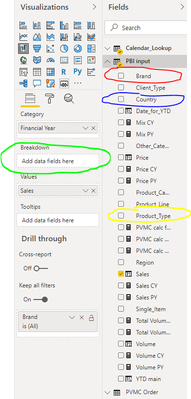
I am looking for a solution, to prepare a changable waterfall chart, which will be showing the sales development by year, but depending on a slicer selection, the YoY change will be either broken down by products, or by countries, or by brands, etc.
To be more precise, I need to prepare a measure, to be used in the green field on the picture below, which depending on the slicer selection, will either put red, blue or yellow data field there:
Can you help me prepare such measure or point me towards different solution?
Solved! Go to Solution.
Hi @Anonymous
I think what you are looking to achieve is possible with a combination of Buttons and Bookmarks as demonstrated in the article below.
https://radacad.com/bookmarks-and-buttons-making-power-bi-charts-even-more-interactive
Slicers can not switch visuals and Measures return a scalar value.
Hi @Anonymous
I think what you are looking to achieve is possible with a combination of Buttons and Bookmarks as demonstrated in the article below.
https://radacad.com/bookmarks-and-buttons-making-power-bi-charts-even-more-interactive
Slicers can not switch visuals and Measures return a scalar value.
Thank you Mariusz, I believe this should work fine!
The Power BI Data Visualization World Championships is back! Get ahead of the game and start preparing now!
Check out the November 2025 Power BI update to learn about new features.
| User | Count |
|---|---|
| 59 | |
| 46 | |
| 42 | |
| 23 | |
| 18 |
| User | Count |
|---|---|
| 193 | |
| 124 | |
| 101 | |
| 67 | |
| 49 |