cancel
Showing results for 
Search instead for 
Did you mean: 

The Power BI Data Visualization World Championships is back! Get ahead of the game and start preparing now! Learn more

Reply
Anonymous
Not applicable

Bookmark Filters

Hi,

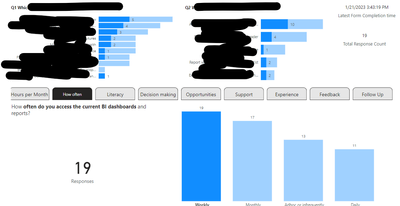
I have a page with a common bar chart and 2 bookmarks in a navigator that also have their own charts. 


Both bookmarks the the 'data' option deselected.   


When I filter a result in bookmark one , by clicking on a bar in the bar chart as per below image,  I can see the common chart above is also filtered as required.   If I then navigate to bookmark 2 ( same page) I can see the filtered result from the common bar chart is lost.   

unembielby_0-1674785269839.png


How can I maintain these filtered results between bookmarks via the navigator?   Thanks.   


2 REPLIES 2
freginier
Super User
Super User

On the bookmarks pane, right click on your bookmarks and deselect the Data option. It would solve your problem

Anonymous
Not applicable

This isn't the solution on this occasion.  As per my message "Both bookmarks the the 'data' option deselected.   "  Thanks for you reply. 

Helpful resources

Announcements
Power BI DataViz World Championships

Power BI Dataviz World Championships

The Power BI Data Visualization World Championships is back! Get ahead of the game and start preparing now!

December 2025 Power BI Update Carousel

Power BI Monthly Update - December 2025

Check out the December 2025 Power BI Holiday Recap!

FabCon Atlanta 2026 carousel

FabCon Atlanta 2026

Join us at FabCon Atlanta, March 16-20, for the ultimate Fabric, Power BI, AI and SQL community-led event. Save $200 with code FABCOMM.