Get certified for free when you join Fabric Data Days 2026 and dive into Fabric, Power BI, SQL, AI, and other essential data skills.
Join nowJuly 7 - July 17 | Round 2 of the Power BI Dataviz World Championships. Don't miss your chance! Learn more
Does anyone know if we can export bookmarks contents to a readable file or easily find out which visuals associated with which bookmark in a report? Sometimes we need to maintain a report created by someone else that has many bookmarks in it. It's very time consuming to learn each bookmark by try it out manuanally one by one. Just wondering if there is more efficient way to know all bookmarks in a report.
Solved! Go to Solution.
Hi @wenchi
Desktop does not support the bookmark export function in current vision .
If you want to export the bookmarks you can export in Power BI Service . The service can only export specified bookmark, and does not support exporting all bookmarks .
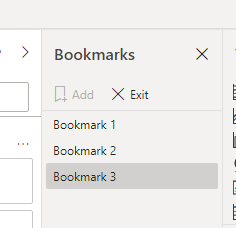
You can see all the bookmarks in Bookmarks pane in desktop . And can only be viewed one by one bookmark .
Best Regards
Community Support Team _ Ailsa Tao
If this post helps, then please consider Accept it as the solution to help the other members find it more quickly.
Hi @wenchi
Desktop does not support the bookmark export function in current vision .
If you want to export the bookmarks you can export in Power BI Service . The service can only export specified bookmark, and does not support exporting all bookmarks .
You can see all the bookmarks in Bookmarks pane in desktop . And can only be viewed one by one bookmark .
Best Regards
Community Support Team _ Ailsa Tao
If this post helps, then please consider Accept it as the solution to help the other members find it more quickly.
Hi @wenchi ,
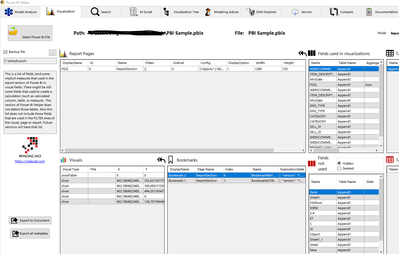
Don't know if this helps but there is an external tool called Power BI Helper that gives you several informations about the metadata of your PBIX files including the bookmarks. Maybe it can help:
https://radacad.com/power-bi-helper
Regards
Miguel Félix
Proud to be a Super User!
Check out my blog: Power BI em PortuguêsI know this is from a while ago but I can't Power BI Helper to pick up bookmark information. Does anyone know if there is a trick to this?
Join us in Barcelona for FabCon and SQLCon, the Fabric, Power BI, SQL, and AI community event. Save €200 with code FABCMTY200.
Join Data Days 2026: 60 days of free live/on-demand sessions, challenges, study groups, and certification opportunities.
| User | Count |
|---|---|
| 26 | |
| 25 | |
| 19 | |
| 19 | |
| 15 |
| User | Count |
|---|---|
| 48 | |
| 46 | |
| 43 | |
| 36 | |
| 35 |