FabCon is coming to Atlanta
Join us at FabCon Atlanta from March 16 - 20, 2026, for the ultimate Fabric, Power BI, AI and SQL community-led event. Save $200 with code FABCOMM.
Register now!- Power BI forums
- Get Help with Power BI
- Desktop
- Service
- Report Server
- Power Query
- Mobile Apps
- Developer
- DAX Commands and Tips
- Custom Visuals Development Discussion
- Health and Life Sciences
- Power BI Spanish forums
- Translated Spanish Desktop
- Training and Consulting
- Instructor Led Training
- Dashboard in a Day for Women, by Women
- Galleries
- Data Stories Gallery
- Themes Gallery
- Contests Gallery
- QuickViz Gallery
- Quick Measures Gallery
- Visual Calculations Gallery
- Notebook Gallery
- Translytical Task Flow Gallery
- TMDL Gallery
- R Script Showcase
- Webinars and Video Gallery
- Ideas
- Custom Visuals Ideas (read-only)
- Issues
- Issues
- Events
- Upcoming Events
The Power BI Data Visualization World Championships is back! Get ahead of the game and start preparing now! Learn more
- Power BI forums
- Forums
- Get Help with Power BI
- Desktop
- Blank Data in Published Report
- Subscribe to RSS Feed
- Mark Topic as New
- Mark Topic as Read
- Float this Topic for Current User
- Bookmark
- Subscribe
- Printer Friendly Page

- Mark as New
- Bookmark
- Subscribe
- Mute
- Subscribe to RSS Feed
- Permalink
- Report Inappropriate Content
Blank Data in Published Report
Hello Everyone,
I have one page in a published report that has two different fields that show-up as blank. In the desktop report, I see the numbers, and they are correct.
I have tried changing the visual type from card to column chart to matrix, regardless of the visual, the published report still shows the value as blank. The fields that show up as blank are from different data sources.
I have seen several posts on this in this forum and other webpages, but none of them led me to a solution to correct this issue.
Does anyone have any thoughts as to what might be the cause of this.
Thanks
Rich
Solved! Go to Solution.


- Mark as New
- Bookmark
- Subscribe
- Mute
- Subscribe to RSS Feed
- Permalink
- Report Inappropriate Content
@Anonymous - Many times when this occurs, resetting the report back to default in the Service solves the problem. Sorry if this was a suggestion from another post but you didn't list what you had tried thus far.
Follow on LinkedIn
@ me in replies or I'll lose your thread!!!
Instead of a Kudo, please vote for this idea
Become an expert!: Enterprise DNA
External Tools: MSHGQM
YouTube Channel!: Microsoft Hates Greg
Latest book!: DAX For Humans
DAX is easy, CALCULATE makes DAX hard...


- Mark as New
- Bookmark
- Subscribe
- Mute
- Subscribe to RSS Feed
- Permalink
- Report Inappropriate Content
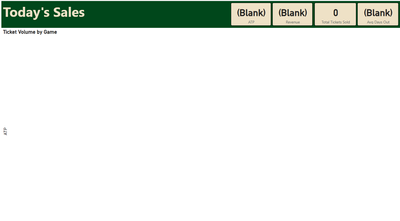
Hi @Greg_Deckler. I am experiencing this issue as well. The page that I am referring to doesn't have any dropdowns ono the page for me to interact with in order to reset to default. If I change a different page and reset to default, nothing happens with this page. I've tried republishing, clearing my cache, and restarting my computer. I experienced this issue as well when I was filtering using relative date instead of an indicator if the sale was made today. At this point, I'm considering deleting the report from the Power Bi service and re-publishing, but this shouldn't be happening at the frequency that it is (every few days). Any help is appreciated.
- Mark as New
- Bookmark
- Subscribe
- Mute
- Subscribe to RSS Feed
- Permalink
- Report Inappropriate Content
Here's another kicker... if I download the report from the service, that page populates on the desktop. But for whatever reason, doesn't populate on the service.


- Mark as New
- Bookmark
- Subscribe
- Mute
- Subscribe to RSS Feed
- Permalink
- Report Inappropriate Content
Something similar happens to me.
Can anyone help me?
The report in PowerBi Desktop displays the correct information:

But in the web publication it appears at zero:

If anyone knows what might be happening, they would appreciate their help.
Best regards.


- Mark as New
- Bookmark
- Subscribe
- Mute
- Subscribe to RSS Feed
- Permalink
- Report Inappropriate Content


- Mark as New
- Bookmark
- Subscribe
- Mute
- Subscribe to RSS Feed
- Permalink
- Report Inappropriate Content
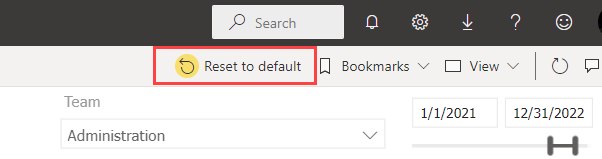
Hi, I have the same issue. Can you please let me know how to reset the report back to default? Many thanks
- Mark as New
- Bookmark
- Subscribe
- Mute
- Subscribe to RSS Feed
- Permalink
- Report Inappropriate Content
@Anonymous
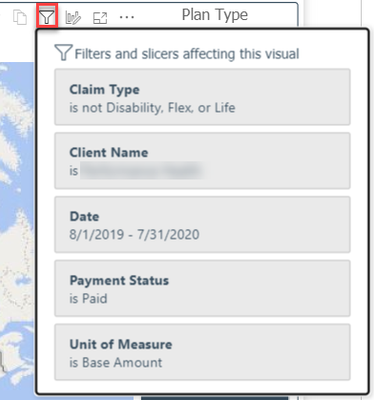
Is there some filter that you applied at some point in the published report that PowerBI might be holding onto? If you mouse over the funnel icon on the visual it will show all the filters that are affecting it.
Try hitting

and then maybe CRTL+F5 to force a page refresh.
- Mark as New
- Bookmark
- Subscribe
- Mute
- Subscribe to RSS Feed
- Permalink
- Report Inappropriate Content
Hi Everyone,
Resetting to default cleared my problem. Thank you for the help.
Just curious if this means that others viewing the report would have seen data in there the entire time? Seems to me that given the reset of my filters allowed me to see it again, the others would have seen the data all along.
Thanks
Rich
- Mark as New
- Bookmark
- Subscribe
- Mute
- Subscribe to RSS Feed
- Permalink
- Report Inappropriate Content
Yes, the reset to default only applies to the filters PowerBI is holding onto for your login. Other users would have been seeing data all along unless they also had filters applied that were returning no results.
The service holding onto your last applied filters is a bit of a double edged sword. It is handy in some cases but can cause a lot of confusion for the avg user until they get used to it.
- Mark as New
- Bookmark
- Subscribe
- Mute
- Subscribe to RSS Feed
- Permalink
- Report Inappropriate Content
@Anonymous - Many times when this occurs, resetting the report back to default in the Service solves the problem. Sorry if this was a suggestion from another post but you didn't list what you had tried thus far.
Follow on LinkedIn
@ me in replies or I'll lose your thread!!!
Instead of a Kudo, please vote for this idea
Become an expert!: Enterprise DNA
External Tools: MSHGQM
YouTube Channel!: Microsoft Hates Greg
Latest book!: DAX For Humans
DAX is easy, CALCULATE makes DAX hard...

- Mark as New
- Bookmark
- Subscribe
- Mute
- Subscribe to RSS Feed
- Permalink
- Report Inappropriate Content
What worked for me was going to the filter section of the published report and changing True/False values to 0/-1 values. For some reason, the web version recognized T/F values in this format, but the formatting of the filter is not converted during publishing.
- Mark as New
- Bookmark
- Subscribe
- Mute
- Subscribe to RSS Feed
- Permalink
- Report Inappropriate Content
Hi,
I'm having the same issue. I replied to a different comment earlier but it's still happening.
90% of the time, my "Today's Sales" page will be completely blank. I've checked my filters and the only filter there is has a "today's sale" indicator. It's a very simple line of Dax: today_ind = if(sale_date = today(), 1, 0), and the ind has to be 1 on the page. Sometimes the page does populate. There aren't any dropdowns on the page, so there isn't a button to "Reset to Default". It works on the desktop version, always, but not on the online service. It also doesn't work if I filter by relevant date being 0 and including today.
Is this possibly because the online service is based on UTC instead of the local time that's published from? I really can't think of anything else. I have a different page for "This Week's Sales" and the sales show for today's date.
Any help would be greatly appreciated!
Helpful resources

Power BI Dataviz World Championships
The Power BI Data Visualization World Championships is back! Get ahead of the game and start preparing now!

Power BI Monthly Update - December 2025
Check out the December 2025 Power BI Holiday Recap!

FabCon Atlanta 2026
Join us at FabCon Atlanta, March 16-20, for the ultimate Fabric, Power BI, AI and SQL community-led event. Save $200 with code FABCOMM.

| User | Count |
|---|---|
| 39 | |
| 37 | |
| 33 | |
| 32 | |
| 29 |


| User | Count |
|---|---|
| 133 | |
| 88 | |
| 85 | |
| 68 | |
| 64 |


