Don't miss your chance to take the Fabric Data Engineer (DP-600) exam for FREE! Find out how by watching the DP-600 session on-demand now through April 28th.
Learn moreJoin the FabCon + SQLCon recap series. Up next: Power BI, Real-Time Intelligence, IQ and AI, and Data Factory take center stage. All sessions are available on-demand after the live show. Register now
Hello,
I have a map visual created and am trying to do a couple of things I cannot seem to get.
1: Is there a way to show the scale legend you see on maps IE |------| 1km that usually appears in the lower right on the bing map in a browser.
2: I have cars gps coordinates displayed. I put the car name into the legend and it makes all cars a different colour on the map but I would like to somehow make all cars EXCEPT a known 2 one colour and the rest another color. I know I can change the color individually but I have 75 different ones.
Thanks,
--James
Solved! Go to Solution.
Hi JSher,
Question 1: I have not seen how to do this with Bing or ArcGIS. Try the custom visual iconMapv3. This visual includes a scale in the map control settings.
Question 2: From my understanding of your post, the following may work.
I have used Australian cities as your "car GPS coordinates".
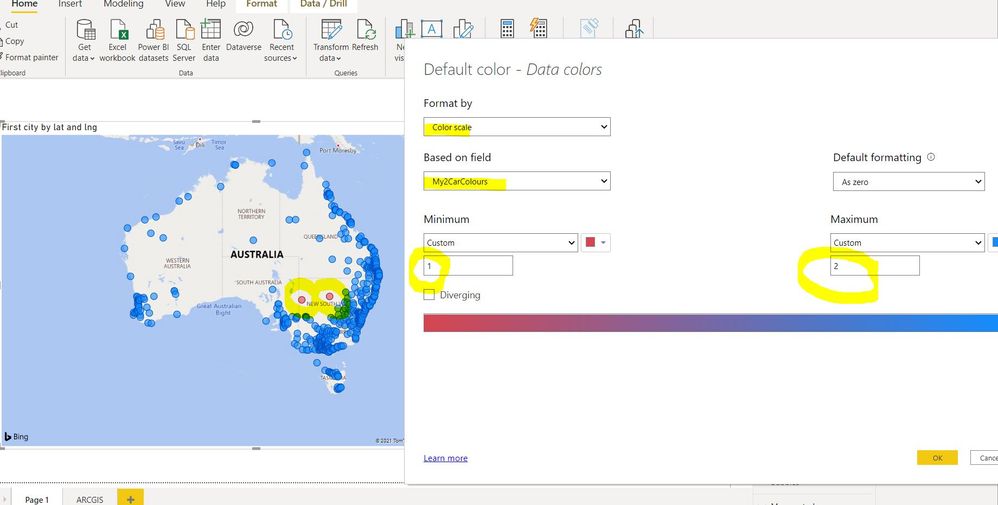
Create a measure for the 2 car types in question, assigning a value of 1 to your two cars and a value of 2 to all other cars.
My2CarColours = IF(MAX(AUS[city]) = "Broken Hill" || MAX(AUS[city]) = "Cobar" , 1, 2 )
Only use lat and long on the map. Do not add anything to legend.
Then, via Format-> Data Colours, use the Fx function to format by colour scale setting your two cars (Custom Value of 1) to one colour and all others to another colour (Custom Value of 2).
You can see the 2 cities, Broken Hill and Cobar are red, and all other cities are blue.
Sample: https://www.dropbox.com/s/7lmmki6612ihp6o/Show2Cars.pbix?dl=0
Show 2 GPS locations in one colour
Hi JSher,
Question 1: I have not seen how to do this with Bing or ArcGIS. Try the custom visual iconMapv3. This visual includes a scale in the map control settings.
Question 2: From my understanding of your post, the following may work.
I have used Australian cities as your "car GPS coordinates".
Create a measure for the 2 car types in question, assigning a value of 1 to your two cars and a value of 2 to all other cars.
My2CarColours = IF(MAX(AUS[city]) = "Broken Hill" || MAX(AUS[city]) = "Cobar" , 1, 2 )
Only use lat and long on the map. Do not add anything to legend.
Then, via Format-> Data Colours, use the Fx function to format by colour scale setting your two cars (Custom Value of 1) to one colour and all others to another colour (Custom Value of 2).
You can see the 2 cities, Broken Hill and Cobar are red, and all other cities are blue.
Sample: https://www.dropbox.com/s/7lmmki6612ihp6o/Show2Cars.pbix?dl=0
Show 2 GPS locations in one colour
Check out the April 2026 Power BI update to learn about new features.
If you have recently started exploring Fabric, we'd love to hear how it's going. Your feedback can help with product improvements.
A new Power BI DataViz World Championship is coming this June! Don't miss out on submitting your entry.
| User | Count |
|---|---|
| 43 | |
| 37 | |
| 35 | |
| 22 | |
| 15 |
| User | Count |
|---|---|
| 65 | |
| 58 | |
| 29 | |
| 27 | |
| 25 |