cancel
Showing results for 
Search instead for 
Did you mean: 

Vote for your favorite vizzies from the Power BI Dataviz World Championship submissions. Vote now!

Reply
Anonymous
Not applicable

Basic calculation help

Hello,


I'm working on a dashboard that requires some calculations and I'm not that familiar with the best way to do it; 


  1. Table 1 - List of KPIs
    1. Service Name (unique)
    2. KPI for quantity of service name per FTE
  2. Table 2 - List of Config Items and related Service Name
    1. Config Item ID
    2. Customer
    3. Service Name


Report

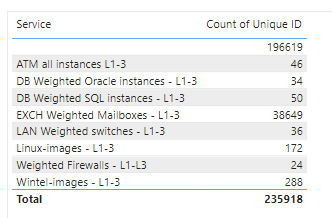
So far I have a table as follows; 

chrisingham05_0-1650634363079.png


What I'd like to include is another column with the following formula;


Count of Unique ID (2a) / KPI for quantity of service name per FTE (1b) = FTE 

An example would be 
"ATM All instances L1-L3" of 46 / "KPI for quantity of service name per FTE" of 100 = 0.46 FTE


I'm not sure where to create this formula or how. Any suggestions would help!

1 ACCEPTED SOLUTION
vojtechsima
Super User
Super User

Hi, @Anonymous 


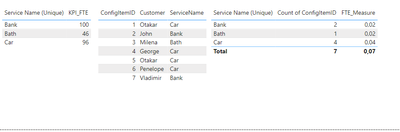
vojtechsima_0-1650636407937.png
Measure like this:

FTE_Measure = CALCULATE( DIVIDE ( DISTINCTCOUNT( 'Table 2'[ConfigItemID]), MAX('Table 1'[KPI_FTE])))


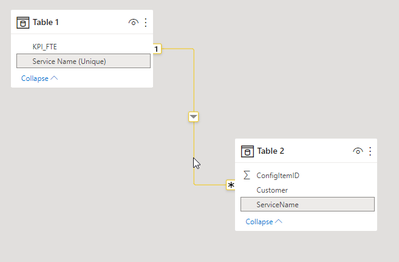
Model like this:

vojtechsima_1-1650636443519.png


Any kudos or recognition appreciated. To learn more on the topic, check out my blog and follow me on LinkedIn.

View solution in original post

5 REPLIES 5
vojtechsima
Super User
Super User

Hi, @Anonymous 


vojtechsima_0-1650636407937.png
Measure like this:

FTE_Measure = CALCULATE( DIVIDE ( DISTINCTCOUNT( 'Table 2'[ConfigItemID]), MAX('Table 1'[KPI_FTE])))


Model like this:

vojtechsima_1-1650636443519.png


Any kudos or recognition appreciated. To learn more on the topic, check out my blog and follow me on LinkedIn.
Anonymous
Not applicable

Perfect, thanks! 

@Anonymous 
No, problem, if you could Kudo my Solution answer, so it'S verified in both ways. THank you


Any kudos or recognition appreciated. To learn more on the topic, check out my blog and follow me on LinkedIn.
Anonymous
Not applicable

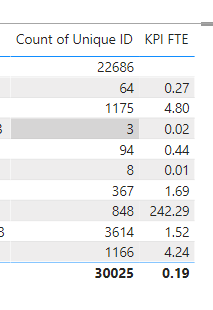
So the formula worked as expected one way, but the totals dont seem to work right. Any idea how I can fix this so it just sums the figures above? Total shows 0.19 whereas it should be something like 300. 


chrisingham05_0-1650890476679.png


Hi, @Anonymous 
Try modify it like this:

FTE_Measure = IF(ISFILTERED('Your Table'), (CALCULATE( DIVIDE ( DISTINCTCOUNT( 'Table 2'[ConfigItemID]), MAX('Table 1'[KPI_FTE])))), SUM('Table'[ColumnForSum]))​​

Use your own tables and column 


Any kudos or recognition appreciated. To learn more on the topic, check out my blog and follow me on LinkedIn.

Helpful resources

Announcements
Power BI DataViz World Championships

Power BI Dataviz World Championships

Vote for your favorite vizzies from the Power BI World Championship submissions!

Sticker Challenge 2026 Carousel

Join our Community Sticker Challenge 2026

If you love stickers, then you will definitely want to check out our Community Sticker Challenge!

January Power BI Update Carousel

Power BI Monthly Update - January 2026

Check out the January 2026 Power BI update to learn about new features.

FabCon Atlanta 2026 carousel

FabCon Atlanta 2026

Join us at FabCon Atlanta, March 16-20, for the ultimate Fabric, Power BI, AI and SQL community-led event. Save $200 with code FABCOMM.