Don't miss your chance to take exam DP-600 or DP-700 on us!
Request nowLearn from the best! Meet the four finalists headed to the FINALS of the Power BI Dataviz World Championships! Register now
Hello,
I'm working on a dashboard that requires some calculations and I'm not that familiar with the best way to do it;
Report
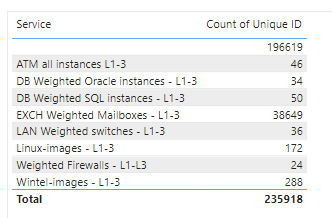
So far I have a table as follows;
What I'd like to include is another column with the following formula;
Count of Unique ID (2a) / KPI for quantity of service name per FTE (1b) = FTE
An example would be
"ATM All instances L1-L3" of 46 / "KPI for quantity of service name per FTE" of 100 = 0.46 FTE
I'm not sure where to create this formula or how. Any suggestions would help!
Solved! Go to Solution.
Hi, @Anonymous
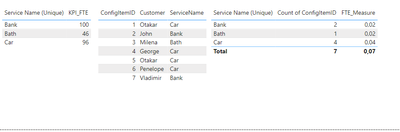
Measure like this:
FTE_Measure = CALCULATE( DIVIDE ( DISTINCTCOUNT( 'Table 2'[ConfigItemID]), MAX('Table 1'[KPI_FTE])))
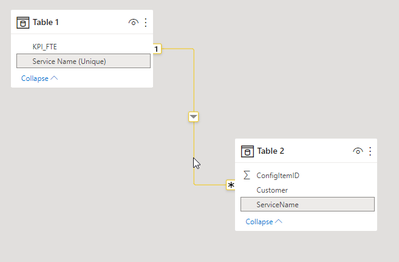
Model like this:
Perfect, thanks!
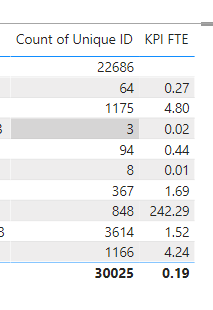
So the formula worked as expected one way, but the totals dont seem to work right. Any idea how I can fix this so it just sums the figures above? Total shows 0.19 whereas it should be something like 300.
Hi, @Anonymous
Try modify it like this:
FTE_Measure = IF(ISFILTERED('Your Table'), (CALCULATE( DIVIDE ( DISTINCTCOUNT( 'Table 2'[ConfigItemID]), MAX('Table 1'[KPI_FTE])))), SUM('Table'[ColumnForSum]))
Use your own tables and column
Share feedback directly with Fabric product managers, participate in targeted research studies and influence the Fabric roadmap.
Check out the February 2026 Power BI update to learn about new features.
| User | Count |
|---|---|
| 49 | |
| 40 | |
| 37 | |
| 14 | |
| 14 |
| User | Count |
|---|---|
| 86 | |
| 69 | |
| 37 | |
| 29 | |
| 26 |