Don't miss your chance to take the Fabric Data Engineer (DP-600) exam for FREE! Find out how by attending the DP-600 session on April 23rd (pacific time), live or on-demand.
Learn moreNext up in the FabCon + SQLCon recap series: The roadmap for Microsoft SQL and Maximizing Developer experiences in Fabric. All sessions are available on-demand after the live show. Register now
Hello,
I'm working on a dashboard that requires some calculations and I'm not that familiar with the best way to do it;
Report
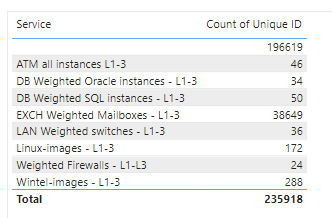
So far I have a table as follows;
What I'd like to include is another column with the following formula;
Count of Unique ID (2a) / KPI for quantity of service name per FTE (1b) = FTE
An example would be
"ATM All instances L1-L3" of 46 / "KPI for quantity of service name per FTE" of 100 = 0.46 FTE
I'm not sure where to create this formula or how. Any suggestions would help!
Solved! Go to Solution.
Hi, @Anonymous
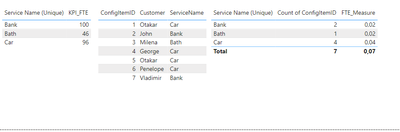
Measure like this:
FTE_Measure = CALCULATE( DIVIDE ( DISTINCTCOUNT( 'Table 2'[ConfigItemID]), MAX('Table 1'[KPI_FTE])))
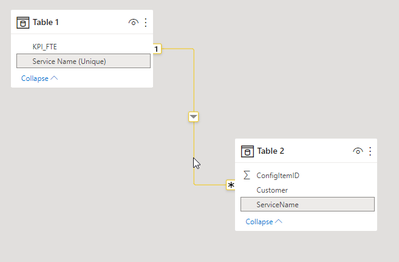
Model like this:
Perfect, thanks!
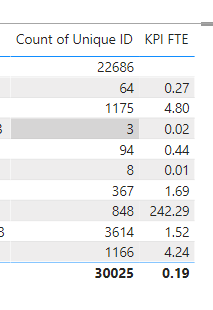
So the formula worked as expected one way, but the totals dont seem to work right. Any idea how I can fix this so it just sums the figures above? Total shows 0.19 whereas it should be something like 300.
Hi, @Anonymous
Try modify it like this:
FTE_Measure = IF(ISFILTERED('Your Table'), (CALCULATE( DIVIDE ( DISTINCTCOUNT( 'Table 2'[ConfigItemID]), MAX('Table 1'[KPI_FTE])))), SUM('Table'[ColumnForSum]))
Use your own tables and column
If you have recently started exploring Fabric, we'd love to hear how it's going. Your feedback can help with product improvements.
A new Power BI DataViz World Championship is coming this June! Don't miss out on submitting your entry.
| User | Count |
|---|---|
| 46 | |
| 43 | |
| 39 | |
| 19 | |
| 15 |
| User | Count |
|---|---|
| 68 | |
| 65 | |
| 31 | |
| 28 | |
| 24 |