Join us at FabCon Atlanta from March 16 - 20, 2026, for the ultimate Fabric, Power BI, AI and SQL community-led event. Save $200 with code FABCOMM.
Register now!Get Fabric Certified for FREE during Fabric Data Days. Don't miss your chance! Request now
Hi there,
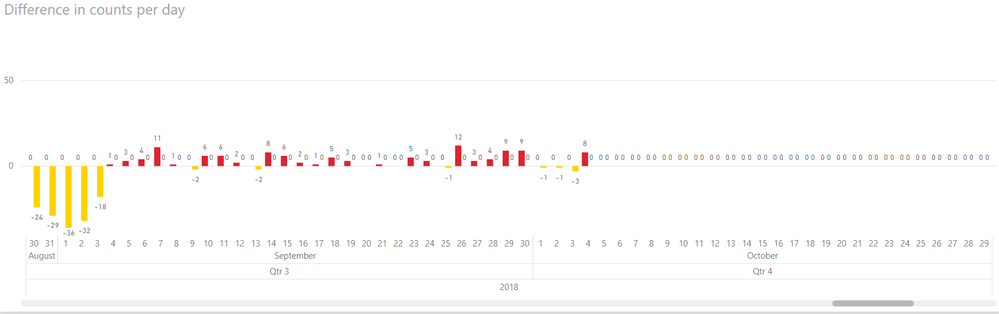
I have two measures I am plotting in a bar chart (I use two so I can color them different colors, one for positive differences, one for negative differences). However, although the date slicer I am using works for charts of raw data (the data and x-axis is filtered), the bar chart of these measures filters the data, but not the x-axis of the chart. How do I get the chart to filter the x-axis based on the slicer too?
The two measures:
DayDiffNegative = if(DISTINCTCOUNT(dat4[id]) - DISTINCTCOUNT(dat4[gin]) < 0, DISTINCTCOUNT(dat4[id]) - DISTINCTCOUNT(dat4[gin]), 0)
DayDiffPositive = if(DISTINCTCOUNT(dat4[id]) - DISTINCTCOUNT(dat4[gin]) > 0, DISTINCTCOUNT(dat4[id]) - DISTINCTCOUNT(dat4[gin]), 0)
The chart, showing the problem, at the right hand end of the x-axis:
Any help would be appreciated,
Regards,
Will
Solved! Go to Solution.
I managed to solve it. Just needed to use BLANK() instead of zeroes in the IF statement...
DayDiffNegative = if(DISTINCTCOUNT(dat4[id]) - DISTINCTCOUNT(dat4[gin]) < 0, DISTINCTCOUNT(dat4[id]) - DISTINCTCOUNT(dat4[gin]), BLANK())
DayDiffPositive = if(DISTINCTCOUNT(dat4[id]) - DISTINCTCOUNT(dat4[gin]) > 0, DISTINCTCOUNT(dat4[id]) - DISTINCTCOUNT(dat4[gin]), BLANK())
Hi,
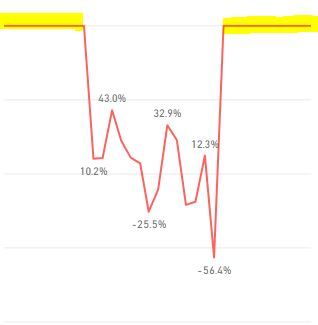
I am having the same issue and your solution was not working for me. As you can see from picture below, when I change the date slicer those values not included in the selected date period appear as zero (highlited values). I would like that the x-axis was changed according to the date slicer in order to show only the desired time period.
The measure I am using is the following:
Measure =CALCULATE( DIVIDE(SUM(A),SUM(B),BLANK()))
Thanks in advance for any help!
I managed to solve it. Just needed to use BLANK() instead of zeroes in the IF statement...
DayDiffNegative = if(DISTINCTCOUNT(dat4[id]) - DISTINCTCOUNT(dat4[gin]) < 0, DISTINCTCOUNT(dat4[id]) - DISTINCTCOUNT(dat4[gin]), BLANK())
DayDiffPositive = if(DISTINCTCOUNT(dat4[id]) - DISTINCTCOUNT(dat4[gin]) > 0, DISTINCTCOUNT(dat4[id]) - DISTINCTCOUNT(dat4[gin]), BLANK())
Check out the November 2025 Power BI update to learn about new features.
Advance your Data & AI career with 50 days of live learning, contests, hands-on challenges, study groups & certifications and more!