This time we’re going bigger than ever. Fabric, Power BI, SQL, AI and more. We're covering it all. You won't want to miss it.
Learn moreLevel up your Power BI skills this month - build one visual each week and tell better stories with data! Get started
In the new format pane of the new version I can no longer find the Conditional formatting option for bar chart.
Is there a way to format the bar color in some way (dax maybe)? I've got x-axis=month, legenda=year, y-axis=revenues: I'd like to simply filter only last two years and show current year bar in red if the revenue is lower than previous year.
Thanks for support!
Solved! Go to Solution.
Hi @AGo ,
If you have something in the legend field, you cannot use formatting.
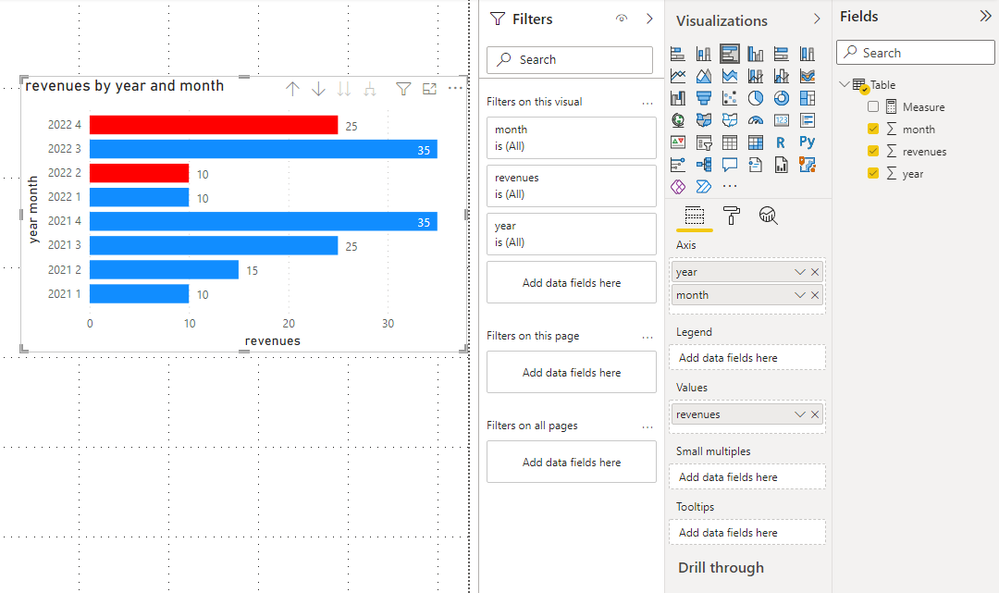
It is suggested to put year and month into x-axis and set color.
You could create a measure like
Color =
VAR _currentyear =
CALCULATE (
SUM ( 'Table'[revenues] ),
FILTER (
ALLSELECTED ( 'Table' ),
[month] = MAX ( 'Table'[month] )
&& [year] = MAX ( 'Table'[year] )
)
)
VAR _lastyear =
CALCULATE (
SUM ( 'Table'[revenues] ),
FILTER (
ALLSELECTED ( 'Table' ),
[month] = MAX ( 'Table'[month] )
&& [year]
= MAX ( 'Table'[year] ) - 1
)
)
RETURN
IF ( _currentyear < _lastyear, "red" )
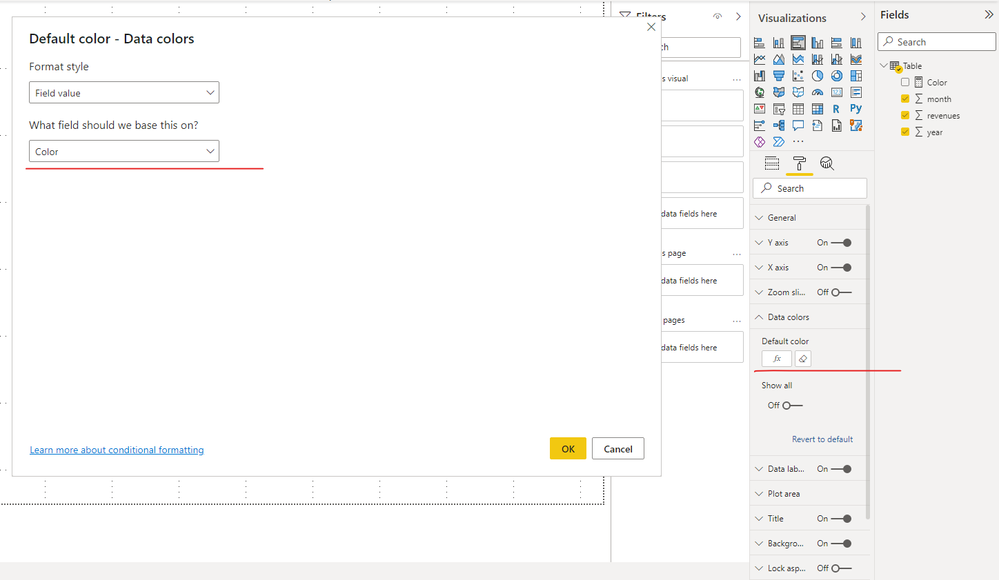
Then add the measure into data colors.
You could check more details from my attachment.
Best Regards,
Stephen Tao
If this post helps, then please consider Accept it as the solution to help the other members find it more quickly.
Hi @AGo ,
If you have something in the legend field, you cannot use formatting.
It is suggested to put year and month into x-axis and set color.
You could create a measure like
Color =
VAR _currentyear =
CALCULATE (
SUM ( 'Table'[revenues] ),
FILTER (
ALLSELECTED ( 'Table' ),
[month] = MAX ( 'Table'[month] )
&& [year] = MAX ( 'Table'[year] )
)
)
VAR _lastyear =
CALCULATE (
SUM ( 'Table'[revenues] ),
FILTER (
ALLSELECTED ( 'Table' ),
[month] = MAX ( 'Table'[month] )
&& [year]
= MAX ( 'Table'[year] ) - 1
)
)
RETURN
IF ( _currentyear < _lastyear, "red" )
Then add the measure into data colors.
You could check more details from my attachment.
Best Regards,
Stephen Tao
If this post helps, then please consider Accept it as the solution to help the other members find it more quickly.
Check out the April 2026 Power BI update to learn about new features.
Sign up to receive a private message when registration opens and key events begin.
If you have recently started exploring Fabric, we'd love to hear how it's going. Your feedback can help with product improvements.
| User | Count |
|---|---|
| 36 | |
| 33 | |
| 31 | |
| 24 | |
| 18 |
| User | Count |
|---|---|
| 68 | |
| 50 | |
| 33 | |
| 24 | |
| 24 |