Join us at FabCon Atlanta from March 16 - 20, 2026, for the ultimate Fabric, Power BI, AI and SQL community-led event. Save $200 with code FABCOMM.
Register now!Learn from the best! Meet the four finalists headed to the FINALS of the Power BI Dataviz World Championships! Register now
Hello everyone,
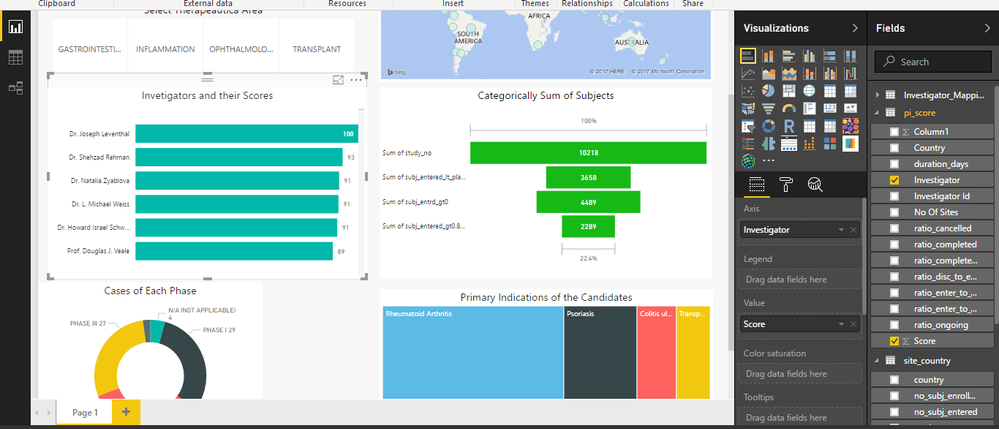
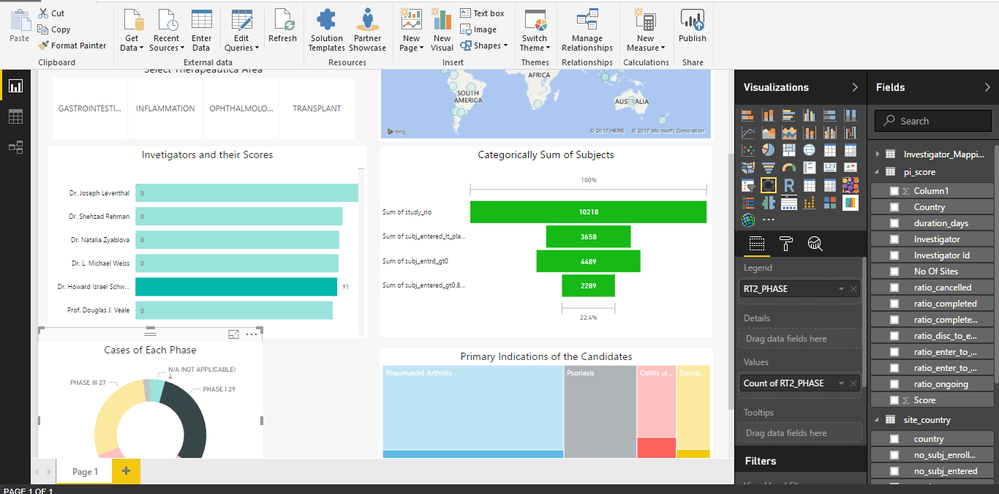
I have created a bar chart that conatins two columns : Investigators and their corresponding scores. It is sorted according to the scores from highest to lowest. What I want is that when the graph gets filtered as per my selection on some other chart then my bar chart should also get rearranged according to remaining scores, instead of showing 0's
Solved! Go to Solution.
Hi @Pulkit,
I don't know if this is what you are looking but if you select the format and edit interactions you can select how the visuals interact between thems.
https://powerbi.microsoft.com/en-us/documentation/powerbi-service-visual-interactions/
Regards,
MFelix
Regards
Miguel Félix
Proud to be a Super User!
Check out my blog: Power BI em PortuguêsHi @Pulkit,
I don't know if this is what you are looking but if you select the format and edit interactions you can select how the visuals interact between thems.
https://powerbi.microsoft.com/en-us/documentation/powerbi-service-visual-interactions/
Regards,
MFelix
Regards
Miguel Félix
Proud to be a Super User!
Check out my blog: Power BI em PortuguêsShare feedback directly with Fabric product managers, participate in targeted research studies and influence the Fabric roadmap.
Check out the February 2026 Power BI update to learn about new features.
| User | Count |
|---|---|
| 53 | |
| 47 | |
| 32 | |
| 16 | |
| 15 |
| User | Count |
|---|---|
| 86 | |
| 71 | |
| 38 | |
| 28 | |
| 25 |