Get certified for free when you join Fabric Data Days 2026 and dive into Fabric, Power BI, SQL, AI, and other essential data skills.
Join nowData Days is here! Join us now for 60+ days of learning, challenges, and connection. Learn more
Hi everyone,
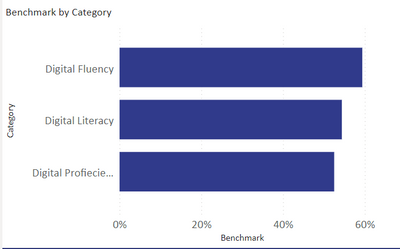
I want to create segments in each of this bar chart. I want to divide each bar in 3 proportionate categories representing one color. Three colors are for 1. "how many people have less than 20% Digital Fluency?" 2. "how many people have between 20% and 60% Digital Fluency?" and 3. "how many have more than 60% digital fluency?".
I want to perform this action for each bar.
thank you in advance.
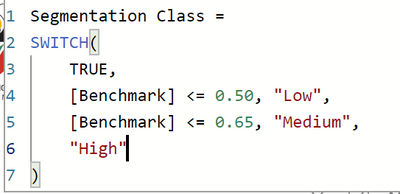
Hi. Can you Please elaborate? Attaching my calculations below.
Hi,
Share the download link of the PBI file.
Hello @Anonymous ,
so you need to define these as a calculated column then you have a column that has 3 options in it, then you add it as a legend in the chart.
If I answered your question, please mark my post as solution, Appreciate your Kudos 👍
Follow me on Linkedin
Vote For my Idea💡
Proud to be a Super User! | |
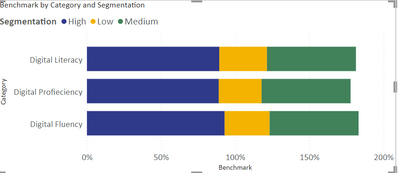
Thank you for the reply. I have tried to do that (scheenshot attached), but then the x-axis is going up to 150%. It is adding % values of all 3 segments. What am I doing wrong?
Hello @Anonymous ,
The value should be count of people so that you know how many people in each color segment.
If I answered your question, please mark my post as solution, Appreciate your Kudos 👍
Follow me on Linkedin
Vote For my Idea💡
Proud to be a Super User! | |
Don't miss out on Data Days, June 15 through August 7. Learn Fabric, Power BI, SQL, AI and more.
Check out the May 2026 Power BI update to learn about new features.
| User | Count |
|---|---|
| 23 | |
| 21 | |
| 20 | |
| 18 | |
| 13 |
| User | Count |
|---|---|
| 58 | |
| 50 | |
| 38 | |
| 31 | |
| 27 |