cancel
Showing results for 
Search instead for 
Did you mean: 

The Power BI Data Visualization World Championships is back! Get ahead of the game and start preparing now! Learn more

Reply
Anonymous
Not applicable

Bar Chart Segmentation

Hi everyone,


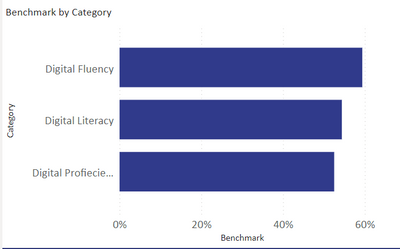
I want to create segments in each of this bar chart. I want to divide each bar in 3 proportionate categories representing one color. Three colors are for 1. "how many people have less than 20% Digital Fluency?" 2. "how many people have between 20% and 60% Digital Fluency?" and 3. "how many have more than 60% digital fluency?". 

I want to perform this action for each bar. 

thank you in advance. 

GiantGiraffe_0-1692787050637.png


5 REPLIES 5
Anonymous
Not applicable

Hi. Can you Please elaborate? Attaching my calculations below.

Benchmark = DIVIDE([Count],[Total Count])
Count = SUM('DigitalLiteracy_chart'[Likert Value])
Total Count = (5*COUNT('DigitalLiteracy_chart'[Likert Value]))

Hi,

Share the download link of the PBI file.


Regards,
Ashish Mathur
http://www.ashishmathur.com
https://www.linkedin.com/in/excelenthusiasts/
Idrissshatila
Super User
Super User

Hello @Anonymous ,


so you need to define these as a calculated column then you have a column that has 3 options in it, then you add it as a legend in the chart.


If I answered your question, please mark my post as solution, Appreciate your Kudos 👍

Follow me on Linkedin
Vote For my Idea💡


Did I answer your question? Mark my post as a solution! Appreciate your Kudos
Follow me on LinkedIn linkedIn
Vote for my Community Mobile App Idea

Proud to be a Super User!


Anonymous
Not applicable

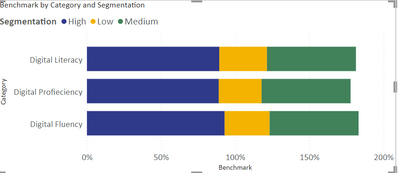
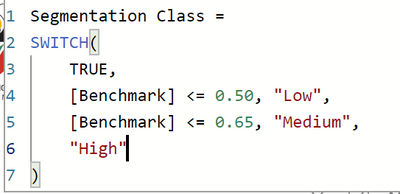
Thank you for the reply. I have tried to do that (scheenshot attached), but then the x-axis is going up to 150%. It is adding % values of all 3 segments. What am I doing wrong? 


GiantGiraffe_1-1692791887983.png


GiantGiraffe_0-1692791424002.png


Hello @Anonymous ,


The value should be count of people so that you know how many people in each color segment.


If I answered your question, please mark my post as solution, Appreciate your Kudos 👍

Follow me on Linkedin
Vote For my Idea💡


Did I answer your question? Mark my post as a solution! Appreciate your Kudos
Follow me on LinkedIn linkedIn
Vote for my Community Mobile App Idea

Proud to be a Super User!


Helpful resources

Announcements
Power BI DataViz World Championships

Power BI Dataviz World Championships

The Power BI Data Visualization World Championships is back! Get ahead of the game and start preparing now!

December 2025 Power BI Update Carousel

Power BI Monthly Update - December 2025

Check out the December 2025 Power BI Holiday Recap!

FabCon Atlanta 2026 carousel

FabCon Atlanta 2026

Join us at FabCon Atlanta, March 16-20, for the ultimate Fabric, Power BI, AI and SQL community-led event. Save $200 with code FABCOMM.

Top Solution Authors