Join us at FabCon Atlanta from March 16 - 20, 2026, for the ultimate Fabric, Power BI, AI and SQL community-led event. Save $200 with code FABCOMM.
Register now!Learn from the best! Meet the four finalists headed to the FINALS of the Power BI Dataviz World Championships! Register now
Hi Experts,
Is there any way to change bar color in clustered column chart in Power BI?
i.e. If second value is < first value in clustered column chart then change second bar color to red, otherwise green.
Regards,
Glenn
Solved! Go to Solution.
Hi @superglenntot,
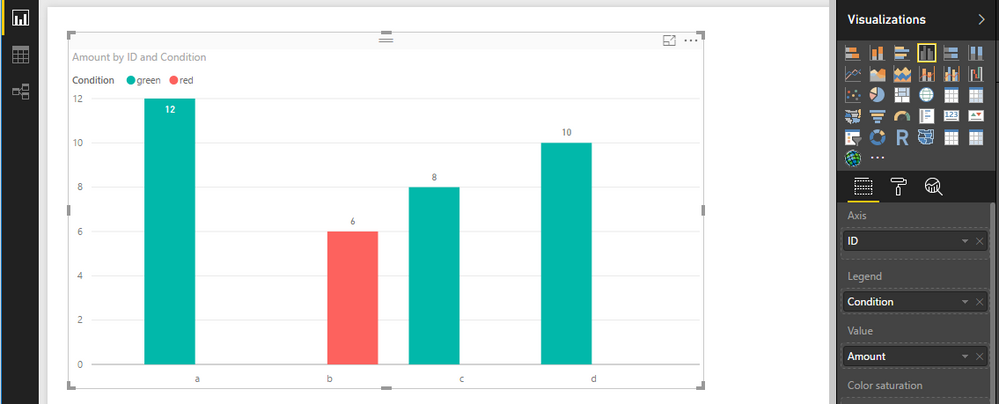
Power BI doesn't provide a feature for us to specify chart column color based on a condition. For your requirement, you can work around the issue utilize the Legend property.
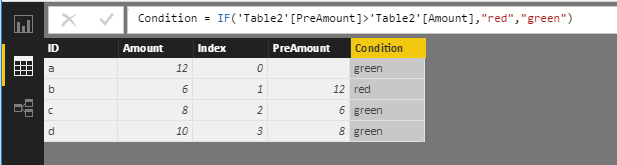
Assume the condition is each amount is less than the previous amount, highlight the current bar with red, otherwise it's green. You can use DAX to transform data firstly. See attached .pbix file.
Best Regards,
Qiuyun Yu
Hi @superglenntot,
Power BI doesn't provide a feature for us to specify chart column color based on a condition. For your requirement, you can work around the issue utilize the Legend property.
Assume the condition is each amount is less than the previous amount, highlight the current bar with red, otherwise it's green. You can use DAX to transform data firstly. See attached .pbix file.
Best Regards,
Qiuyun Yu
How can i achieve this in measure
Thank you vry much, Qiuyun Yu!
Share feedback directly with Fabric product managers, participate in targeted research studies and influence the Fabric roadmap.
Check out the February 2026 Power BI update to learn about new features.
| User | Count |
|---|---|
| 60 | |
| 53 | |
| 40 | |
| 15 | |
| 14 |
| User | Count |
|---|---|
| 97 | |
| 81 | |
| 35 | |
| 29 | |
| 25 |