cancel
Showing results for 
Search instead for 
Did you mean: 

The Power BI Data Visualization World Championships is back! Get ahead of the game and start preparing now! Learn more

Reply
carlol
Helper IV
Helper IV

Bar Chart: Color code based on text

Color-code based on text

Unlike in Excel, you can't color-code text values to display as a particular color, such as "Accepted"=blue, "Declined"=red, "None"=grey. You create measures related to these values and apply formatting based on those instead.

For example, StatusColor = SWITCH('Table'[Status], "Accepted", "blue", "Declined", "red", "None", "grey")

Then in the Background color dialog box, you format the Status field based on the values in the StatusColor field.


https://docs.microsoft.com/en-ie/power-bi/create-reports/desktop-conditional-table-formatting


Question


I have a bar chart , the user can choose worldwide and 1 other country 

I want the bar chart to display Color blue for worldwide & Green for the other randonly selected country  


As in Excel, you can color-code text values to display as a particular color, such as "Accepted"=blue, "Declined"=red,


Can I do this in powerBI , the only option I can see , is me going through every feasible selection combo and setting the colors manually but even if I did this combersome task , when published to PowerBi service it appers to loose all formatting

1 ACCEPTED SOLUTION
carlol
Helper IV
Helper IV

Got it working 


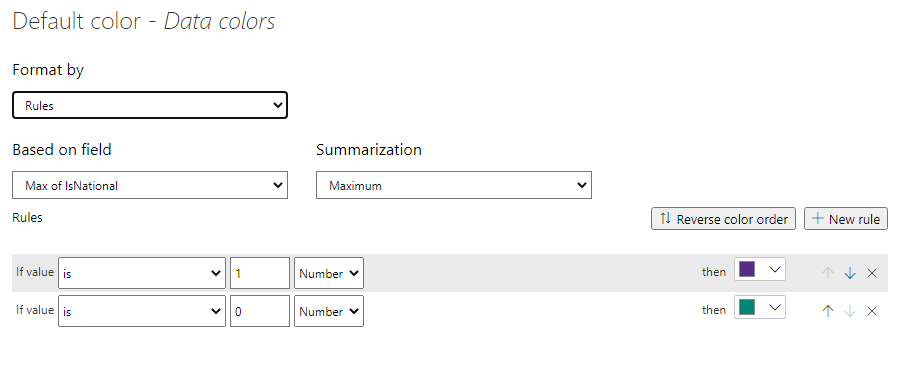
Set a Flag with value 1 or 0 to allow me identify Worldwide and set the other Countries to 0 

Case When CountryD = 9999 Then 1 Else 0 End As IsNational


You can do this in the model , SQL Server .. whatever suits 


Under Data Colors in the clustered Chart I set the FX


Capture.PNG


View solution in original post

3 REPLIES 3
carlol
Helper IV
Helper IV

Got it working 


Set a Flag with value 1 or 0 to allow me identify Worldwide and set the other Countries to 0 

Case When CountryD = 9999 Then 1 Else 0 End As IsNational


You can do this in the model , SQL Server .. whatever suits 


Under Data Colors in the clustered Chart I set the FX


Capture.PNG


hmahesh94
Helper I
Helper I

Hi @carlol 

There is no direct way to conditionally format based on text in Power BI.

Please try the below method, I believe you have the same situation:

Power BI Conditional Text Formatting Made Easy 


If you think I answered your question, please give it a like and Accept it as a solution.


Cheers!


It is p

Using a table is fine , the issue I am having is trying to implement the same functionailty in a chart 

Helpful resources

Announcements
Power BI DataViz World Championships

Power BI Dataviz World Championships

The Power BI Data Visualization World Championships is back! Get ahead of the game and start preparing now!

November Power BI Update Carousel

Power BI Monthly Update - November 2025

Check out the November 2025 Power BI update to learn about new features.

FabCon Atlanta 2026 carousel

FabCon Atlanta 2026

Join us at FabCon Atlanta, March 16-20, for the ultimate Fabric, Power BI, AI and SQL community-led event. Save $200 with code FABCOMM.