cancel
Showing results for 
Search instead for 
Did you mean: 

July 28 - August 9 | Final Round of the Power BI Dataviz World Championships. This is your chance. Learn more

Reply
carlol
Resolver I
Resolver I

Bar Chart: Color code based on text

Color-code based on text

Unlike in Excel, you can't color-code text values to display as a particular color, such as "Accepted"=blue, "Declined"=red, "None"=grey. You create measures related to these values and apply formatting based on those instead.

For example, StatusColor = SWITCH('Table'[Status], "Accepted", "blue", "Declined", "red", "None", "grey")

Then in the Background color dialog box, you format the Status field based on the values in the StatusColor field.


https://docs.microsoft.com/en-ie/power-bi/create-reports/desktop-conditional-table-formatting


Question


I have a bar chart , the user can choose worldwide and 1 other country 

I want the bar chart to display Color blue for worldwide & Green for the other randonly selected country  


As in Excel, you can color-code text values to display as a particular color, such as "Accepted"=blue, "Declined"=red,


Can I do this in powerBI , the only option I can see , is me going through every feasible selection combo and setting the colors manually but even if I did this combersome task , when published to PowerBi service it appers to loose all formatting

1 ACCEPTED SOLUTION
carlol
Resolver I
Resolver I

Got it working 


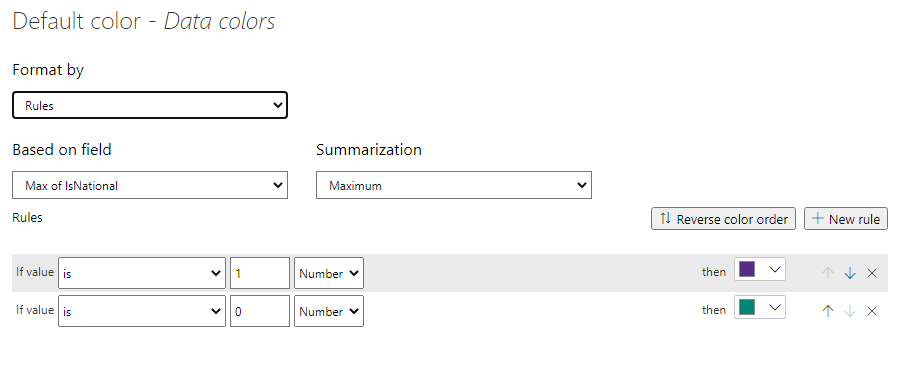
Set a Flag with value 1 or 0 to allow me identify Worldwide and set the other Countries to 0 

Case When CountryD = 9999 Then 1 Else 0 End As IsNational


You can do this in the model , SQL Server .. whatever suits 


Under Data Colors in the clustered Chart I set the FX


Capture.PNG


View solution in original post

3 REPLIES 3
carlol
Resolver I
Resolver I

Got it working 


Set a Flag with value 1 or 0 to allow me identify Worldwide and set the other Countries to 0 

Case When CountryD = 9999 Then 1 Else 0 End As IsNational


You can do this in the model , SQL Server .. whatever suits 


Under Data Colors in the clustered Chart I set the FX


Capture.PNG


hmahesh94
Helper I
Helper I

Hi @carlol 

There is no direct way to conditionally format based on text in Power BI.

Please try the below method, I believe you have the same situation:

Power BI Conditional Text Formatting Made Easy 


If you think I answered your question, please give it a like and Accept it as a solution.


Cheers!


It is p

Using a table is fine , the issue I am having is trying to implement the same functionailty in a chart 

Helpful resources

Announcements
FabCon and SQLCon Barcelona 2026

FabCon & SQLCon – Barcelona 2026

Join us in Barcelona for FabCon and SQLCon, the Fabric, Power BI, SQL, and AI community event. Save €200 with code FABCMTY200.

Fabric Community Sticker Design Challenge Barcelona Carousel

Fabric Community Sticker Challenge - Barcelona 2026

If you love stickers, then you will definitely want to check out our community sticker challenge, Barcelona edition!

July Power BI Update Carousel

Power BI Monthly Update - July 2026

Check out the July 2026 Power BI update to learn about new features.

Power BI DataViz World Championships carousel

Power BI DataViz World Championships - June 2026

A new Power BI DataViz World Championship is coming this June! Don't miss out on submitting your entry.

Top Solution Authors