cancel
Showing results for 
Search instead for 
Did you mean: 

The Power BI Data Visualization World Championships is back! Get ahead of the game and start preparing now! Learn more

Reply
Anonymous
Not applicable

Balance Sheet Filtering

Hi, 

I am trying to create a Balance Sheet Report in Power BI, & i am struggling to work out how to create dynamic comparison periods. 


The way the datamodel is built & because the balance sheet needs to always include historical data, we are using a PeriodCode column which is a combination of the Year & Month (202301 = Jan 2023). We use the Month Number 00 to bring over opening balances so when we are viewing data for the B/S in 2023, we don't have to select every single PeriodCode. 

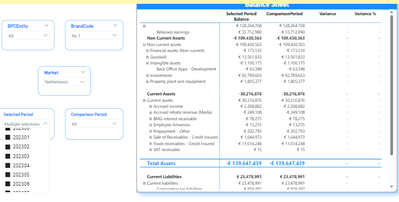
Just to give an idea of my problem, If I want to view data for up until the end of March 2023, I need to select all 4 PeriodCodes (202300, 202301, 202302 & 202303), & this is working perfecty but how can I create a measure that dynamically shows this data but for one periodcode previous? I can't use -1 as this would not include multiple periodcodes which i need it too? 

I tried creating a duplicate of the periodcode column & slicer so I had 2 seperate slicers (I renamed the duplicated), and then refered to them seperately in my measures but the slicers are changing both measures rather than just the one for each slicer if that makes sense? 

I have attached a snip too: 

Shaunbuckleyy_0-1700580484544.png


Any help would be greatly appreciated 🙌

1 ACCEPTED SOLUTION
Anonymous
Not applicable

Hi @Anonymous ,

For the problem "the slicers are changing both measures rather than just the one for each slicer", I can offer you a solution:
As the screenshot shows, I created two slicers and two table visual objects. I first select the slicer on the left, click on "Format", click on "Edit interactions", and then disable filtering on the right side of the form and slicer, and don't do anything on the left side of the form.
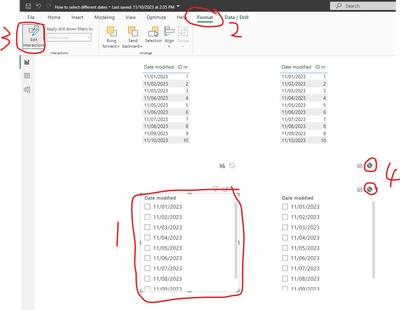
vjunyantmsft_0-1700719482931.png

Then select the right side of the slicer, the same steps will be the left side of the table and the slicer to disable the filter, the right side of the table do not do any operation.
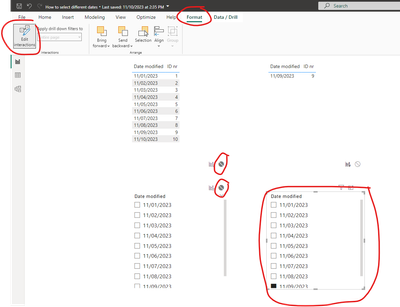
vjunyantmsft_1-1700720489933.png

Then you can realize the effect of a slicer acting on a visual object.
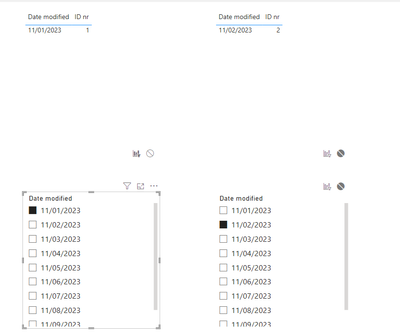
vjunyantmsft_2-1700720569152.png


Best Regards,

Dino Tao

If this post helps, then please consider Accept it as the solution to help the other members find it more quickly.

 

View solution in original post

2 REPLIES 2
Anonymous
Not applicable

Hi @Anonymous ,

For the problem "the slicers are changing both measures rather than just the one for each slicer", I can offer you a solution:
As the screenshot shows, I created two slicers and two table visual objects. I first select the slicer on the left, click on "Format", click on "Edit interactions", and then disable filtering on the right side of the form and slicer, and don't do anything on the left side of the form.

vjunyantmsft_0-1700719482931.png

Then select the right side of the slicer, the same steps will be the left side of the table and the slicer to disable the filter, the right side of the table do not do any operation.

vjunyantmsft_1-1700720489933.png

Then you can realize the effect of a slicer acting on a visual object.

vjunyantmsft_2-1700720569152.png


Best Regards,

Dino Tao

If this post helps, then please consider Accept it as the solution to help the other members find it more quickly.


Anonymous
Not applicable

Hi @Anonymous ,

Sorry I can't understand what do you mean about "create a measure that dynamically shows this data but for one periodcode previous", do you want to realize that when you select a new PeriodCode, you can still display the value of the previously selected PeriodCode?

Best Regards,
Dino Tao

Helpful resources

Announcements
Power BI DataViz World Championships

Power BI Dataviz World Championships

The Power BI Data Visualization World Championships is back! Get ahead of the game and start preparing now!

December 2025 Power BI Update Carousel

Power BI Monthly Update - December 2025

Check out the December 2025 Power BI Holiday Recap!

FabCon Atlanta 2026 carousel

FabCon Atlanta 2026

Join us at FabCon Atlanta, March 16-20, for the ultimate Fabric, Power BI, AI and SQL community-led event. Save $200 with code FABCOMM.