cancel
Showing results for 
Search instead for 
Did you mean: 

The Power BI Data Visualization World Championships is back! Get ahead of the game and start preparing now! Learn more

Reply
Anonymous
Not applicable

Background Color on Measure (Text Field)

Hi Team,


I have created an measure that takes Max of Color and I put that in the matrix.


Measure = Max(Table1[Color])


This is what data looks like:


CompanyMeasure
C10_Green
C23_Red
C32_Yellow
C41_Blue


I have added this measure in my matrix. How do i background color on this measure considering I'm taking a max?


I tried creating a mesaure:

Measure 2: Var c = SelectedValue() Return if c = 0_Green, "Green", False, but it wont let me select Measure


I would like 0_Green to have Green etc.

1 ACCEPTED SOLUTION

You can reference your measure? Are you confused because I've named my measure 'Measure'  and you already have a measure called 'Measure'? 


Here, try this as measure. Then select this measure BGColor in the Conditional Formatting dialogue.

BGColor = 
VAR col = [Measure]
RETURN
IF(col = "3_red", "Red",
    IF(col = "0_green", "Green",
        IF(col = "2_yellow", "Yellow",
            IF(col = "1_blue", "Blue", "White"))))


Kind regards

Djerro123

-------------------------------

If this answered your question, please mark it as the Solution. This also helps others to find what they are looking for.

Kudo's are welcome 🙂


Did I answer your question? Mark my post as a solution!

Proud to be a Super User!


View solution in original post

5 REPLIES 5
JarroVGIT
Resident Rockstar
Resident Rockstar

I've recreated your table in PowerBI and created the following measure:

Measure = 
VAR col = SELECTEDVALUE('Table'[Color], "Grey")
RETURN
IF(col = "3_red", "Red",
    IF(col = "0_green", "Green",
        IF(col = "2_yellow", "Yellow",
            IF(col = "1_blue", "Blue", col))))

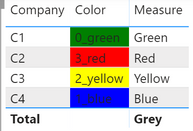
Then I put everything in a table visual, resulting in the following table:

image.png

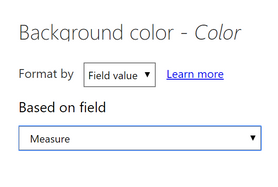
I was able to set the conditional formatting of any column, based on a value (of Measure, in this case):

Note: choose Field ValueNote: choose Field ValueResulting tableResulting table

Note that the measure could be a lot easier if all your values are in the format of x_color, by taking the substring rather then a long nested IF statement. If there could be multiple numbers before the underscore, than this wouldn't work but that's another problem then 😉

Measure 2 = 
VAR col = SELECTEDVALUE('Table'[Color], "0_white")
RETURN
RIGHT(col, (LEN(col)-2))


Kind regards

Djerro123

-------------------------------

If this answered your question, please mark it as the Solution. This also helps others to find what they are looking for.

Kudo's are welcome 🙂


Did I answer your question? Mark my post as a solution!

Proud to be a Super User!


Anonymous
Not applicable

@JarroVGIT How do I keep my Max Measure? I understand what you are tying to do. But I need to keep that Max Measure on my Matrix then apply the color on top of it. I have a lot of companies.

You can reference your measure? Are you confused because I've named my measure 'Measure'  and you already have a measure called 'Measure'? 


Here, try this as measure. Then select this measure BGColor in the Conditional Formatting dialogue.

BGColor = 
VAR col = [Measure]
RETURN
IF(col = "3_red", "Red",
    IF(col = "0_green", "Green",
        IF(col = "2_yellow", "Yellow",
            IF(col = "1_blue", "Blue", "White"))))


Kind regards

Djerro123

-------------------------------

If this answered your question, please mark it as the Solution. This also helps others to find what they are looking for.

Kudo's are welcome 🙂


Did I answer your question? Mark my post as a solution!

Proud to be a Super User!


Anonymous
Not applicable

@DJ I messed it up. I selected the column. THanks for help. That actually fixed my issue.

tex628
Community Champion
Community Champion

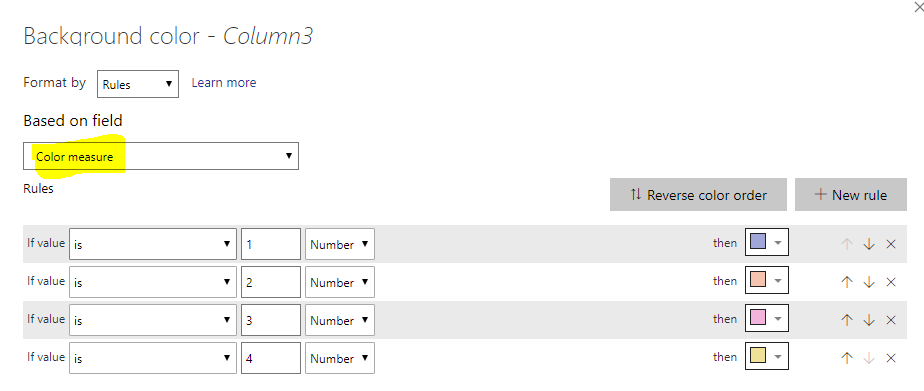
Create a numeric measure and then do a conditional formatting on the desired column using that measure:

Color measure = 
Switch(
[Company] ;
"C1" ; 1 ;
"C2" ; 2 ;
"C3" ; 3 ; 
"C4" ; 4
)


image.png


Connect on LinkedIn

Helpful resources

Announcements
November Power BI Update Carousel

Power BI Monthly Update - November 2025

Check out the November 2025 Power BI update to learn about new features.

Fabric Data Days Carousel

Fabric Data Days

Advance your Data & AI career with 50 days of live learning, contests, hands-on challenges, study groups & certifications and more!

FabCon Atlanta 2026 carousel

FabCon Atlanta 2026

Join us at FabCon Atlanta, March 16-20, for the ultimate Fabric, Power BI, AI and SQL community-led event. Save $200 with code FABCOMM.

Top Solution Authors
Top Kudoed Authors