Don't miss your chance to take the Fabric Data Engineer (DP-700) exam on us!
Learn moreWe've captured the moments from FabCon & SQLCon that everyone is talking about, and we are bringing them to the community, live and on-demand. Starts on April 14th. Register now
Hi Team,
I have created an measure that takes Max of Color and I put that in the matrix.
Measure = Max(Table1[Color])
This is what data looks like:
| Company | Measure |
| C1 | 0_Green |
| C2 | 3_Red |
| C3 | 2_Yellow |
| C4 | 1_Blue |
I have added this measure in my matrix. How do i background color on this measure considering I'm taking a max?
I tried creating a mesaure:
Measure 2: Var c = SelectedValue() Return if c = 0_Green, "Green", False, but it wont let me select Measure
I would like 0_Green to have Green etc.
Solved! Go to Solution.
You can reference your measure? Are you confused because I've named my measure 'Measure' and you already have a measure called 'Measure'?
Here, try this as measure. Then select this measure BGColor in the Conditional Formatting dialogue.
BGColor =
VAR col = [Measure]
RETURN
IF(col = "3_red", "Red",
IF(col = "0_green", "Green",
IF(col = "2_yellow", "Yellow",
IF(col = "1_blue", "Blue", "White"))))
Kind regards
Djerro123
-------------------------------
If this answered your question, please mark it as the Solution. This also helps others to find what they are looking for.
Kudo's are welcome 🙂
Proud to be a Super User!
I've recreated your table in PowerBI and created the following measure:
Measure =
VAR col = SELECTEDVALUE('Table'[Color], "Grey")
RETURN
IF(col = "3_red", "Red",
IF(col = "0_green", "Green",
IF(col = "2_yellow", "Yellow",
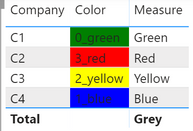
IF(col = "1_blue", "Blue", col))))Then I put everything in a table visual, resulting in the following table:
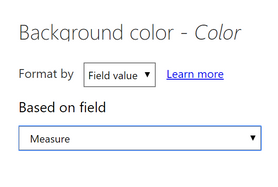
I was able to set the conditional formatting of any column, based on a value (of Measure, in this case):
Note: choose Field Value
Resulting table
Note that the measure could be a lot easier if all your values are in the format of x_color, by taking the substring rather then a long nested IF statement. If there could be multiple numbers before the underscore, than this wouldn't work but that's another problem then 😉
Measure 2 =
VAR col = SELECTEDVALUE('Table'[Color], "0_white")
RETURN
RIGHT(col, (LEN(col)-2))
Kind regards
Djerro123
-------------------------------
If this answered your question, please mark it as the Solution. This also helps others to find what they are looking for.
Kudo's are welcome 🙂
Proud to be a Super User!
@JarroVGIT How do I keep my Max Measure? I understand what you are tying to do. But I need to keep that Max Measure on my Matrix then apply the color on top of it. I have a lot of companies.
You can reference your measure? Are you confused because I've named my measure 'Measure' and you already have a measure called 'Measure'?
Here, try this as measure. Then select this measure BGColor in the Conditional Formatting dialogue.
BGColor =
VAR col = [Measure]
RETURN
IF(col = "3_red", "Red",
IF(col = "0_green", "Green",
IF(col = "2_yellow", "Yellow",
IF(col = "1_blue", "Blue", "White"))))
Kind regards
Djerro123
-------------------------------
If this answered your question, please mark it as the Solution. This also helps others to find what they are looking for.
Kudo's are welcome 🙂
Proud to be a Super User!
@DJ I messed it up. I selected the column. THanks for help. That actually fixed my issue.
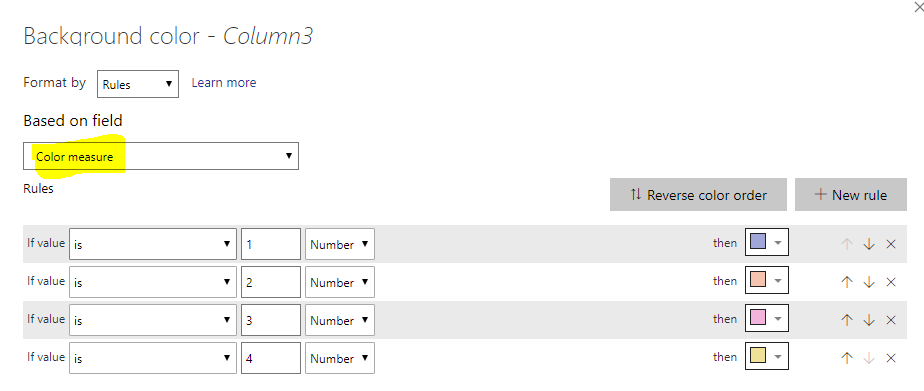
Create a numeric measure and then do a conditional formatting on the desired column using that measure:
Color measure =
Switch(
[Company] ;
"C1" ; 1 ;
"C2" ; 2 ;
"C3" ; 3 ;
"C4" ; 4
)If you have recently started exploring Fabric, we'd love to hear how it's going. Your feedback can help with product improvements.
A new Power BI DataViz World Championship is coming this June! Don't miss out on submitting your entry.
Share feedback directly with Fabric product managers, participate in targeted research studies and influence the Fabric roadmap.
| User | Count |
|---|---|
| 56 | |
| 40 | |
| 36 | |
| 20 | |
| 18 |
| User | Count |
|---|---|
| 74 | |
| 72 | |
| 38 | |
| 35 | |
| 26 |