cancel
Showing results for 
Search instead for 
Did you mean: 

July 7 - July 17 | Round 2 of the Power BI Dataviz World Championships. Don't miss your chance! Learn more

Reply
ChrisHanes
New Member

BUG: Rename Datasource infinate loop

Spoiler
If you rename a datasource query and click off the window, it gets stuck in an infinate loop.  It tells you the name can't be blank, but when you hit "close" you never get a chance to alter the name.  It just keeps telling you it cannot be blank.  Very annoying, I had to end task on power BI and lose all saves.  The rename function is designed poorly anyway (clunky). If you hit rename, you still have to click in the name to start editing, typing a character does nothing.
1 ACCEPTED SOLUTION
v-yuta-msft
Community Support
Community Support

@ChrisHanes ,


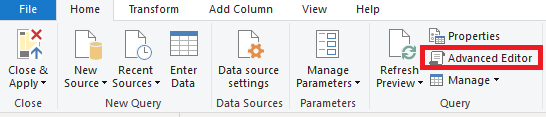
You can modify the data source by query editor-> advanced editor.

Capture.PNG 


Regards,

Jimmy Tao

View solution in original post

2 REPLIES 2
v-yuta-msft
Community Support
Community Support

@ChrisHanes ,


You can modify the data source by query editor-> advanced editor.

Capture.PNG 


Regards,

Jimmy Tao

That isn't a solution, that is a different way to rename.  They still need to fix the bug.  Having to shut down Power BI is not a viable answer.

Helpful resources

Announcements
FabCon and SQLCon Barcelona 2026

FabCon & SQLCon – Barcelona 2026

Join us in Barcelona for FabCon and SQLCon, the Fabric, Power BI, SQL, and AI community event. Save €200 with code FABCMTY200.

60 days of Data Days Carousel

Data Days 2026

Join Data Days 2026: 60 days of free live/on-demand sessions, challenges, study groups, and certification opportunities.

Power BI DataViz World Championships carousel

Power BI DataViz World Championships - June 2026

A new Power BI DataViz World Championship is coming this June! Don't miss out on submitting your entry.

Top Solution Authors