cancel
Showing results for 
Search instead for 
Did you mean: 

The Power BI Data Visualization World Championships is back! Get ahead of the game and start preparing now! Learn more

Reply
ipelly
New Member

Axis sorting not working when "Show Items with No Data" checked

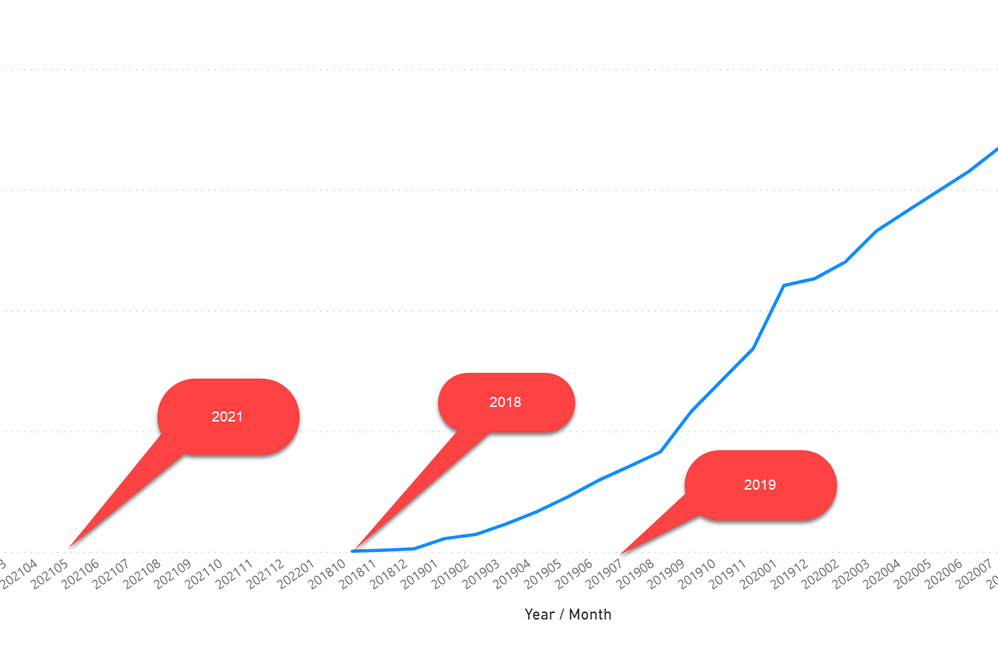
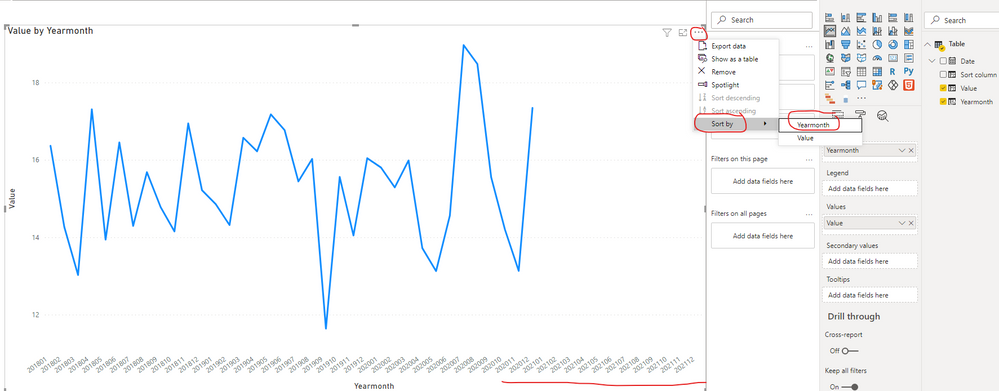
I have a table with some null data, and am plotting it by year/month. Even though the X axis is sorted by year / month (so 201801, 201802, etc), all the months/years with no data are coming first, even though they're later than the months/years with data. Pic attached.


badorder.png

1 ACCEPTED SOLUTION
v-robertq-msft
Community Support
Community Support

Hi, @ipelly 

According to your description, I can understand clearly what you want to get, I think you can achieve this using another calculate column to sort the [Year month] column, you can try my steps:

  1. Create two columns with the same DAX formula but different names in the data table like this:
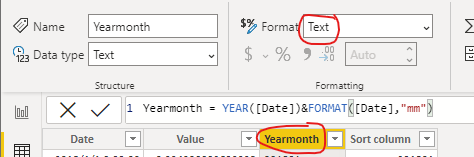
Yearmonth = YEAR([Date])&FORMAT([Date],"mm")
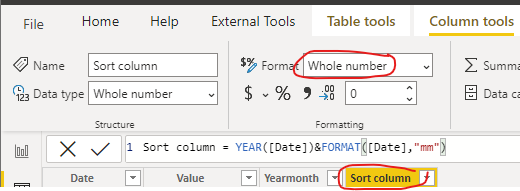
Sort column = YEAR([Date])&FORMAT([Date],"mm")

Then change them to different data type, one “Whole number” and one “Text”, like this:

v-robertq-msft_0-1616493097768.png

v-robertq-msft_1-1616493097777.png


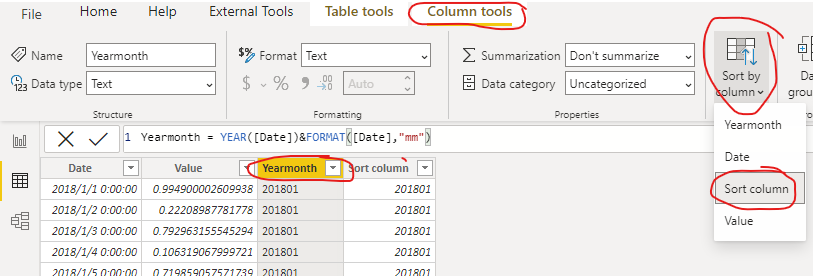
  1. Sort the column [Yearmonth] like this:

v-robertq-msft_2-1616493097782.png


  1. Go to the line chart, sort by [Yearmonth]

v-robertq-msft_3-1616493097794.png


And you can get what you want

You can download my test pbix file here

Thank you very much!


Best Regards,

Community Support Team _Robert Qin

If this post helps, then please consider Accept it as the solution to help the other members find it more quickly.

View solution in original post

2 REPLIES 2
v-robertq-msft
Community Support
Community Support

Hi, @ipelly 

According to your description, I can understand clearly what you want to get, I think you can achieve this using another calculate column to sort the [Year month] column, you can try my steps:

  1. Create two columns with the same DAX formula but different names in the data table like this:
Yearmonth = YEAR([Date])&FORMAT([Date],"mm")
Sort column = YEAR([Date])&FORMAT([Date],"mm")

Then change them to different data type, one “Whole number” and one “Text”, like this:

v-robertq-msft_0-1616493097768.png

v-robertq-msft_1-1616493097777.png


  1. Sort the column [Yearmonth] like this:

v-robertq-msft_2-1616493097782.png


  1. Go to the line chart, sort by [Yearmonth]

v-robertq-msft_3-1616493097794.png


And you can get what you want

You can download my test pbix file here

Thank you very much!


Best Regards,

Community Support Team _Robert Qin

If this post helps, then please consider Accept it as the solution to help the other members find it more quickly.

amitchandak
Super User
Super User

@ipelly , just check that you have sorted on month year column using three dots

Share with Power BI Enthusiasts: Full Power BI Video (20 Hours) YouTube
Microsoft Fabric Series 60+ Videos YouTube
Microsoft Fabric Hindi End to End YouTube

Helpful resources

Announcements
November Power BI Update Carousel

Power BI Monthly Update - November 2025

Check out the November 2025 Power BI update to learn about new features.

Fabric Data Days Carousel

Fabric Data Days

Advance your Data & AI career with 50 days of live learning, contests, hands-on challenges, study groups & certifications and more!

FabCon Atlanta 2026 carousel

FabCon Atlanta 2026

Join us at FabCon Atlanta, March 16-20, for the ultimate Fabric, Power BI, AI and SQL community-led event. Save $200 with code FABCOMM.

Top Kudoed Authors