Join us at FabCon Atlanta from March 16 - 20, 2026, for the ultimate Fabric, Power BI, AI and SQL community-led event. Save $200 with code FABCOMM.
Register now!The Power BI Data Visualization World Championships is back! Get ahead of the game and start preparing now! Learn more
Hi!
I have a simple question, but i do not know where to start.
I would like to convert a set of dates into numbers based on chronology. E.g. First date = 1, second date = 2
| Date | Result |
| 13.01.2020 14:34:32 | 1 |
| 14.01.2020 14:34:32 | 2 |
| 15.01.2020 14:34:32 | 3 |
| 16.01.2020 14:34:32 | 4 |
PS: i have to use direct query
Thanks!
Solved! Go to Solution.
Hi @Anonymous ,
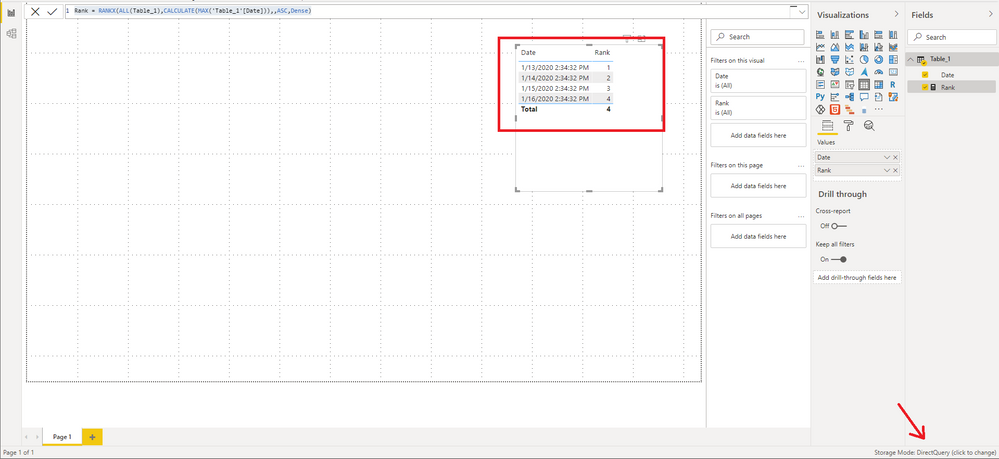
My test environment is Direct Query to connect to the SQL server, and the goal can be achieved by creating measure.
Rank = RANKX(ALL(Table_1),CALCULATE(MAX('Table_1'[Date])),,ASC,Dense)
Best Regards,
Stephen Tao
If this post helps, then please consider Accept it as the solution to help the other members find it more quickly.
Hi @Anonymous ,
Sorry to disturb you...
But did I answer your question ? Use RANKX function instead of RANK.EQ Please mark my reply as solution. Thank you very much.
Best Regards,
Stephen Tao
Hi! I am sorry for not replying. No, unfortunatly i got the same message saying that it does not work in direct query. However could an issue be that i also have hh/mm/ss in the date format?
Hi @Anonymous ,
My test environment is Direct Query to connect to the SQL server, and the goal can be achieved by creating measure.
Rank = RANKX(ALL(Table_1),CALCULATE(MAX('Table_1'[Date])),,ASC,Dense)
Best Regards,
Stephen Tao
If this post helps, then please consider Accept it as the solution to help the other members find it more quickly.
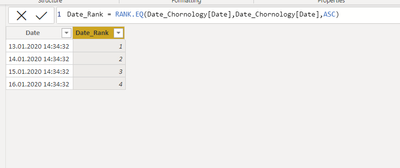
@Anonymous simple way is to create a column based on the rank function that will give ranking to dates in your table. Dax for that column would be like below
Proud to be a Super User!
Thanks for taking the time.
This does not work for me, as i have to use direct query, and i get an error saying that RANK.EQ is not supported in direct query mode.
Check out the November 2025 Power BI update to learn about new features.
Advance your Data & AI career with 50 days of live learning, contests, hands-on challenges, study groups & certifications and more!