Get certified for free when you join Fabric Data Days 2026 and dive into Fabric, Power BI, SQL, AI, and other essential data skills.
Join nowTry your skills in the Power BI Dataviz World Championship! Round one ends June 26. Join now
Hello! I am trying to build a calculation that will give me the avg days between each component of the project process.
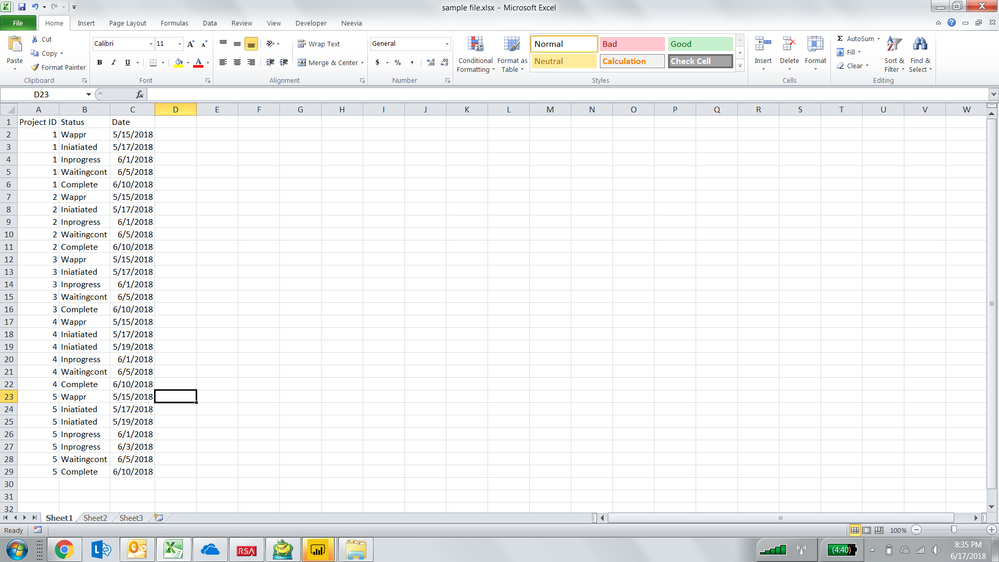
For example: In the below excel file I have project ID 1 and I want to konw the avg days between each project status and there are several status levels up until it is in complete. I want to be able to see all those calculations on a bar chart showing the avg. That way if one status is taking longer than others by project we will have that visibility. Also, there are some situations where the status will get flipped back to a previous status and we want to analyze that as well.
Example:
Wappr 5/15/2018
Iniatiated 5/17/2018
2 days in between
Inprogress 6/1/2018
Waitingcont 6/5/2018
4 days in between
Complete 6/10/2018
26 days in between
HI @nmck86
This calculated column gets close
Column =
VAR Wappr =
MINX(
FILTER(
'Table1',
'Table1'[Project ID] = EARLIER('Table1'[Project ID])
),
'Table1'[Date])
RETURN INT([Date] - Wappr)
| User | Count |
|---|---|
| 23 | |
| 20 | |
| 19 | |
| 18 | |
| 10 |
| User | Count |
|---|---|
| 53 | |
| 53 | |
| 40 | |
| 37 | |
| 32 |