Share feedback directly with Fabric product managers, participate in targeted research studies and influence the Fabric roadmap.
Sign up nowGet Fabric certified for FREE! Don't miss your chance! Learn more
Hi,
I try to do 3 weeks MA and 'Ave per week' for the below data. Note 'Ave per week' is for info only.
| Week | NScheduled | Ave per week |
| 1 | 1 | 1 |
| 1 | 1 | 1 |
| 1 | 1 | 1 |
| 1 | 1 | 1 |
| 2 | 6 | 3.5 |
| 2 | 1 | 3.5 |
| 3 | 4 | 2.666666667 |
| 3 | 3 | 2.666666667 |
| 3 | 1 | 2.666666667 |
Solved! Go to Solution.
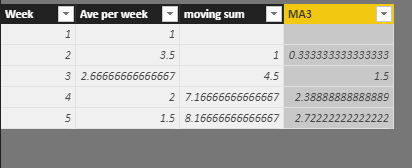
Hi @tomgag
In your original table, create a calculated column
Ave per week =
DIVIDE (
CALCULATE ( SUM ( Table1[NScheduled] ), ALLEXCEPT ( Table1, Table1[Week] ) ),
CALCULATE ( COUNT ( Table1[Week] ), ALLEXCEPT ( Table1, Table1[Week] ) )
)
Then create a new table from Table1
Table2 = SUMMARIZE(ALL(Table1),[Week],Table1[Ave per week])
In this table, create calculated columns
moving sum =
CALCULATE (
SUM ( 'Table2'[Ave per week] ),
FILTER (
ALL ( 'Table2' ),
[Week] < EARLIER ( 'Table2'[Week] )
&& [Week]
>= EARLIER ( 'Table2'[Week] ) - 3
)
)
MA3 = [moving sum]/3
Best Regards
maggie
Hi,
What does your actual base data look like? Is there is a Date column in there? If no, do you atleast have a year and Month column? Along with the Date column (if it is there), will there be a week column as well?
Share the actual data and show the expected result.
Hi @tomgag
In your original table, create a calculated column
Ave per week =
DIVIDE (
CALCULATE ( SUM ( Table1[NScheduled] ), ALLEXCEPT ( Table1, Table1[Week] ) ),
CALCULATE ( COUNT ( Table1[Week] ), ALLEXCEPT ( Table1, Table1[Week] ) )
)
Then create a new table from Table1
Table2 = SUMMARIZE(ALL(Table1),[Week],Table1[Ave per week])
In this table, create calculated columns
moving sum =
CALCULATE (
SUM ( 'Table2'[Ave per week] ),
FILTER (
ALL ( 'Table2' ),
[Week] < EARLIER ( 'Table2'[Week] )
&& [Week]
>= EARLIER ( 'Table2'[Week] ) - 3
)
)
MA3 = [moving sum]/3
Best Regards
maggie
Ave per week as a column would look like:
Ave per week =
VAR __table = FILTER(ALL('Table'),[Week]=EARLIER([Week]))
RETURN AVERAGEX(__table,[NScheduled])
@tomgag specify what is MA & Share the sample date with the clear brief explanation what your looking
Regards,
Chetan K
MA is moving average. is it will be in this case:
Week 4 MA = (Week 1 value 1 + Week 2 value 3.5 + Week 3 value 2.67 ) / 3
A moving average has this general format (from the Rolling Average Quick Measure)
Value rolling average =
IF(
ISFILTERED('Table2'[Date]),
ERROR("Time intelligence quick measures can only be grouped or filtered by the Power BI-provided date hierarchy or primary date column."),
VAR __LAST_DATE = ENDOFMONTH('Table2'[Date].[Date])
VAR __DATE_PERIOD =
DATESBETWEEN(
'Table2'[Date].[Date],
STARTOFMONTH(DATEADD(__LAST_DATE, -3, MONTH)),
ENDOFMONTH(DATEADD(__LAST_DATE, 1, MONTH))
)
RETURN
AVERAGEX(
CALCULATETABLE(
SUMMARIZE(
VALUES('Table2'),
'Table2'[Date].[Year],
'Table2'[Date].[QuarterNo],
'Table2'[Date].[Quarter],
'Table2'[Date].[MonthNo],
'Table2'[Date].[Month]
),
__DATE_PERIOD
),
CALCULATE(SUM('Table2'[Value]), ALL('Table2'[Date].[Day]))
)
)
If you love stickers, then you will definitely want to check out our Community Sticker Challenge!
Check out the January 2026 Power BI update to learn about new features.
| User | Count |
|---|---|
| 62 | |
| 60 | |
| 45 | |
| 21 | |
| 18 |
| User | Count |
|---|---|
| 122 | |
| 117 | |
| 37 | |
| 34 | |
| 30 |