cancel
Showing results for 
Search instead for 
Did you mean: 

Learn from the best! Meet the four finalists headed to the FINALS of the Power BI Dataviz World Championships! Register now

Reply
ven853
Regular Visitor

Average

I have null values in my column identified as 999.9.  I need to replace them with the average of the row above and the row below.  In some circumstances like shown below, the row below is also a null value.  In that case I need it to keep searching down until it comes to a value other than 999.9 and then use that to average with the row above. In this example:

1.  I need a formula that for row 286 will average rows 285 and 289 getting 1.6. 

2.  Then the formula would averave rows 286 (which is now 1.6) and row 289 getting 2.4 for row 287.

3.  Then the formula would average rows 287 (which is now 2.4) and row 289 getting 2.7 for row 288.

Final product would be:

Row 286 = 1.6

Row 287 = 2.4

Row 288 = 2.7

  AverageBeforeAfterImage.PNG

Any help would be much appreciated.

1 ACCEPTED SOLUTION
v-jiascu-msft
Microsoft Employee
Microsoft Employee

Hi @ven853,


To be honest, it's hard to achieve it using Power Query. I would suggest you leverage the power of Python and R. I created a demo solution with both Python and R. You can choose the best one that suits you. You can download it from the attachment. 

# 'dataset' holds the input data for this script

def find_next(excluded, ds):
    for item in ds:
        if item != excluded:
            return item
    return 0

result = []
column1 = dataset.iloc[:, 0]
for index in range(len(column1)):
    if column1[index] != 999.9:
        result.append(column1[index])
    else:
        next = find_next(999.9, column1[index + 1:])
        result.append((next + result[-1]) / 2)
dataset["new"] = result
# 'dataset' holds the input data for this script

find_next <- function(excluded, ds) {
    for (item in ds[,1]) {
        if (item != excluded) {
            return(item)
        }
    }
    return(0)
}

result <- c()
ds_length <- nrow(dataset)
for (index in 1: ds_length) {
    if (dataset[index, 1] == 999.9) {
        result[index] <- (tail(result, 1) + find_next(999.9, tail(dataset, -index))) / 2.0
    }
    else{
        result[index] <- dataset[index, 1]
    }
}
final <- data.frame(result)
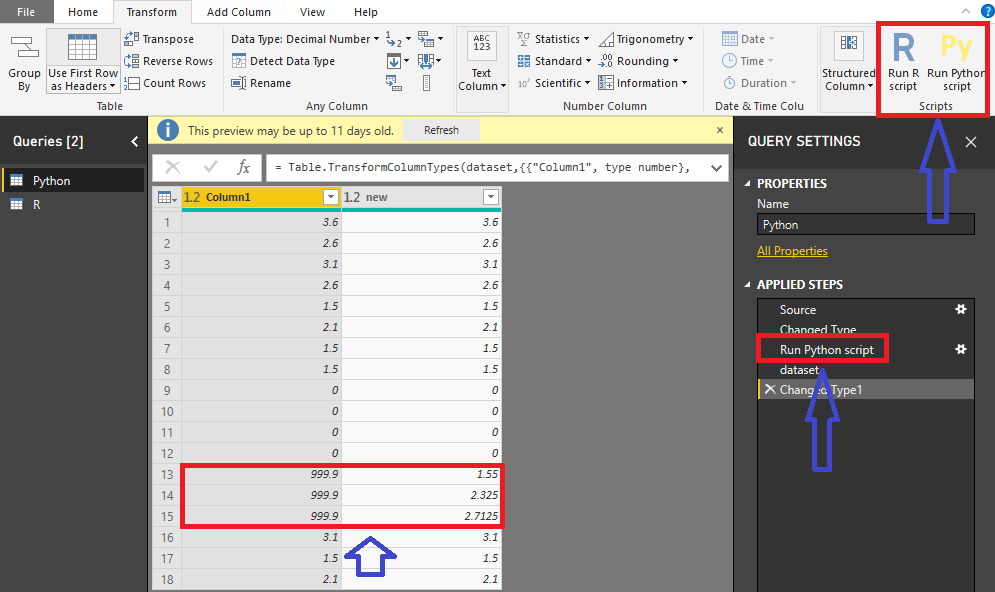
Average


Best Regards,
Dale

Community Support Team _ Dale
If this post helps, then please consider Accept it as the solution to help the other members find it more quickly.

View solution in original post

2 REPLIES 2
v-jiascu-msft
Microsoft Employee
Microsoft Employee

Hi @ven853,


To be honest, it's hard to achieve it using Power Query. I would suggest you leverage the power of Python and R. I created a demo solution with both Python and R. You can choose the best one that suits you. You can download it from the attachment. 

# 'dataset' holds the input data for this script

def find_next(excluded, ds):
    for item in ds:
        if item != excluded:
            return item
    return 0

result = []
column1 = dataset.iloc[:, 0]
for index in range(len(column1)):
    if column1[index] != 999.9:
        result.append(column1[index])
    else:
        next = find_next(999.9, column1[index + 1:])
        result.append((next + result[-1]) / 2)
dataset["new"] = result
# 'dataset' holds the input data for this script

find_next <- function(excluded, ds) {
    for (item in ds[,1]) {
        if (item != excluded) {
            return(item)
        }
    }
    return(0)
}

result <- c()
ds_length <- nrow(dataset)
for (index in 1: ds_length) {
    if (dataset[index, 1] == 999.9) {
        result[index] <- (tail(result, 1) + find_next(999.9, tail(dataset, -index))) / 2.0
    }
    else{
        result[index] <- dataset[index, 1]
    }
}
final <- data.frame(result)

Average


Best Regards,
Dale

Community Support Team _ Dale
If this post helps, then please consider Accept it as the solution to help the other members find it more quickly.
AlexisOlson
Super User
Super User

FYI, this will be very difficult if not impossible in DAX as it requires recursion.


Recursion is possible in the Power Query M Language though as seen here:

https://www.thebiccountant.com/2017/09/26/recursion-m-beginners/

Helpful resources

Announcements
Join our Fabric User Panel

Join our Fabric User Panel

Share feedback directly with Fabric product managers, participate in targeted research studies and influence the Fabric roadmap.

February Power BI Update Carousel

Power BI Monthly Update - February 2026

Check out the February 2026 Power BI update to learn about new features.

FabCon Atlanta 2026 carousel

FabCon Atlanta 2026

Join us at FabCon Atlanta, March 16-20, for the ultimate Fabric, Power BI, AI and SQL community-led event. Save $200 with code FABCOMM.