cancel
Showing results for 
Search instead for 
Did you mean: 

Learn from the best! Meet the four finalists headed to the FINALS of the Power BI Dataviz World Championships! Register now

Reply
Anonymous
Not applicable

Average with Datesbetween

Hi,
I have some unexpected values that I dont understand why they appear.


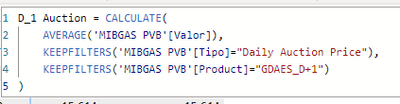
I calculate a daily value using average called D_1 Auction as below:

restevez11_0-1666712500614.png


I also calculated a monthly average using my Dates Table called Fechas, and related to the table "Mibgas PVB"). I call this measure 

restevez11_1-1666712611643.png

As expected, with a monthly context, both measures are equal, but in the second one, the total average appears without any date.

restevez11_2-1666712760729.png


 Why this value appears and how can I get rid off it?


Thanks


1 ACCEPTED SOLUTION
Anonymous
Not applicable

Solved using this measure:

D_1 Auction Promedio = IF( [D_1 Auction]=BLANK(),BLANK(),
 CALCULATE(
    [D_1 Auction],
    DATESBETWEEN(Fechas[Dia],STARTOFMONTH(Fechas[Dia]),ENDOFMONTH(Fechas[Dia]))
)
)
 

View solution in original post

1 REPLY 1
Anonymous
Not applicable

Solved using this measure:

D_1 Auction Promedio = IF( [D_1 Auction]=BLANK(),BLANK(),
 CALCULATE(
    [D_1 Auction],
    DATESBETWEEN(Fechas[Dia],STARTOFMONTH(Fechas[Dia]),ENDOFMONTH(Fechas[Dia]))
)
)
 

Helpful resources

Announcements
Join our Fabric User Panel

Join our Fabric User Panel

Share feedback directly with Fabric product managers, participate in targeted research studies and influence the Fabric roadmap.

March Power BI Update Carousel

Power BI Community Update - March 2026

Check out the March 2026 Power BI update to learn about new features.