- Power BI forums
- Updates
- News & Announcements
- Get Help with Power BI
- Desktop
- Service
- Report Server
- Power Query
- Mobile Apps
- Developer
- DAX Commands and Tips
- Custom Visuals Development Discussion
- Health and Life Sciences
- Power BI Spanish forums
- Translated Spanish Desktop
- Power Platform Integration - Better Together!
- Power Platform Integrations (Read-only)
- Power Platform and Dynamics 365 Integrations (Read-only)
- Training and Consulting
- Instructor Led Training
- Dashboard in a Day for Women, by Women
- Galleries
- Community Connections & How-To Videos
- COVID-19 Data Stories Gallery
- Themes Gallery
- Data Stories Gallery
- R Script Showcase
- Webinars and Video Gallery
- Quick Measures Gallery
- 2021 MSBizAppsSummit Gallery
- 2020 MSBizAppsSummit Gallery
- 2019 MSBizAppsSummit Gallery
- Events
- Ideas
- Custom Visuals Ideas
- Issues
- Issues
- Events
- Upcoming Events
- Community Blog
- Power BI Community Blog
- Custom Visuals Community Blog
- Community Support
- Community Accounts & Registration
- Using the Community
- Community Feedback
Register now to learn Fabric in free live sessions led by the best Microsoft experts. From Apr 16 to May 9, in English and Spanish.
- Power BI forums
- Forums
- Get Help with Power BI
- Desktop
- Re: Average line or measure card per category
- Subscribe to RSS Feed
- Mark Topic as New
- Mark Topic as Read
- Float this Topic for Current User
- Bookmark
- Subscribe
- Printer Friendly Page


- Mark as New
- Bookmark
- Subscribe
- Mute
- Subscribe to RSS Feed
- Permalink
- Report Inappropriate Content
Average line or measure card per category
Hi All,
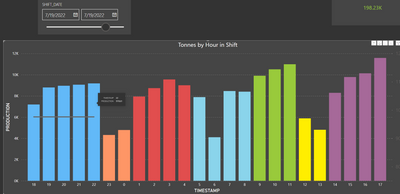
I have just about finished this dash but struggling with averages.
I would like to have an average card or line per category but my meassure is not working well.
I need to sum each categoy total production and divide it by the number of hours.
Eg... in BLUE is evening shift change.
hour 18: 7191
hour 19: 8796
hour 20: 8957
hour 21: 9056
hour 22: 9178
SUM is : 43178/5 = average of 8635
However my average line is showing 97.
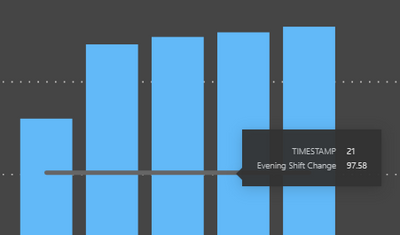
Here is my measure:
Solved! Go to Solution.


- Mark as New
- Bookmark
- Subscribe
- Mute
- Subscribe to RSS Feed
- Permalink
- Report Inappropriate Content
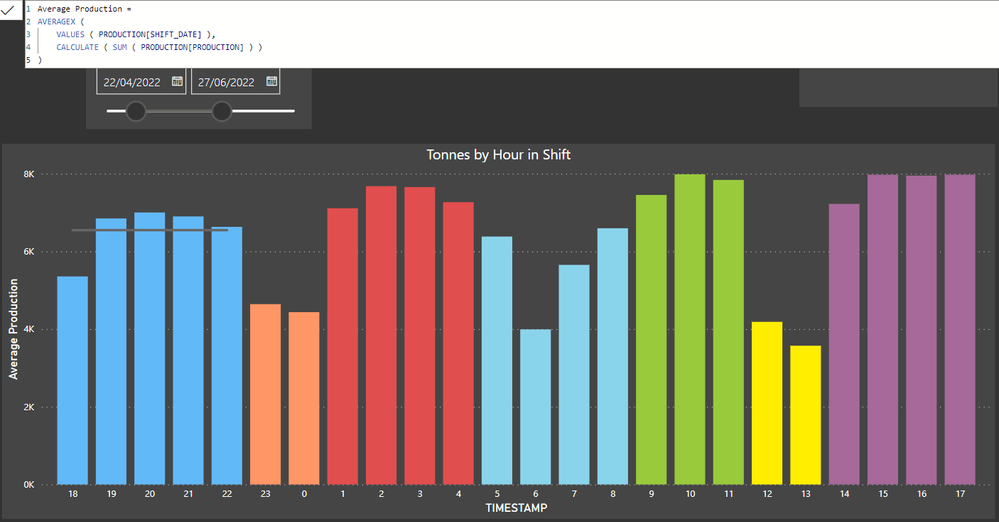
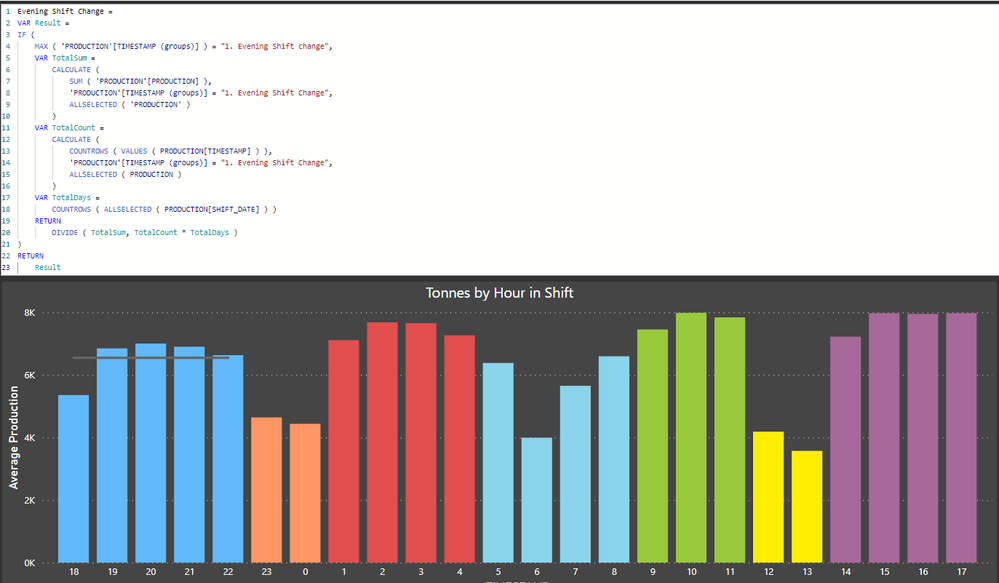
- Mark as New
- Bookmark
- Subscribe
- Mute
- Subscribe to RSS Feed
- Permalink
- Report Inappropriate Content
- Mark as New
- Bookmark
- Subscribe
- Mute
- Subscribe to RSS Feed
- Permalink
- Report Inappropriate Content
@tamerj1 You have been the solution to what i have been wanting to achieve.
Thanks so much. Big Kudo to you.
- Mark as New
- Bookmark
- Subscribe
- Mute
- Subscribe to RSS Feed
- Permalink
- Report Inappropriate Content
Hi @Freeseman
Attached your sample file with the solution
Evening Shift Change =
VAR Result =
IF (
    MAX ( 'PRODUCTION'[TIMESTAMP (groups)] ) = "1. Evening Shift change",
    VAR TotalSum =
        CALCULATE (
            SUM ( 'PRODUCTION'[PRODUCTION] ),
            'PRODUCTION'[TIMESTAMP (groups)] = "1. Evening Shift Change",
            ALLSELECTED ( 'PRODUCTION' )
        )
    VAR TotalCount =
        CALCULATE (
            COUNTROWS ( VALUES ( PRODUCTION[TIMESTAMP] ) ),
            'PRODUCTION'[TIMESTAMP (groups)] = "1. Evening Shift Change",
            ALLSELECTED ( PRODUCTION )
        )
    RETURN
        DIVIDE ( TotalSum, TotalCount )
)
RETURN
Result- Mark as New
- Bookmark
- Subscribe
- Mute
- Subscribe to RSS Feed
- Permalink
- Report Inappropriate Content
@tamerj1 I guess what i was trying to say is, If you drag the slider it should always stay within daily average rates. Like sum of production / shift date (hours) if it increases.
If i drag the slider, the production goes higher and the averages remain good but i need this average to be per hour per shift date... the Y axis must always be around 12k - 15k max something to do with the average over a long period however for the day looks perfect
- Mark as New
- Bookmark
- Subscribe
- Mute
- Subscribe to RSS Feed
- Permalink
- Report Inappropriate Content
Hi @Freeseman
To be honest, I did not fully understand what you are trying to say. Would you please present some examples that might help me better understand your requirement. Thank you
- Mark as New
- Bookmark
- Subscribe
- Mute
- Subscribe to RSS Feed
- Permalink
- Report Inappropriate Content
If i do the drop down slicer per day the averages make sense for the total production.
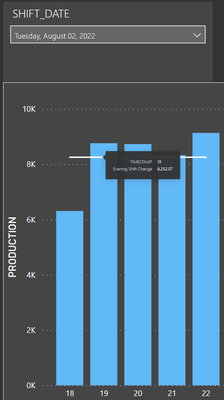
If i do it over more than 1 day eg: 3 months it is incorrect as it jumps to millions.
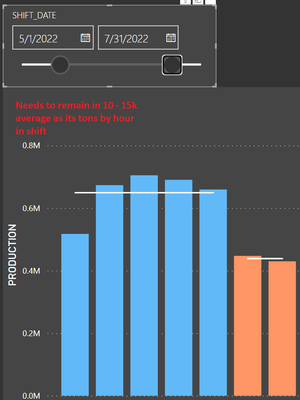
Here is a dash i am trying to replicate and it is done over 3 months.

It is as if we needed to get average tons by period of time
Over a long period of time the average tons per category "SHIFT" should always be between 4k and 9K does this make sense? @tamerj1
- Mark as New
- Bookmark
- Subscribe
- Mute
- Subscribe to RSS Feed
- Permalink
- Report Inappropriate Content
@tamerj1 YES!!!!!!
Thank you, this is exactly what i am needing. this is perfect however is it possible to keep the average at 8k?
what i mean is... The average if you drage the date slider should be the average of the total production in those 5 hours divide by 5.

- Mark as New
- Bookmark
- Subscribe
- Mute
- Subscribe to RSS Feed
- Permalink
- Report Inappropriate Content
@Freeseman , Using timestamp or hour of timestamp, create a measure like
calculate(averagex(values(PRODUCTION[TImeStamp]), [Evening Shift Change]), allselected())
Microsoft Power BI Learning Resources, 2023 !!
Learn Power BI - Full Course with Dec-2022, with Window, Index, Offset, 100+ Topics !!
Did I answer your question? Mark my post as a solution! Appreciate your Kudos !! Proud to be a Super User! !!
- Mark as New
- Bookmark
- Subscribe
- Mute
- Subscribe to RSS Feed
- Permalink
- Report Inappropriate Content
Thanks @amitchandak but this gave me an average of all. I need per category.
You can try by the link to the file.
- Mark as New
- Bookmark
- Subscribe
- Mute
- Subscribe to RSS Feed
- Permalink
- Report Inappropriate Content
calculate(averagex(values(PRODUCTION[TImeStamp]), [Evening Shift Change]), Filter(allselected(PRODUCTION), PRODUCTION[Category] = max(PRODUCTION[Category]) ) )
Microsoft Power BI Learning Resources, 2023 !!
Learn Power BI - Full Course with Dec-2022, with Window, Index, Offset, 100+ Topics !!
Did I answer your question? Mark my post as a solution! Appreciate your Kudos !! Proud to be a Super User! !!

Helpful resources

Microsoft Fabric Learn Together
Covering the world! 9:00-10:30 AM Sydney, 4:00-5:30 PM CET (Paris/Berlin), 7:00-8:30 PM Mexico City

Power BI Monthly Update - April 2024
Check out the April 2024 Power BI update to learn about new features.

Fabric Community Update - April 2024
Find out what's new and trending in the Fabric Community.

| User | Count |
|---|---|
| 108 | |
| 106 | |
| 88 | |
| 74 | |
| 69 |


| User | Count |
|---|---|
| 123 | |
| 112 | |
| 95 | |
| 83 | |
| 73 |


