Join us at FabCon Atlanta from March 16 - 20, 2026, for the ultimate Fabric, Power BI, AI and SQL community-led event. Save $200 with code FABCOMM.
Register now!The Power BI Data Visualization World Championships is back! Get ahead of the game and start preparing now! Learn more
Hi All,
Hope I can help with this. I am working on this project where I need to make the triangle analyses in Power BI,
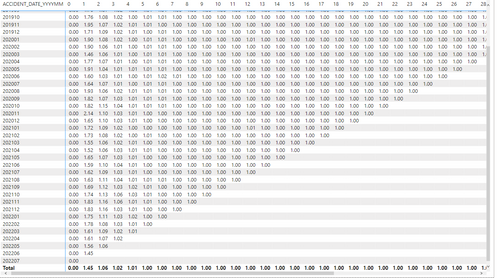
And I got a triangle like this:
AVG from 202206 202205 202204 in accident month 2 (1.06 +1.07+1.09/3) = 1.07
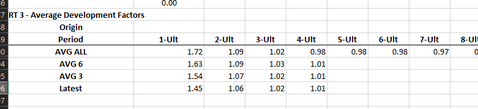
It will look something like this:
How can I take the average from the last 3 months from this development month (columns)??
Please see a sample of my data on Power BI here:
Thanks for the help.
Michelle
Please provide sanitized sample data that fully covers your issue.
https://community.powerbi.com/t5/Community-Blog/How-to-provide-sample-data-in-the-Power-BI-Forum/ba-...
Please show the expected outcome based on the sample data you provided.
https://community.powerbi.com/t5/Desktop/How-to-Get-Your-Question-Answered-Quickly/m-p/1447523
Thanks for the feedback. I updated the request with a sample of my data! Hope someone can help me.
Thank you for providing sample data. Unfortunately it only contains months until 201906.
In general you can use EDATE for these computations, specifically EDATE (ACCIDENT_DATE,-DEV_MONTHS)
Hi @lbendlin
I updated the data with more rows. EDATE didn't work because I want the averages of the "Ratio" measure. I added to the link the excel sheet with formulas so you can understand better what I am trying to do.
Thanks for any help.
Michelle
Please see the link for the Power BI and Excel sheet here Link
The Power BI Data Visualization World Championships is back! Get ahead of the game and start preparing now!
| User | Count |
|---|---|
| 41 | |
| 38 | |
| 36 | |
| 30 | |
| 28 |
| User | Count |
|---|---|
| 128 | |
| 88 | |
| 79 | |
| 67 | |
| 62 |