This is best Fabric, Power BI, SQL and AI community event. How do we know? The last event sold out! Save €200 with code FABCMTY200.
Register nowThe Fabric community is upgrading! Read all of the details including the timeline and what you can expect. Learn more
Good morning
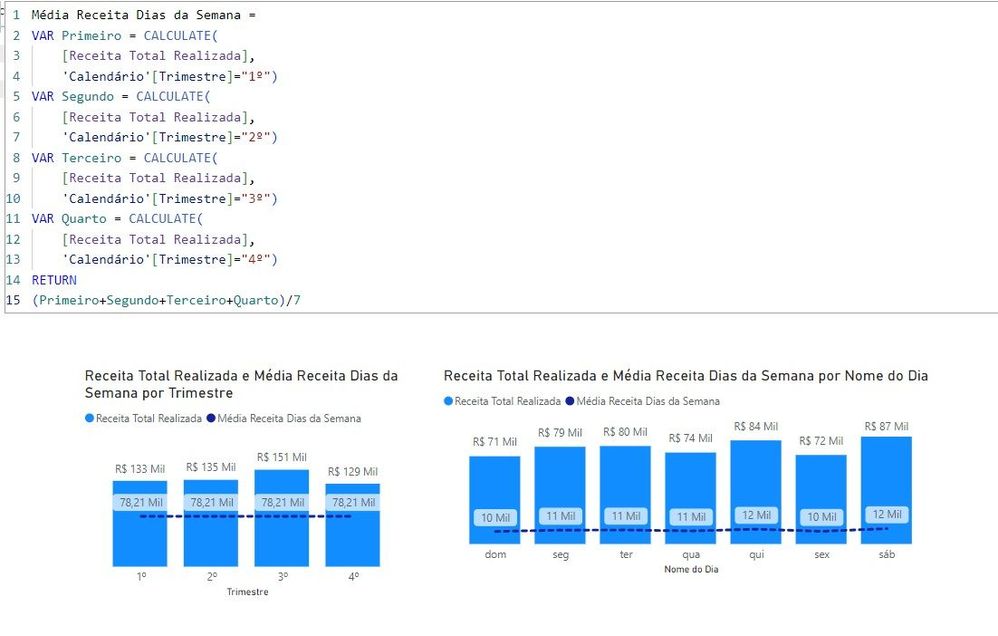
I need to create two column charts that show a line with the average value.
I took the measurement by calculating the average and when I made the first graph everything went fine. But in the second, no.
The value to be shown is the same as the first graph. In the second graph it is not only showing the wrong value, but it is also changing. The value should be the same as it is the average.
Could anyone help me with how to resolve this?
Solved! Go to Solution.
Hi @rafamorim87 ,
Based on my testing, please try the following methods:
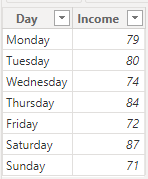
1.Create the simple table.
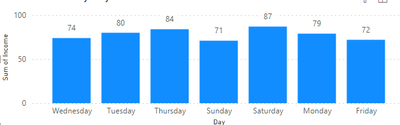
2.Drag the Day field into the line and column chart X-axis. Drag the income into the Y-axis.
3.Create the measure to calculate the average.
Dias =
var total_ = CALCULATE(SUM('Table'[Income]), ALL('Table'))
RETURN
DIVIDE(total_, 7)
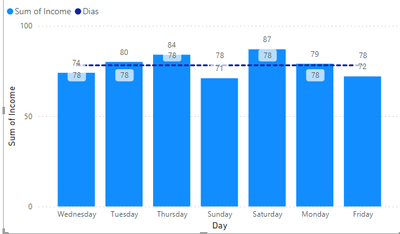
4.Drag the measure into the visual, the result is shown below.
Best Regards,
Wisdom Wu
If this post helps, then please consider Accept it as the solution to help the other members find it more quickly.
Hi @rafamorim87 ,
Based on my testing, please try the following methods:
1.Create the simple table.
2.Drag the Day field into the line and column chart X-axis. Drag the income into the Y-axis.
3.Create the measure to calculate the average.
Dias =
var total_ = CALCULATE(SUM('Table'[Income]), ALL('Table'))
RETURN
DIVIDE(total_, 7)
4.Drag the measure into the visual, the result is shown below.
Best Regards,
Wisdom Wu
If this post helps, then please consider Accept it as the solution to help the other members find it more quickly.
Join us in Barcelona for FabCon and SQLCon, the Fabric, Power BI, SQL, and AI community event. Save €200 with code FABCMTY200.
| User | Count |
|---|---|
| 24 | |
| 22 | |
| 20 | |
| 18 | |
| 14 |
| User | Count |
|---|---|
| 29 | |
| 23 | |
| 22 | |
| 20 | |
| 20 |