cancel
Showing results for 
Search instead for 
Did you mean: 

Get Fabric Certified for FREE during Fabric Data Days. Don't miss your chance! Request now

Reply
gsed99
Helper III
Helper III

Average aggregated by dimension and sum grand total of the averages

Hello,

I am trying to get the average $'s by Opportunity ID in a measure of a table, and then have the grand total be a sum of that measure instead of the overall average.

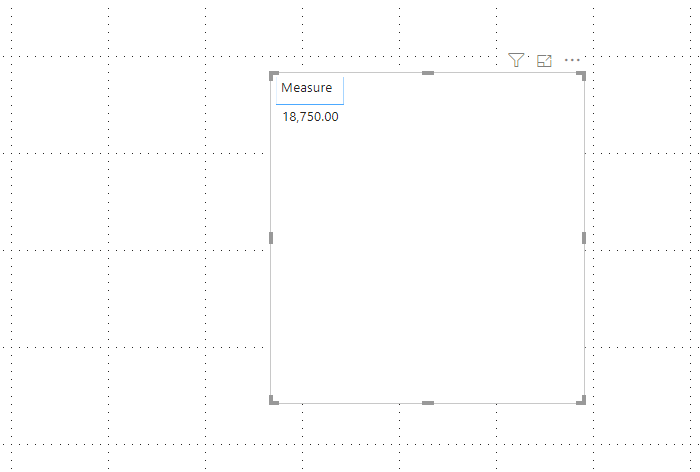
Below is some example date to illustrate the idea, where basically I would want to summarize the License $ by Account in averageing the License $ by Opportunity ID, in this example totaling $18,750 (which includes the 0's). Right now the system is averaging every single line and getting $27,778. I would like this to be maliable so I can bring in other dimensions like Region and the numbers still total the same.

How can this best be done?
Thank you in advance!!

-Greg


Account NameOpportunity ID License $ Contact ID
US BankO-106021 $      50,0000031N00001uEXuEQAW
US BankO-106021 $      50,0000031N00001uEIYlQAO
US BankO-106021 $      50,0000031N00001uEXEhQAO
US BankO-106021 $      50,0000031N00001uG5h5QAC
US BankO764540 $      25,0000031N00001uEXuEQAW
US BankO764540 $      25,0000031N00001uEIYlQAO
US BankO762962 $               -  0031N00001uEXEhQAO
US BankO762962 $               -  0031N00001uG5h5QAC
US BankO-353468 $               -  0031N00001uEIYlQAO
1 ACCEPTED SOLUTION
v-deddai1-msft
Community Support
Community Support

Hi @gsed99 ,


Would you please try the following measure:


Measure =

SUMX (

    SUMMARIZE (

        'Table',

        'Table'[Opportunity ID],

        "avg", AVERAGE ( 'Table'[ License $ ] )

    ),

    [avg]

)

    / DISTINCTCOUNT ( 'Table'[Opportunity ID] )


Untitled picture3.png


If this post helps, then please consider Accept it as the solution to help the other members find it more quickly.


Best Regards,

Dedmon Dai

View solution in original post

3 REPLIES 3
v-deddai1-msft
Community Support
Community Support

Hi @gsed99 ,


Would you please try the following measure:


Measure =

SUMX (

    SUMMARIZE (

        'Table',

        'Table'[Opportunity ID],

        "avg", AVERAGE ( 'Table'[ License $ ] )

    ),

    [avg]

)

    / DISTINCTCOUNT ( 'Table'[Opportunity ID] )


Untitled picture3.png


If this post helps, then please consider Accept it as the solution to help the other members find it more quickly.


Best Regards,

Dedmon Dai

@v-deddai1-msft Thank you so much!!!!!

Greg_Deckler
Community Champion
Community Champion

So, This looks like a measure totals problem. Very common. See my post about it here: https://community.powerbi.com/t5/DAX-Commands-and-Tips/Dealing-with-Measure-Totals/td-p/63376

Also, this Quick Measure, Measure Totals, The Final Word should get you what you need:
https://community.powerbi.com/t5/Quick-Measures-Gallery/Measure-Totals-The-Final-Word/m-p/547907


In particular, I think you want something like this: https://community.powerbi.com/t5/Quick-Measures-Gallery/Matrix-Measure-Total-Triple-Threat-Rock-amp-...


Follow on LinkedIn
@ me in replies or I'll lose your thread!!!
Instead of a Kudo, please vote for this idea
Become an expert!: Enterprise DNA
External Tools: MSHGQM
YouTube Channel!: Microsoft Hates Greg
Latest book!:
DAX For Humans

DAX is easy, CALCULATE makes DAX hard...

Helpful resources

Announcements
November Power BI Update Carousel

Power BI Monthly Update - November 2025

Check out the November 2025 Power BI update to learn about new features.

Fabric Data Days Carousel

Fabric Data Days

Advance your Data & AI career with 50 days of live learning, contests, hands-on challenges, study groups & certifications and more!

FabCon Atlanta 2026 carousel

FabCon Atlanta 2026

Join us at FabCon Atlanta, March 16-20, for the ultimate Fabric, Power BI, AI and SQL community-led event. Save $200 with code FABCOMM.

Top Solution Authors
Top Kudoed Authors