cancel
Showing results for 
Search instead for 
Did you mean: 

The Power BI Data Visualization World Championships is back! Get ahead of the game and start preparing now! Learn more

Reply
AaronRogers3
Helper I
Helper I

Average Time per Item Code

I am currently successfully getting the average times as a whole using this DAX formula for example:

Average Cleaning Time = FORMAT(AVERAGE(RECORDS_TABLE[CLEANING_TIME]),"HH:MM:SS")

For each of my records in my table  there is an ITEM CODE. So there is set-up, processing, reconciliation, cleaning and total time associated against Item codes.


I have been asked to visualisations which shows the Average Times per Item Code.


Does anyone know how i can achieve this? the times are in HH:MM:SS format.


Thanks!

1 ACCEPTED SOLUTION
v-danhe-msft
Microsoft Employee
Microsoft Employee

Hi @AaronRogers3,

Based on my test, you could refer to below steps:

1.I have entered some sample data:
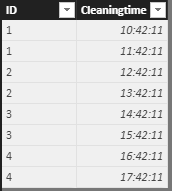
A.PNG

2.Create a new measure and a Table visual and now you could get the average times for per Item Code.

A = var t = SUMMARIZE('Sheet3',Sheet3[ID],"avgtime",FORMAT(AVERAGE(Sheet3[Cleaningtime]),"HH:MM:SS"))

return MAXX(t,[avgtime])

B.PNG

If I misunderstood you, could you please offer me more information about your data structure or share your pbix file if possible?


You can also download the PBIX file to have a view.

https://www.dropbox.com/s/zj2u6ngxer3yica/Average%20Time%20per%20Item%20Code.pbix?dl=0


Regards,

Daniel He

Community Support Team _ Daniel He
If this post helps, then please consider Accept it as the solution to help the other members find it more quickly.

View solution in original post

2 REPLIES 2
v-danhe-msft
Microsoft Employee
Microsoft Employee

Hi @AaronRogers3,

Based on my test, you could refer to below steps:

1.I have entered some sample data:

A.PNG

2.Create a new measure and a Table visual and now you could get the average times for per Item Code.

A = var t = SUMMARIZE('Sheet3',Sheet3[ID],"avgtime",FORMAT(AVERAGE(Sheet3[Cleaningtime]),"HH:MM:SS"))

return MAXX(t,[avgtime])

B.PNG

If I misunderstood you, could you please offer me more information about your data structure or share your pbix file if possible?


You can also download the PBIX file to have a view.

https://www.dropbox.com/s/zj2u6ngxer3yica/Average%20Time%20per%20Item%20Code.pbix?dl=0


Regards,

Daniel He

Community Support Team _ Daniel He
If this post helps, then please consider Accept it as the solution to help the other members find it more quickly.

Seems to be working fine and is what i need!


Thanks 🙂

Helpful resources

Announcements
Power BI DataViz World Championships

Power BI Dataviz World Championships

The Power BI Data Visualization World Championships is back! Get ahead of the game and start preparing now!

December 2025 Power BI Update Carousel

Power BI Monthly Update - December 2025

Check out the December 2025 Power BI Holiday Recap!

FabCon Atlanta 2026 carousel

FabCon Atlanta 2026

Join us at FabCon Atlanta, March 16-20, for the ultimate Fabric, Power BI, AI and SQL community-led event. Save $200 with code FABCOMM.