This time we’re going bigger than ever. Fabric, Power BI, SQL, AI and more. We're covering it all. You won't want to miss it.
Learn moreLevel up your Power BI skills this month - build one visual each week and tell better stories with data! Get started
I am currently successfully getting the average times as a whole using this DAX formula for example:
Average Cleaning Time = FORMAT(AVERAGE(RECORDS_TABLE[CLEANING_TIME]),"HH:MM:SS")
For each of my records in my table there is an ITEM CODE. So there is set-up, processing, reconciliation, cleaning and total time associated against Item codes.
I have been asked to visualisations which shows the Average Times per Item Code.
Does anyone know how i can achieve this? the times are in HH:MM:SS format.
Thanks!
Solved! Go to Solution.
Hi @AaronRogers3,
Based on my test, you could refer to below steps:
1.I have entered some sample data:
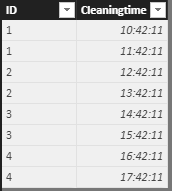
2.Create a new measure and a Table visual and now you could get the average times for per Item Code.
A = var t = SUMMARIZE('Sheet3',Sheet3[ID],"avgtime",FORMAT(AVERAGE(Sheet3[Cleaningtime]),"HH:MM:SS"))
return MAXX(t,[avgtime])
If I misunderstood you, could you please offer me more information about your data structure or share your pbix file if possible?
You can also download the PBIX file to have a view.
https://www.dropbox.com/s/zj2u6ngxer3yica/Average%20Time%20per%20Item%20Code.pbix?dl=0
Regards,
Daniel He
Hi @AaronRogers3,
Based on my test, you could refer to below steps:
1.I have entered some sample data:
2.Create a new measure and a Table visual and now you could get the average times for per Item Code.
A = var t = SUMMARIZE('Sheet3',Sheet3[ID],"avgtime",FORMAT(AVERAGE(Sheet3[Cleaningtime]),"HH:MM:SS"))
return MAXX(t,[avgtime])
If I misunderstood you, could you please offer me more information about your data structure or share your pbix file if possible?
You can also download the PBIX file to have a view.
https://www.dropbox.com/s/zj2u6ngxer3yica/Average%20Time%20per%20Item%20Code.pbix?dl=0
Regards,
Daniel He
Seems to be working fine and is what i need!
Thanks 🙂
Check out the April 2026 Power BI update to learn about new features.
Sign up to receive a private message when registration opens and key events begin.
If you have recently started exploring Fabric, we'd love to hear how it's going. Your feedback can help with product improvements.
| User | Count |
|---|---|
| 38 | |
| 29 | |
| 28 | |
| 20 | |
| 18 |
| User | Count |
|---|---|
| 66 | |
| 36 | |
| 30 | |
| 25 | |
| 24 |