This time we’re going bigger than ever. Fabric, Power BI, SQL, AI and more. We're covering it all. You won't want to miss it.
Learn moreLevel up your Power BI skills this month - build one visual each week and tell better stories with data! Get started
I am trying to average rows in my Power Bi matrix but am unable to because my values field contains values that are both text and numeric. Is there a way to handle this? Average only the columns which are numeric and not the text columns. Thanks fo rthe help.
Solved! Go to Solution.
Hi @ryanjilka ,
Then you could try ISTEXT() function.
https://docs.microsoft.com/en-us/dax/istext-function-dax
Modify the formula as below.
_value = IF(ISTEXT(SELECTEDVALUE('Table'[value])),0,SELECTEDVALUE('Table'[value]))
Measure = AVERAGEX(ALL('Table'[id]),[_value])
Or ISERROR() function.
https://docs.microsoft.com/en-us/dax/iserror-function-dax
_value = IF(ISERROR(SELECTEDVALUE('Table'[value])+0),0,SELECTEDVALUE('Table'[value])+0)
Measure = AVERAGEX(ALL('Table'[id]),[_value])
Best Regards,
Jay
It is a little more complecated than "Yes" and "No" and so this doesn't seem to work. I only want to average the numerics and not the text but I can't because of the type of field. Is there another way to acomplish this? Thanks!
Hi @ryanjilka ,
Then you could try ISTEXT() function.
https://docs.microsoft.com/en-us/dax/istext-function-dax
Modify the formula as below.
_value = IF(ISTEXT(SELECTEDVALUE('Table'[value])),0,SELECTEDVALUE('Table'[value]))
Measure = AVERAGEX(ALL('Table'[id]),[_value])
Or ISERROR() function.
https://docs.microsoft.com/en-us/dax/iserror-function-dax
_value = IF(ISERROR(SELECTEDVALUE('Table'[value])+0),0,SELECTEDVALUE('Table'[value])+0)
Measure = AVERAGEX(ALL('Table'[id]),[_value])
Best Regards,
Jay
Hi @ryanjilka ,
Depends on how complicate your column is. If the column only contains "yes" or "no" and the numeric, you could create a measure to replace the value.
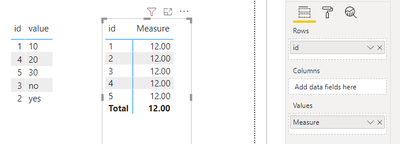
Sample data for your reference.
_value = IF(SELECTEDVALUE('Table'[value])="yes"||SELECTEDVALUE('Table'[value])="no",0,SELECTEDVALUE('Table'[value])+0)
Measure = AVERAGEX(ALL('Table'[id]),[_value])
Best Regards,
Jay
Check out the April 2026 Power BI update to learn about new features.
Sign up to receive a private message when registration opens and key events begin.
If you have recently started exploring Fabric, we'd love to hear how it's going. Your feedback can help with product improvements.
| User | Count |
|---|---|
| 37 | |
| 32 | |
| 27 | |
| 24 | |
| 17 |
| User | Count |
|---|---|
| 70 | |
| 50 | |
| 31 | |
| 26 | |
| 22 |