cancel
Showing results for 
Search instead for 
Did you mean: 

Learn from the best! Meet the four finalists headed to the FINALS of the Power BI Dataviz World Championships! Register now

Reply
Anonymous
Not applicable

Average Line

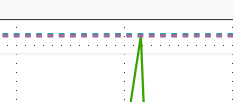
How come when I add average line, it shows up like this?

Capture.PNG

4 REPLIES 4
v-jiascu-msft
Microsoft Employee
Microsoft Employee

Hi @Anonymous,


Did you solve your issue? can you mark an answer, please?


Best Regards,

Dale

Community Support Team _ Dale
If this post helps, then please consider Accept it as the solution to help the other members find it more quickly.
quentin_vigne
Solution Sage
Solution Sage

Hi @Anonymous


It looks like you added a Max Line and not an average line. (Both sections are close to each other)


- Quentin

Anonymous
Not applicable

When I add a max line also, both show up in the same spot.Capture.PNG

Hi @Anonymous,


Can you share the file?

1. Please check how did you set the line.

2. Please enable the labels to check if the line has the right values.

Average_Line


Best Regards,

Dale

Community Support Team _ Dale
If this post helps, then please consider Accept it as the solution to help the other members find it more quickly.

Helpful resources

Announcements
New to Fabric survey Carousel

New to Fabric Survey

If you have recently started exploring Fabric, we'd love to hear how it's going. Your feedback can help with product improvements.

Power BI DataViz World Championships carousel

Power BI DataViz World Championships - June 2026

A new Power BI DataViz World Championship is coming this June! Don't miss out on submitting your entry.

Join our Fabric User Panel

Join our Fabric User Panel

Share feedback directly with Fabric product managers, participate in targeted research studies and influence the Fabric roadmap.

March Power BI Update Carousel

Power BI Community Update - March 2026

Check out the March 2026 Power BI update to learn about new features.