Get certified for free when you join Fabric Data Days 2026 and dive into Fabric, Power BI, SQL, AI, and other essential data skills.
Join nowTry your skills in the Power BI Dataviz World Championship! Round one ends June 26. Join now
Hi,
I'm trying to get an average of daily transactions at 3 levels and am not sure how to do it.
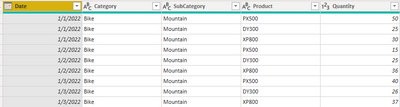
Here is the sample data
What I want to happen is to the average daily transactions aggregated based on the layer that the matrix is filtered at. But what I'm getting by using the Average function is the average at the transaction level.
When I simply use the Average function, this is what I get:
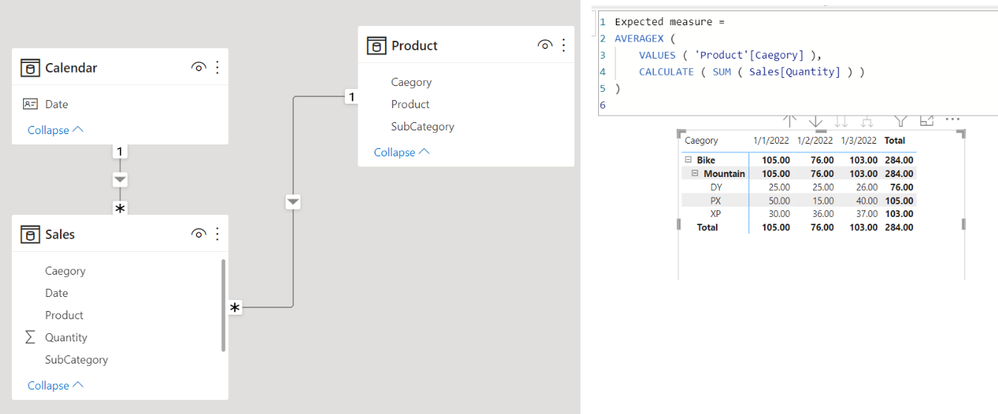
But what I would actually want to see is (Bike for example):
1/1/22 : 105
1/2/22 : 76
1/3/22 : 103
I understand that simply using a SUM in this example would work, but there is a larger dataset I'm using and what to get rolling daily and weekly averages, so this is how I'll need it.
Any help is appreciated!
Solved! Go to Solution.
Hi,
I am not sure whether I understood your question correctly, but please check the below picture and the attached pbix file.
Expected measure =
AVERAGEX (
VALUES ( 'Product'[Caegory] ),
CALCULATE ( SUM ( Sales[Quantity] ) )
)
Hi,
I am not sure whether I understood your question correctly, but please check the below picture and the attached pbix file.
Expected measure =
AVERAGEX (
VALUES ( 'Product'[Caegory] ),
CALCULATE ( SUM ( Sales[Quantity] ) )
)
Don't miss out on Data Days, June 15 through August 7. Learn Fabric, Power BI, SQL, AI and more.
Check out the May 2026 Power BI update to learn about new features.
| User | Count |
|---|---|
| 24 | |
| 22 | |
| 21 | |
| 20 | |
| 14 |
| User | Count |
|---|---|
| 59 | |
| 52 | |
| 41 | |
| 33 | |
| 32 |