Join us at FabCon Atlanta from March 16 - 20, 2026, for the ultimate Fabric, Power BI, AI and SQL community-led event. Save $200 with code FABCOMM.
Register now!Learn from the best! Meet the four finalists headed to the FINALS of the Power BI Dataviz World Championships! Register now
Hi,
I'm trying to get an average of daily transactions at 3 levels and am not sure how to do it.
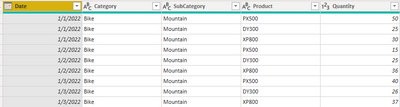
Here is the sample data
What I want to happen is to the average daily transactions aggregated based on the layer that the matrix is filtered at. But what I'm getting by using the Average function is the average at the transaction level.
When I simply use the Average function, this is what I get:
But what I would actually want to see is (Bike for example):
1/1/22 : 105
1/2/22 : 76
1/3/22 : 103
I understand that simply using a SUM in this example would work, but there is a larger dataset I'm using and what to get rolling daily and weekly averages, so this is how I'll need it.
Any help is appreciated!
Solved! Go to Solution.
Hi,
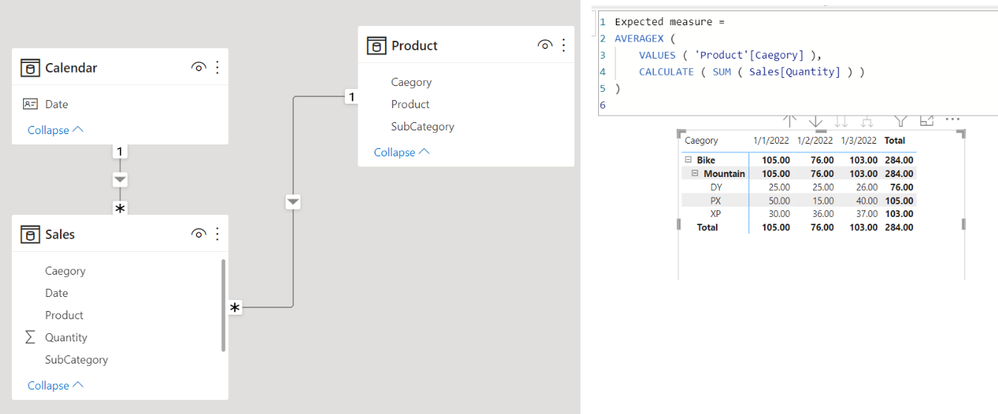
I am not sure whether I understood your question correctly, but please check the below picture and the attached pbix file.
Expected measure =
AVERAGEX (
VALUES ( 'Product'[Caegory] ),
CALCULATE ( SUM ( Sales[Quantity] ) )
)
Hi,
I am not sure whether I understood your question correctly, but please check the below picture and the attached pbix file.
Expected measure =
AVERAGEX (
VALUES ( 'Product'[Caegory] ),
CALCULATE ( SUM ( Sales[Quantity] ) )
)
Share feedback directly with Fabric product managers, participate in targeted research studies and influence the Fabric roadmap.
Check out the February 2026 Power BI update to learn about new features.
| User | Count |
|---|---|
| 54 | |
| 51 | |
| 39 | |
| 15 | |
| 14 |
| User | Count |
|---|---|
| 93 | |
| 79 | |
| 37 | |
| 27 | |
| 25 |