Don't miss your chance to take the Fabric Data Engineer (DP-700) exam on us!
Learn moreWe've captured the moments from FabCon & SQLCon that everyone is talking about, and we are bringing them to the community, live and on-demand. Starts on April 14th. Register now
Hey all,
I'm handling some data in a report and I was wondering how to do a computation while importing said data.
The data is split up by "scenarios", which is further split up by weeks (or partial weeks, example: time_bucket_id 1 goes from 28/10-31/10, time_bucket_id 2 goes from 01/11-03/11, filling up the rest of the week under a different time id due to it being a different month) however some scenarios' data starts only partway through the first month, making it look like said first month has super underperformed.
I want to automatically get rid of the incomplete first months with this logic (pseudo code but table names encased in "" are correct):
if( "scenario_id"'s "time_bucket_id" = 1 and day("time_bucket_id"'s "start date") != 1 ), remove( row, and all other rows from the same "scenario_id" on the same month("time_bucket_id"'s "start_date") and year("time_bucket_id"'s "start_date") )
But I'm not entirely sure how to perform it in M, any help would be greatly appreciated.
Small clarifications:
A scenario's first date will always have a time_bucket_id of 1, and is in the space of weeks.
Each time bucket id has a date on which it starts, days of the week are irrelevant I only want to it check for 1st's of said months.
If you need any other clarifications just ask
Hi @Sam_Zeus ,
In you scenario, Please have a try to use Table.Group .
If it doesn't meet your requirement, Kindly share your sample data and excepted result to me if you don't have any Confidential Information. Please upload your files to One Drive and share the link here.
@v-frfei-msft
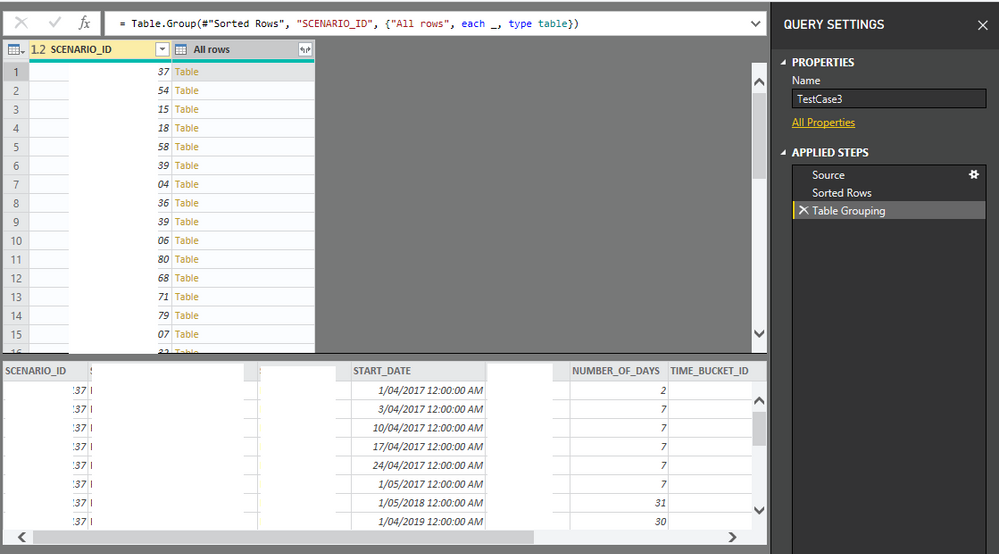
From the following code I now have this:
let
Source = Oracle.Database(__),
#"Sorted Rows" = Table.Sort(Source,{{"SCENARIO_ID", Order.Ascending}, {"TIME_BUCKET_ID", Order.Ascending}}),
#"Table Grouping" = Table.Group(#"Sorted Rows", "SCENARIO_ID", {"All rows", each _, type table})
in
#"Table Grouping"
How do I:
A: Use the Table.RemoveFirstN inside these new mini tables?
B: Once I'm done with processing the data how to it revert it back to being one table?
I've gotten a little further in fixing it, I trialed a fix on a table with only 1 scenario and it worked:
Source = Oracle.Database(___),
#"Sorted Rows" = Table.Sort(Source,{{"SCENARIO_ID", Order.Ascending}, {"TIME_BUCKET_ID", Order.Ascending}}),
#"Test" = Table.RemoveFirstN(#"Sorted Rows", each Date.Day([START_DATE]) <> 1)
However I need to to be able to loop through multiple scenarios, kind of similar to this (code doesnt work but general idea):
Source = Oracle.Database(___),
#"Sorted Rows" = Table.Sort(Source,{{"SCENARIO_ID", Order.Ascending}, {"TIME_BUCKET_ID", Order.Ascending}}),
#"Test" = each [SCENARIO_ID] (Table.RemoveFirstN(#"Sorted Rows", each Date.Day([START_DATE]) <> 1))
If you have recently started exploring Fabric, we'd love to hear how it's going. Your feedback can help with product improvements.
A new Power BI DataViz World Championship is coming this June! Don't miss out on submitting your entry.
Share feedback directly with Fabric product managers, participate in targeted research studies and influence the Fabric roadmap.
| User | Count |
|---|---|
| 55 | |
| 35 | |
| 31 | |
| 19 | |
| 17 |
| User | Count |
|---|---|
| 75 | |
| 72 | |
| 38 | |
| 35 | |
| 25 |