cancel
Showing results for 
Search instead for 
Did you mean: 

Vote for your favorite vizzies from the Power BI Dataviz World Championship submissions. Vote now!

Reply
ngct1112
Post Patron
Post Patron

Automate Re-sequence (Power query)

Hi,


May I ask is there any way I could import new lines in the table and re-sequence?


Original Table:

ID
AA
AA-02
AA-03
BB
BB-02
CC


New items Table:

AA
AA
CC


Desired outcome after Refresh:

ID
AA
AA-02
AA-03
AA-04
AA-05
BB
BB-02
CC
CC-01


Appreciated if there are any soluctions.

1 ACCEPTED SOLUTION
Anonymous
Not applicable

Hi @ngct1112 ,


My workaround is adding a rank column based on each ID, here is the full M code:

let
    Source = Excel.Workbook(File.Contents("C:\Users\eyelynq\Desktop\Sort By.xlsx"), null, true),
    Table1_Table = Source{[Item="Table1",Kind="Table"]}[Data],
    #"Changed Type" = Table.TransformColumnTypes(Table1_Table,{{"ID", type text}}),
    #"Split Column by Delimiter" = Table.SplitColumn(#"Changed Type", "ID", Splitter.SplitTextByEachDelimiter({"-"}, QuoteStyle.Csv, false), {"ID.1", "ID.2"}),
    #"Added Index" = Table.AddIndexColumn(#"Split Column by Delimiter", "Index", 1, 1, Int64.Type),
    Grouped = Table.Group(#"Added Index", {"ID.1"}, {{"AllRows", each _, type table [ID.1=nullable text, ID.2=nullable text, Index=number]}}),
    RankFunction = (tabletorank as table) as table =>
     let
      SortRows = Table.Sort(tabletorank,{{"ID.1", Order.Descending}}),
      AddIndex = Table.AddIndexColumn(SortRows, "Rank", 0, 1)
     in
      AddIndex,
    AddedRank = Table.TransformColumns(Grouped, {"AllRows", each RankFunction(_)}),
    #"Expanded AllRows" = Table.ExpandTableColumn(AddedRank, "AllRows", {"Rank"}, {"Rank"}),
    #"Added Custom" = Table.AddColumn(#"Expanded AllRows", "Desired", each if [Rank]=0 then [ID.1] else  [ID.1] &"-0"&Number.ToText([Rank])),
    #"Removed Columns" = Table.RemoveColumns(#"Added Custom",{"Rank", "ID.1"})
in
#"Removed Columns"
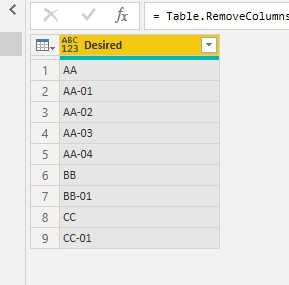
group by.PNG


But the final output is a little different from what you expected since power bi could not specify which is the new added rows.


Best Regards,
Eyelyn Qin
If this post helps, then please consider Accept it as the solution to help the other members find it more quickly.

View solution in original post

1 REPLY 1
Anonymous
Not applicable

Hi @ngct1112 ,


My workaround is adding a rank column based on each ID, here is the full M code:

let
    Source = Excel.Workbook(File.Contents("C:\Users\eyelynq\Desktop\Sort By.xlsx"), null, true),
    Table1_Table = Source{[Item="Table1",Kind="Table"]}[Data],
    #"Changed Type" = Table.TransformColumnTypes(Table1_Table,{{"ID", type text}}),
    #"Split Column by Delimiter" = Table.SplitColumn(#"Changed Type", "ID", Splitter.SplitTextByEachDelimiter({"-"}, QuoteStyle.Csv, false), {"ID.1", "ID.2"}),
    #"Added Index" = Table.AddIndexColumn(#"Split Column by Delimiter", "Index", 1, 1, Int64.Type),
    Grouped = Table.Group(#"Added Index", {"ID.1"}, {{"AllRows", each _, type table [ID.1=nullable text, ID.2=nullable text, Index=number]}}),
    RankFunction = (tabletorank as table) as table =>
     let
      SortRows = Table.Sort(tabletorank,{{"ID.1", Order.Descending}}),
      AddIndex = Table.AddIndexColumn(SortRows, "Rank", 0, 1)
     in
      AddIndex,
    AddedRank = Table.TransformColumns(Grouped, {"AllRows", each RankFunction(_)}),
    #"Expanded AllRows" = Table.ExpandTableColumn(AddedRank, "AllRows", {"Rank"}, {"Rank"}),
    #"Added Custom" = Table.AddColumn(#"Expanded AllRows", "Desired", each if [Rank]=0 then [ID.1] else  [ID.1] &"-0"&Number.ToText([Rank])),
    #"Removed Columns" = Table.RemoveColumns(#"Added Custom",{"Rank", "ID.1"})
in
#"Removed Columns"

group by.PNG


But the final output is a little different from what you expected since power bi could not specify which is the new added rows.


Best Regards,
Eyelyn Qin
If this post helps, then please consider Accept it as the solution to help the other members find it more quickly.

Helpful resources

Announcements
Power BI DataViz World Championships

Power BI Dataviz World Championships

Vote for your favorite vizzies from the Power BI World Championship submissions!

Sticker Challenge 2026 Carousel

Join our Community Sticker Challenge 2026

If you love stickers, then you will definitely want to check out our Community Sticker Challenge!

January Power BI Update Carousel

Power BI Monthly Update - January 2026

Check out the January 2026 Power BI update to learn about new features.

FabCon Atlanta 2026 carousel

FabCon Atlanta 2026

Join us at FabCon Atlanta, March 16-20, for the ultimate Fabric, Power BI, AI and SQL community-led event. Save $200 with code FABCOMM.