Don't miss your chance to take the Fabric Data Engineer (DP-700) exam on us!
Learn moreWe've captured the moments from FabCon & SQLCon that everyone is talking about, and we are bringing them to the community, live and on-demand. Starts on April 14th. Register now
Hi,
May I ask is there any way I could import new lines in the table and re-sequence?
Original Table:
| ID |
| AA |
| AA-02 |
| AA-03 |
| BB |
| BB-02 |
| CC |
New items Table:
| AA |
| AA |
| CC |
Desired outcome after Refresh:
| ID |
| AA |
| AA-02 |
| AA-03 |
| AA-04 |
| AA-05 |
| BB |
| BB-02 |
| CC |
| CC-01 |
Appreciated if there are any soluctions.
Solved! Go to Solution.
Hi @ngct1112 ,
My workaround is adding a rank column based on each ID, here is the full M code:
let
Source = Excel.Workbook(File.Contents("C:\Users\eyelynq\Desktop\Sort By.xlsx"), null, true),
Table1_Table = Source{[Item="Table1",Kind="Table"]}[Data],
#"Changed Type" = Table.TransformColumnTypes(Table1_Table,{{"ID", type text}}),
#"Split Column by Delimiter" = Table.SplitColumn(#"Changed Type", "ID", Splitter.SplitTextByEachDelimiter({"-"}, QuoteStyle.Csv, false), {"ID.1", "ID.2"}),
#"Added Index" = Table.AddIndexColumn(#"Split Column by Delimiter", "Index", 1, 1, Int64.Type),
Grouped = Table.Group(#"Added Index", {"ID.1"}, {{"AllRows", each _, type table [ID.1=nullable text, ID.2=nullable text, Index=number]}}),
RankFunction = (tabletorank as table) as table =>
let
SortRows = Table.Sort(tabletorank,{{"ID.1", Order.Descending}}),
AddIndex = Table.AddIndexColumn(SortRows, "Rank", 0, 1)
in
AddIndex,
AddedRank = Table.TransformColumns(Grouped, {"AllRows", each RankFunction(_)}),
#"Expanded AllRows" = Table.ExpandTableColumn(AddedRank, "AllRows", {"Rank"}, {"Rank"}),
#"Added Custom" = Table.AddColumn(#"Expanded AllRows", "Desired", each if [Rank]=0 then [ID.1] else [ID.1] &"-0"&Number.ToText([Rank])),
#"Removed Columns" = Table.RemoveColumns(#"Added Custom",{"Rank", "ID.1"})
in
#"Removed Columns"
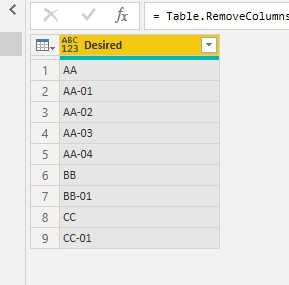
But the final output is a little different from what you expected since power bi could not specify which is the new added rows.
Best Regards,
Eyelyn Qin
If this post helps, then please consider Accept it as the solution to help the other members find it more quickly.
Hi @ngct1112 ,
My workaround is adding a rank column based on each ID, here is the full M code:
let
Source = Excel.Workbook(File.Contents("C:\Users\eyelynq\Desktop\Sort By.xlsx"), null, true),
Table1_Table = Source{[Item="Table1",Kind="Table"]}[Data],
#"Changed Type" = Table.TransformColumnTypes(Table1_Table,{{"ID", type text}}),
#"Split Column by Delimiter" = Table.SplitColumn(#"Changed Type", "ID", Splitter.SplitTextByEachDelimiter({"-"}, QuoteStyle.Csv, false), {"ID.1", "ID.2"}),
#"Added Index" = Table.AddIndexColumn(#"Split Column by Delimiter", "Index", 1, 1, Int64.Type),
Grouped = Table.Group(#"Added Index", {"ID.1"}, {{"AllRows", each _, type table [ID.1=nullable text, ID.2=nullable text, Index=number]}}),
RankFunction = (tabletorank as table) as table =>
let
SortRows = Table.Sort(tabletorank,{{"ID.1", Order.Descending}}),
AddIndex = Table.AddIndexColumn(SortRows, "Rank", 0, 1)
in
AddIndex,
AddedRank = Table.TransformColumns(Grouped, {"AllRows", each RankFunction(_)}),
#"Expanded AllRows" = Table.ExpandTableColumn(AddedRank, "AllRows", {"Rank"}, {"Rank"}),
#"Added Custom" = Table.AddColumn(#"Expanded AllRows", "Desired", each if [Rank]=0 then [ID.1] else [ID.1] &"-0"&Number.ToText([Rank])),
#"Removed Columns" = Table.RemoveColumns(#"Added Custom",{"Rank", "ID.1"})
in
#"Removed Columns"
But the final output is a little different from what you expected since power bi could not specify which is the new added rows.
Best Regards,
Eyelyn Qin
If this post helps, then please consider Accept it as the solution to help the other members find it more quickly.
If you have recently started exploring Fabric, we'd love to hear how it's going. Your feedback can help with product improvements.
A new Power BI DataViz World Championship is coming this June! Don't miss out on submitting your entry.
Share feedback directly with Fabric product managers, participate in targeted research studies and influence the Fabric roadmap.
| User | Count |
|---|---|
| 53 | |
| 36 | |
| 33 | |
| 19 | |
| 17 |
| User | Count |
|---|---|
| 73 | |
| 72 | |
| 38 | |
| 35 | |
| 26 |