This time we’re going bigger than ever. Fabric, Power BI, SQL, AI and more. We're covering it all. You won't want to miss it.
Learn moreLevel up your Power BI skills this month - build one visual each week and tell better stories with data! Get started
Hi ,
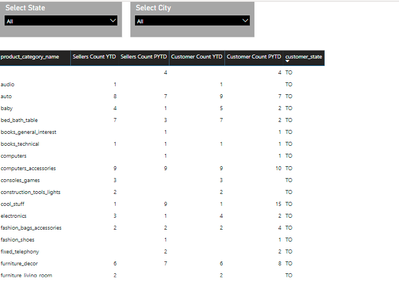
Is it possible to autoexport a particular grid (visual) as a excel in power bi report.
What i want the following table should be autoexport only not whole report.
Any Help wpold be appreciated.
@amitchandak @Fowmy @Anonymous
Regards,
Preeti
Hi @Preeti_Yadav ,
Do you want to export data from the slicer and visuals to excel?
As of now, you can only export the data in each of them, and the slicer loses its functionality after exporting.
refer: https://docs.microsoft.com/en-us/power-bi/visuals/power-bi-visualization-export-data
Don't forget to give thumbs up and accept this as a solution if it helped you!!!
Best Regards
Lucien
Currently you can only export the data that feeds the visual. There are a couple of ideas that ask for export of metadata (like the formatting and the filters) too. Supposedly that is being considered.
For now you need to export the data and then recreate the format yourself.
Hi,
There are a couple of ideas that ask for export of metadata (like the formatting and the filters) too.
As you mentioned this, how it is done?
Regards,
Preeti
We don't know yet when and how it will be implemented.
Okays Thank You!!
Check out the April 2026 Power BI update to learn about new features.
Sign up to receive a private message when registration opens and key events begin.
If you have recently started exploring Fabric, we'd love to hear how it's going. Your feedback can help with product improvements.
| User | Count |
|---|---|
| 36 | |
| 28 | |
| 27 | |
| 20 | |
| 18 |
| User | Count |
|---|---|
| 67 | |
| 35 | |
| 33 | |
| 25 | |
| 24 |