Join us at FabCon Atlanta from March 16 - 20, 2026, for the ultimate Fabric, Power BI, AI and SQL community-led event. Save $200 with code FABCOMM.
Register now!The Power BI Data Visualization World Championships is back! Get ahead of the game and start preparing now! Learn more
I am trying to use a column of unique values to count the number of times the values appear in another table. My data looks like the following:
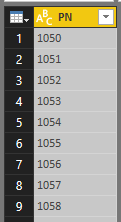
The values to be looked up:
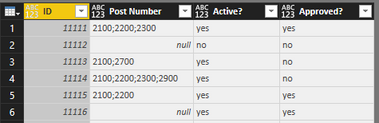
The values to be looked up against look like this, where the column I am interested in is the 2nd one, "Post Number."
What I hope to acheive here is a to be able to create a table (a visual) where I can see a count of how many times each value appears. The tricky part here is of course that I am not looking for an exact match, just whether or not the value is contained somewhere within the cell.
Example: The value "2200" appears 3 times in the above data set, so I would expect to see "3" returned.
From there I plan to filter based on the 3rd and 4th columns, Active, and Approved on the visual level.
I have tried serveral methods without any luck. Any advice?
Solved! Go to Solution.
Perhaps something like:
Measure =
VAR __pn = MAX(Table9[PN])
VAR __pnLength = LEN(__pn)
VAR __table = ALL('Table10')
VAR __table1 = ADDCOLUMNS(__table,"__Count",(LEN([Post Number]) - LEN(SUBSTITUTE([Post Number],__pn,"")))/__pnLength)
RETURN SUMX(__table1,[__Count])
Perhaps something like:
Measure =
VAR __pn = MAX(Table9[PN])
VAR __pnLength = LEN(__pn)
VAR __table = ALL('Table10')
VAR __table1 = ADDCOLUMNS(__table,"__Count",(LEN([Post Number]) - LEN(SUBSTITUTE([Post Number],__pn,"")))/__pnLength)
RETURN SUMX(__table1,[__Count])
Whoa, thank you very much!
The Power BI Data Visualization World Championships is back! Get ahead of the game and start preparing now!
Check out the November 2025 Power BI update to learn about new features.
| User | Count |
|---|---|
| 66 | |
| 47 | |
| 43 | |
| 26 | |
| 19 |
| User | Count |
|---|---|
| 198 | |
| 126 | |
| 102 | |
| 67 | |
| 50 |