cancel
Showing results for 
Search instead for 
Did you mean: 

The Power BI Data Visualization World Championships is back! Get ahead of the game and start preparing now! Learn more

Reply
carlosflores
Helper I
Helper I

Troubles with KPI showing a measure

Greetings Community. I'm having troubles with a KPI showing a measure


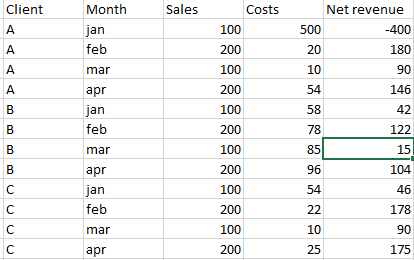
Ihave a table like this (with a bunchof rows):


pregunta2.PNG


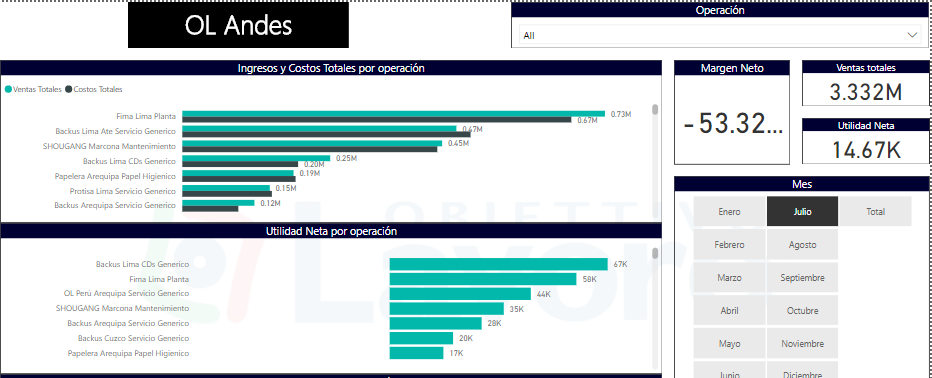
I have a Slicer with all the clients and another Slicer to filter the months like this:


pregunta3.PNG


I'm using this measure to calculate the net margin (Net revenue / Sales)


net_margin = SUMX( 'Tablename'; DIVIDE([Net revenue]; [Ventas Sales];0 ))


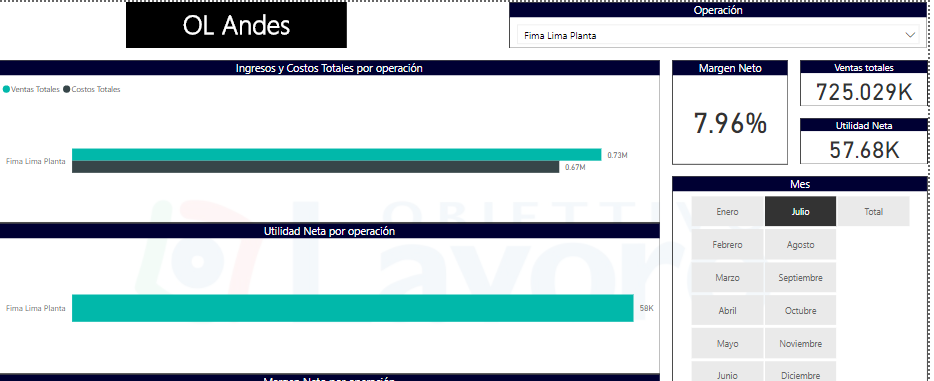
It works when I'm selecting only one client,


pregunta4.PNG


But when I select all clients, the measure calculates the SUM of all the net margins as shown in the second image. I would really appreciate some help on this matter please.


Thanks in advance.

1 ACCEPTED SOLUTION

Thanks everyone. I figured it out watching some tutorials and learning how measures work, I had to divide the sums of each column, like this:


net_margin = DIVIDE( SUM('Table Name'[Net revenue]); SUM('Datos brutos'[Sales]); 0)


Thanks again 

View solution in original post

3 REPLIES 3
Anonymous
Not applicable

HI @carlosflores,


I' m not think you can simply nested sumx function with other measures, power bi will drill and calculate on detail level instead of direct calculated on summarized result.


For this scenario, you need to manually summary table and add new column with specific calculate formula, then calculate on new column.

Optimizing DAX expressions involving multiple measures


Regards,

Xiaoxin Sheng

Ashish_Mathur
Super User
Super User

Hi,


How about this measure


=[Net Revenue]/[Sales]


Does this work?


Regards,
Ashish Mathur
http://www.ashishmathur.com
https://www.linkedin.com/in/excelenthusiasts/

Thanks everyone. I figured it out watching some tutorials and learning how measures work, I had to divide the sums of each column, like this:


net_margin = DIVIDE( SUM('Table Name'[Net revenue]); SUM('Datos brutos'[Sales]); 0)


Thanks again 

Helpful resources

Announcements
Power BI DataViz World Championships

Power BI Dataviz World Championships

The Power BI Data Visualization World Championships is back! Get ahead of the game and start preparing now!

November Power BI Update Carousel

Power BI Monthly Update - November 2025

Check out the November 2025 Power BI update to learn about new features.

FabCon Atlanta 2026 carousel

FabCon Atlanta 2026

Join us at FabCon Atlanta, March 16-20, for the ultimate Fabric, Power BI, AI and SQL community-led event. Save $200 with code FABCOMM.