Get certified for free when you join Fabric Data Days 2026 and dive into Fabric, Power BI, SQL, AI, and other essential data skills.
Join nowData Days is here! Join us now for 60+ days of learning, challenges, and connection. Learn more
Hi,
I've got one table with groups and low-level teams:
| Group1 | Group2 | Group3 | Group4 |
| A | D | I | M |
| B | E | J | N |
| C | F | K | |
| G | L | ||
| H |
In a different table I've got tickets and and one of team {A, B, ..., N} assigned to it.
| ID | Team | Group |
| 1 | A | |
| 2 | I | |
| 3 | N | |
| 4 | B |
What I need to do is fullfil Group column based on first table assigmnet. How to do this?
BR
Rafal
Solved! Go to Solution.
Hi @rmieszko
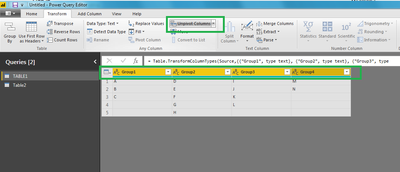
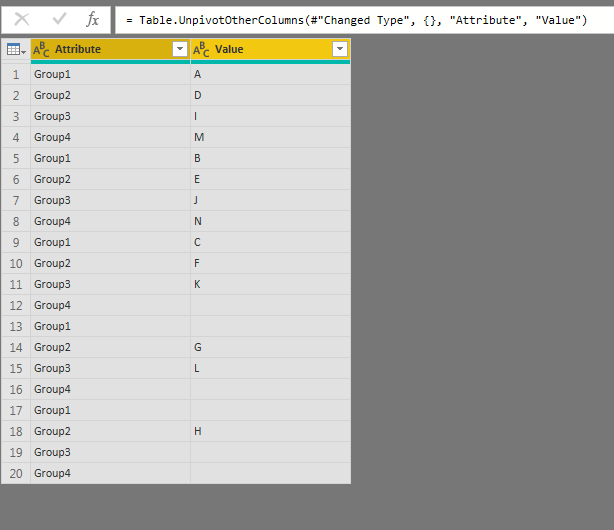
I advise you to open your Query Editor then to unpivot all the columns of your table 1.
You will also get that:
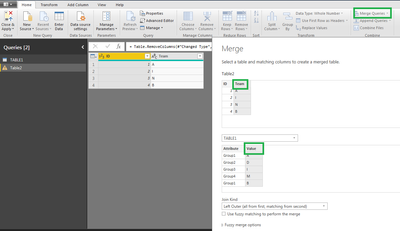
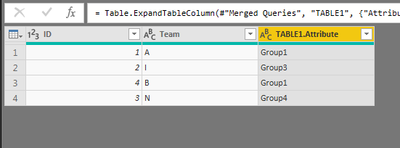
You also will able to use the function Merge Queries to get the data you need in your other table.
Regards,
CR
for the merge queries, here are the steps:
Then you select only Attribute
Regards,
CR
Hi @rmieszko
I advise you to open your Query Editor then to unpivot all the columns of your table 1.
You will also get that:
You also will able to use the function Merge Queries to get the data you need in your other table.
Regards,
CR
for the merge queries, here are the steps:
Then you select only Attribute
Regards,
CR
I guess it's good idea 🙂 I will check this on Monday and let you know. Thank you!
Don't miss out on Data Days, June 15 through August 7. Learn Fabric, Power BI, SQL, AI and more.
Check out the May 2026 Power BI update to learn about new features.
| User | Count |
|---|---|
| 23 | |
| 21 | |
| 20 | |
| 17 | |
| 13 |
| User | Count |
|---|---|
| 58 | |
| 51 | |
| 37 | |
| 30 | |
| 26 |