Get certified for free when you join Fabric Data Days 2026 and dive into Fabric, Power BI, SQL, AI, and other essential data skills.
Join nowData Days is here! Join us now for 60+ days of learning, challenges, and connection. Learn more
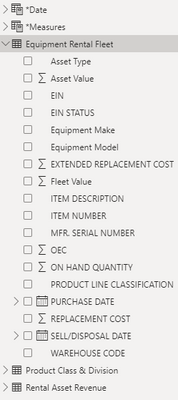
I have a table that contains asset information such as Item Number, Fleet Value (Asset * Qty), purchase date and sell/disposal date. I am looking for some help in creating a visual to show sum(fleet value) by month. Do you guys have any ideas on how to relate an aggregate fleet value between months of being purchased and sold?
Solved! Go to Solution.
Hi @burtta ,
I created some data:
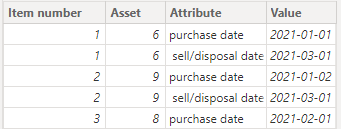
Here are the steps you can follow:
1. Select [purchase date] and [sell/disposal date] -- Transform – Unpivot Columns.
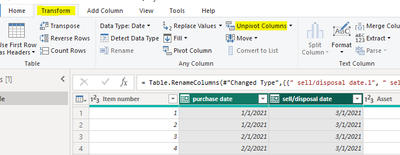
Result:
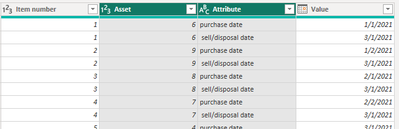
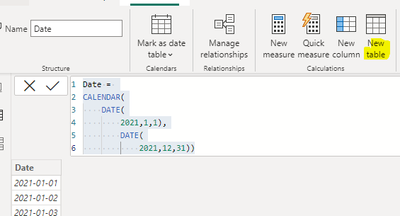
2. Create calaculated table.
Date =
CALENDAR(
DATE(
2021,1,1),
DATE(
2021,12,31))
3. Create measure.
Measure =
var _Qty=
COUNTX(
FILTER(ALL('Table'),
'Table'[Attribute]=MAX('Table'[Attribute])&&
YEAR('Table'[Value])=YEAR(MAX('Date'[Date]))&&
MONTH('Table'[Value])=MONTH(MAX('Date'[Date]))),[Item number])
var _sum=
SUMX(
FILTER(ALL('Table'),
'Table'[Attribute]=MAX('Table'[Attribute])&&
YEAR('Table'[Value])=YEAR(MAX('Date'[Date]))&&
MONTH('Table'[Value])=MONTH(MAX('Date'[Date]))),[Asset])
return
_sum * _Qty
4. Result:
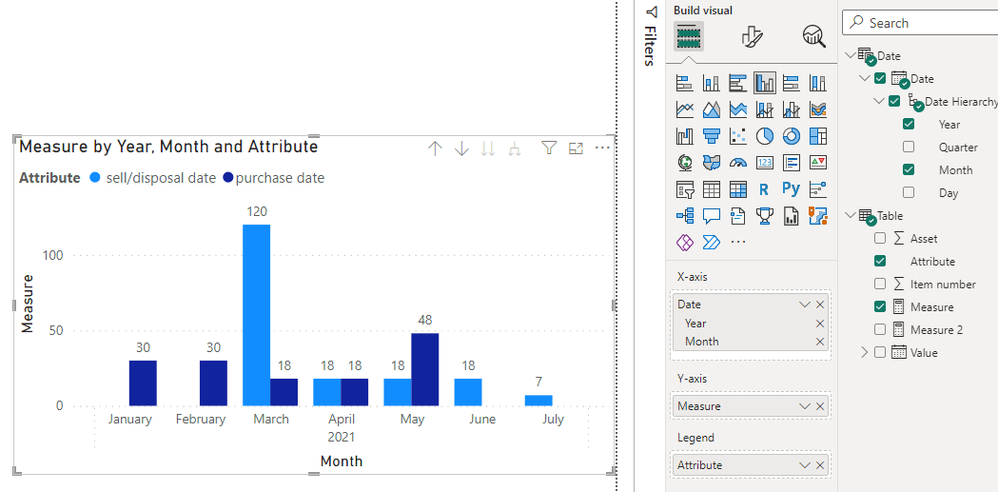
If I have misunderstood your meaning, please provide your desired output and your pbix without privacy information.
Best Regards,
Liu Yang
If this post helps, then please consider Accept it as the solution to help the other members find it more quickly
Here is the measure that resolved my problem.
Hi,
Share some sample data and show the expected result.
Hi @burtta ,
I created some data:
Here are the steps you can follow:
1. Select [purchase date] and [sell/disposal date] -- Transform – Unpivot Columns.
Result:
2. Create calaculated table.
Date =
CALENDAR(
DATE(
2021,1,1),
DATE(
2021,12,31))
3. Create measure.
Measure =
var _Qty=
COUNTX(
FILTER(ALL('Table'),
'Table'[Attribute]=MAX('Table'[Attribute])&&
YEAR('Table'[Value])=YEAR(MAX('Date'[Date]))&&
MONTH('Table'[Value])=MONTH(MAX('Date'[Date]))),[Item number])
var _sum=
SUMX(
FILTER(ALL('Table'),
'Table'[Attribute]=MAX('Table'[Attribute])&&
YEAR('Table'[Value])=YEAR(MAX('Date'[Date]))&&
MONTH('Table'[Value])=MONTH(MAX('Date'[Date]))),[Asset])
return
_sum * _Qty
4. Result:
If I have misunderstood your meaning, please provide your desired output and your pbix without privacy information.
Best Regards,
Liu Yang
If this post helps, then please consider Accept it as the solution to help the other members find it more quickly
Don't miss out on Data Days, June 15 through August 7. Learn Fabric, Power BI, SQL, AI and more.
Check out the May 2026 Power BI update to learn about new features.
| User | Count |
|---|---|
| 23 | |
| 21 | |
| 20 | |
| 18 | |
| 13 |
| User | Count |
|---|---|
| 58 | |
| 51 | |
| 38 | |
| 31 | |
| 26 |