
Join us at FabCon Atlanta from March 16 - 20, 2026, for the ultimate Fabric, Power BI, AI and SQL community-led event. Save $200 with code FABCOMM.
Register now!The Power BI Data Visualization World Championships is back! Get ahead of the game and start preparing now! Learn more
Hello,
I'm using the As Timeline visual to make a labor clocking timeline.
Red = the total time someone is clocked in
Green = when they are clocking to an activity
It appears with stacked off (to create one, overlapping timeline for each person), the as timeline brings forward the latest activity. The is normally fine if someone is clocked in say 8-5. It puts the red from 8am-5pm, and overlaps on top and activity they clock after 8 am. However, the system automatically punches a user in an out at midnight. So night shift has an in punch from 10pm-11:59:59 pm, and a punch from Midnight to 6 am. This cuts off or brings the red punch back to the front from 12-6am.
Curious if there's a way to control the order it's displayed rather than just by the time in? I would like that each activity they clock to is always brought to the front, and their punch in and out for the day is always the furthest item back, so to speak.
Thanks,
M
Hi @mlinton3 ,
Can you please share some sample data and expected results with us? Then we will be more clear about your requirement. Thanks.
X
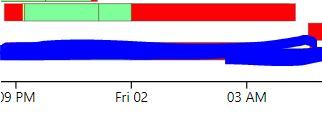
See the above timeline.
The red time runs 8:42pm to 12:00 am then adds a punch at midnight and runs 12:00 am to 4:16 am.
The green time runs 9:13 pm to 11:09 pm, then a new activity from 11:09 pm to 4:05 am
I need the green punch, from 11:09 pm to 4:05 am, to display on top of the 12:00 am to 4:16 am red punch.
As you can see, when I select it, the data is there, it's just covered up.
Thanks,
M
Check out the November 2025 Power BI update to learn about new features.
Advance your Data & AI career with 50 days of live learning, contests, hands-on challenges, study groups & certifications and more!