cancel
Showing results for 
Search instead for 
Did you mean: 

Try your skills in the Power BI Dataviz World Championship! Round one ends June 26. Join now

Reply
PBIBeginner2022
Helper III
Helper III

Array with three entry/input visual Power BI Desktop

Hi,


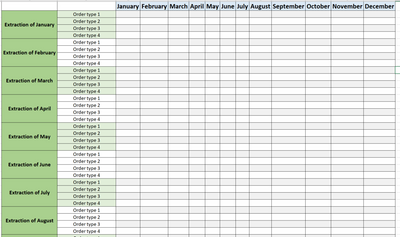
I would create on Power BI Desktop an array with three input/entry :


  • 2 input in line
  • 1 input in column


First input is my extraction date of my order in month.

Second input in line is my order type.

In put in column is all month of the current year.


Please find attached an overview of what I want to achieve : 


PBIBeginner2022_0-1655131555830.png


Thanks in advance

2 REPLIES 2
v-henryk-mstf
Community Support
Community Support

Hi @PBIBeginner2022 ,


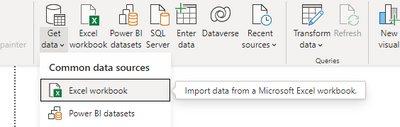
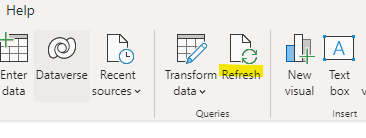
Based on your description, my suggestion is that you can create this array in excel and then connect to this data source in powerbi desktop. When you click refresh, it will update the latest data in the excel table. powerbi desktop is not the best tool for entering data directly.

vhenrykmstf_0-1655365248157.png

vhenrykmstf_1-1655365312019.png


If the problem is still not resolved, please point it out. Looking forward to your reply.


Best Regards,
Henry


If this post helps, then please consider Accept it as the solution to help the other members find it more quickly.

Thanks @v-henryk-mstf 


However, this didn't solve my problem. I want a visual like the photo I attached in my first message with into this array the data of my tables in Power BI.

Helpful resources

Announcements
Fabric Data Days is here Carousel

Data Days 2026

Don't miss out on Data Days, June 15 through August 7. Learn Fabric, Power BI, SQL, AI and more.

Power BI DataViz World Championships carousel

Power BI DataViz World Championships - June 2026

A new Power BI DataViz World Championship is coming this June! Don't miss out on submitting your entry.